Rideshare Driver Hourly Pay: How to Calculate What You Really Earn per Hour
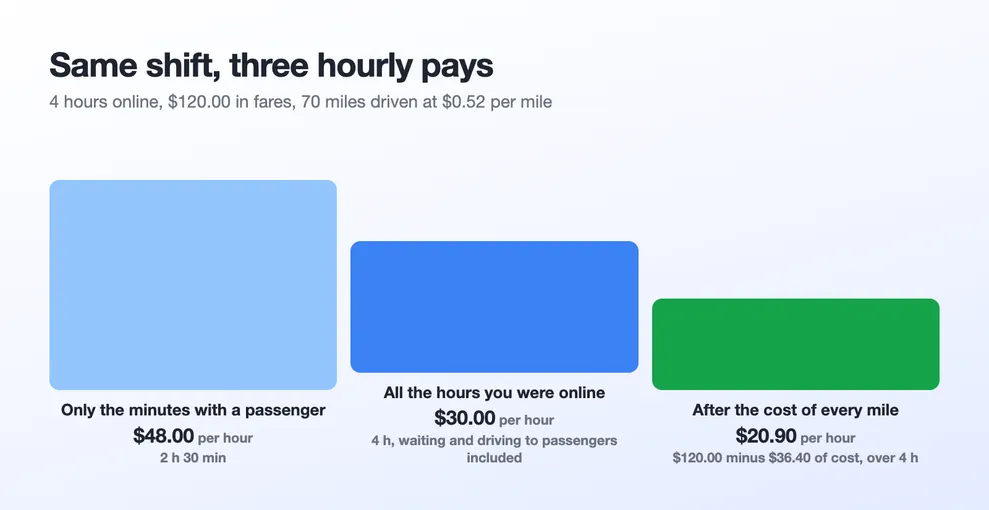
A driver says “I make $48 an hour”. Then you look at the shift: four hours online, $120 in fares. The $48 only counts the minutes with a passenger in the car. The waiting and the drive to the pickup are not in it, and neither is what the car spent.
The number that matters is your real pay per hour. This guide shows how to calculate it, how to set a target for it, and how to check each offer against it. We used the apps, tested every feature and did a full review.
Taxes depend on where you live and on your case. Check the sources at the end and ask a tax professional.
Table of Contents
- The Short Answer
- Three Hourly Pays for the Same Shift
- Where the Hours Go
- The Formula
- A Worked Example
- Set a Target per Hour
- Money to Set Aside for Taxes
- How to Find Your Real Numbers
- Suggestion: a Helper for Your iPhone
- Sources
The Short Answer
Real pay per hour = (earnings − cost of every mile) ÷ every hour you were online.
Count the miles you drove with the app on, including the ones to the passenger. Count the hours from the first minute online to the last, including the waiting. Then compare the result with a target you chose.
Three Hourly Pays for the Same Shift
The shift at the top of the page is invented: 4 hours online, $120.00 in fares, 70 miles driven at $0.52 per mile.
- $48.00 an hour: only the 2 h 30 min with a passenger. It is the number that sounds good
- $30.00 an hour: the same $120.00 over the 4 hours you were online
- $20.90 an hour: after the $36.40 the miles cost. This is what stayed with you
The first number is more than double the last one, from the same shift.
Where the Hours Go
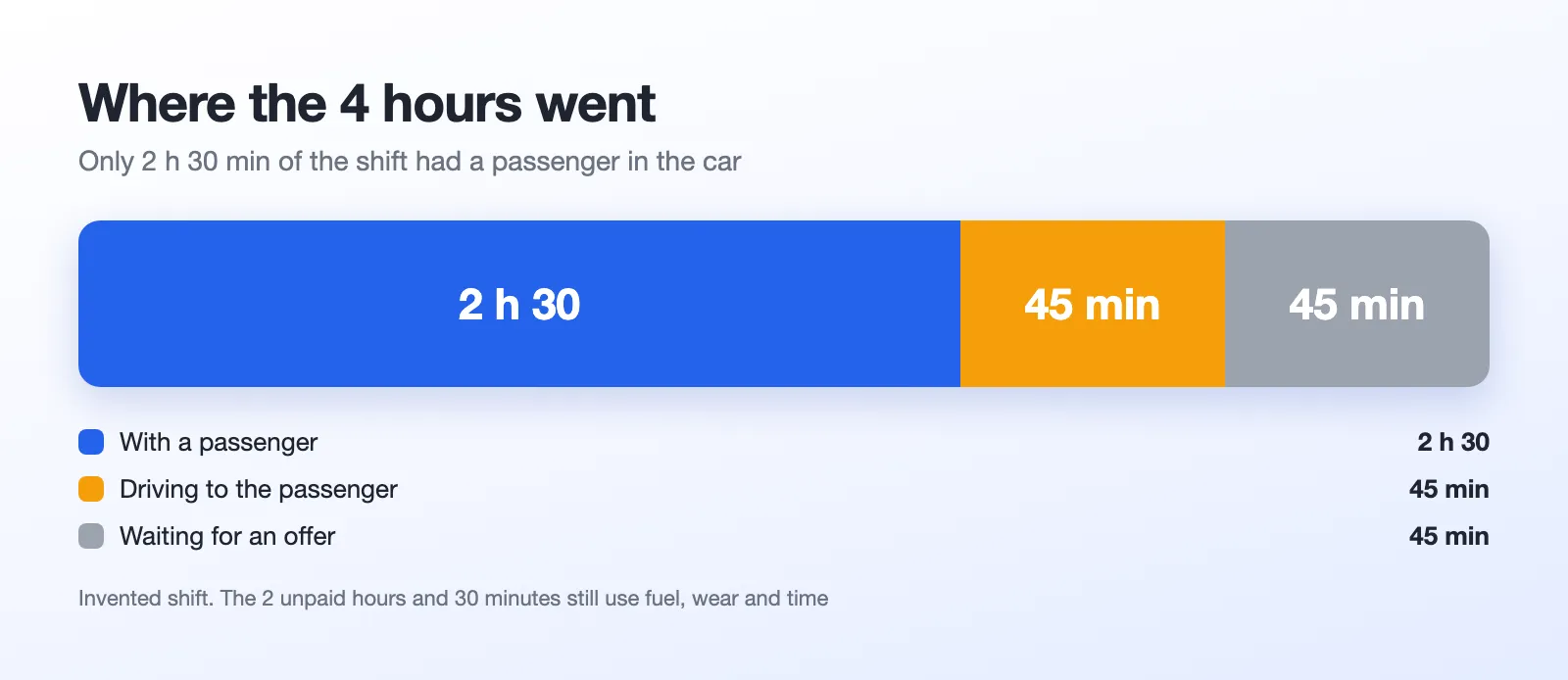
A shift has three kinds of time, and only one is paid:
- With a passenger: the time the fare pays for
- Driving to the passenger: unpaid, but it uses fuel, wear and your time
- Waiting for an offer: unpaid, and it is still an hour online
Two apps can pay the same fare per ride and still leave you with very different hours, depending on how long you wait and how far you drive to the pickup.
The Formula
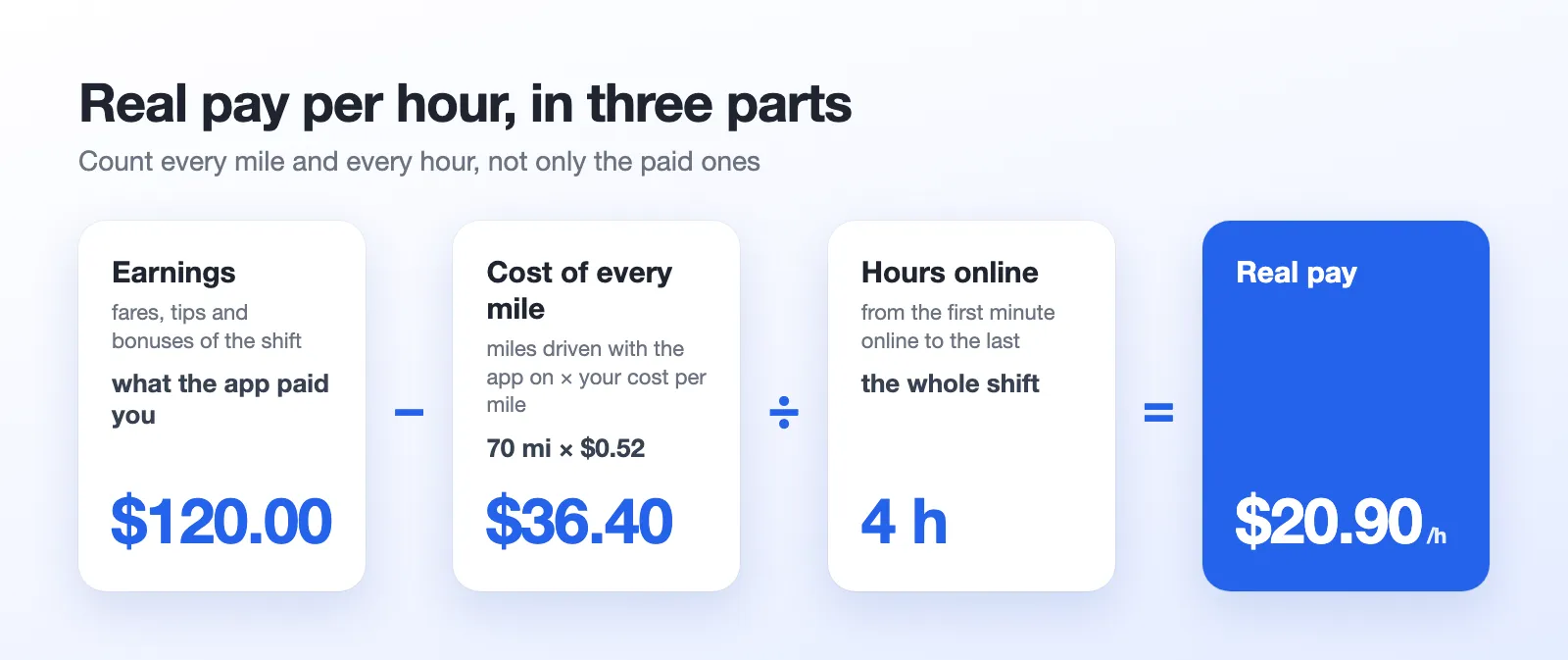
- Earnings: fares, tips and bonuses of the shift
- Cost of every mile: the miles driven with the app on, times your cost per mile. Our guide on the cost per mile shows how to find it
- Hours online: the whole time, not only the rides
In the example, $120.00 − $36.40 = $83.60, and $83.60 ÷ 4 h = $20.90 an hour.
A Worked Example
The same invented shift, counted three ways:
| Earnings | Hours | Per hour | |
|---|---|---|---|
| Only the rides | $120.00 | 2 h 30 min | $48.00 |
| All hours online | $120.00 | 4 h | $30.00 |
| All hours, after the cost of 70 miles | $83.60 | 4 h | $20.90 |
If your fuel is the only cost you count, the last line moves up. At $0.12 a mile for fuel, 70 miles cost $8.40 and the shift pays $27.90 an hour. Wear and fixed costs are real too, and they are the ones that move the number from $27.90 to $20.90.
Set a Target per Hour
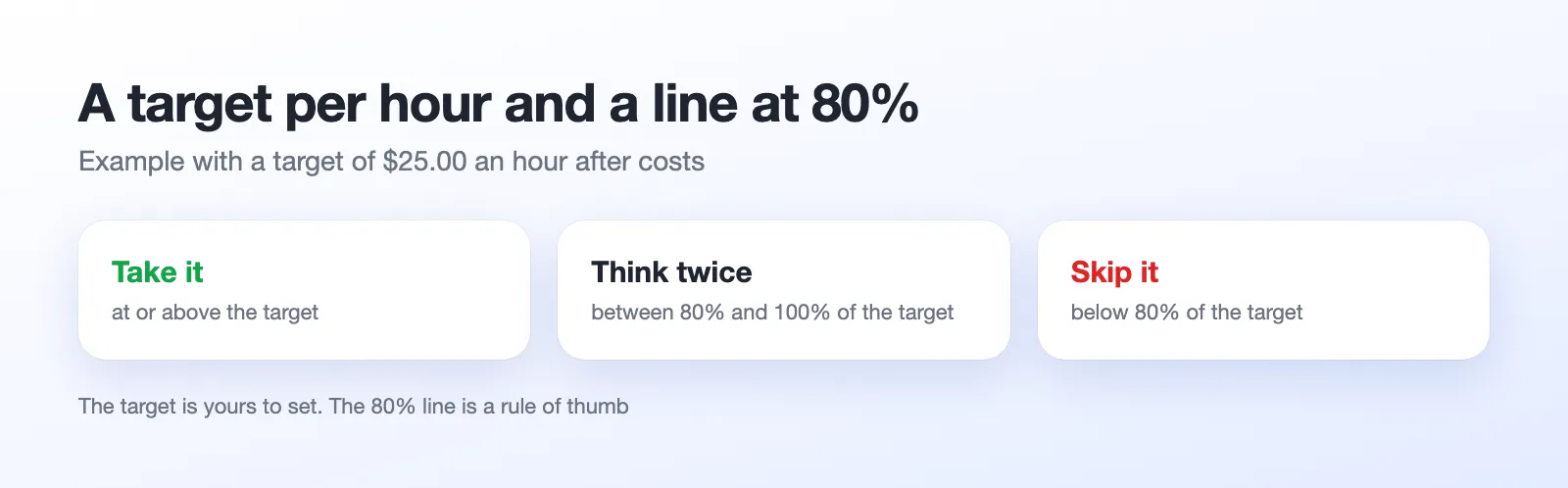
A number only helps if you compare it with something. Pick a target pay per hour, after costs, and use it as the line.
- At or above the target: take it
- Between 80% and 100%: think twice
- Below 80%: skip it
The target is yours: it depends on your city, your car and what you need from the shift. The 80% line is a rule of thumb, not an official number.
Money to Set Aside for Taxes
Drivers are usually self-employed, so the app does not take taxes out of the fare. In the United States the IRS says the self-employment tax rate is 15.3%: 12.4% for Social Security and 2.9% for Medicare. It also says you may have to file estimated taxes quarterly.
That rate is not your whole tax bill, and the rules depend on your income and your case. Ask a tax professional how it applies to you. A good habit is to set money aside from every shift, so the bill does not arrive all at once.
How to Find Your Real Numbers
- Hours online: note when you turn the app on and off. Count the waiting
- Earnings: add fares, tips and bonuses from the app’s earnings page for the same hours
- Miles: use the odometer, from the first mile with the app on to the last
- Cost per mile: fuel, wear and fixed costs, as in our cost per mile guide
- Calculate: earnings minus miles times cost per mile, divided by the hours
Do it for a whole week, not one shift. A slow Tuesday and a busy Friday tell different stories.
Suggestion: a Helper for Your iPhone
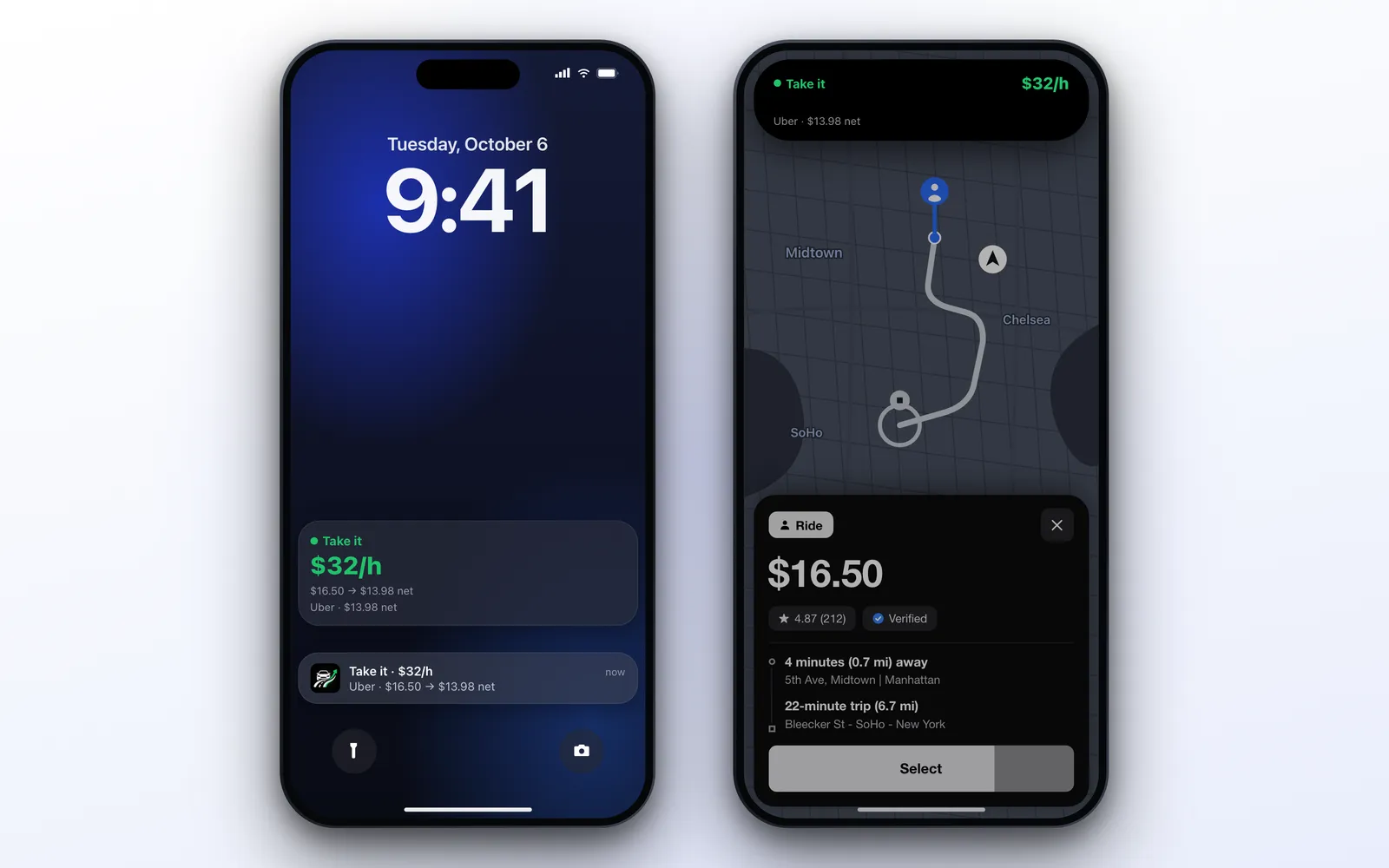
The math above is simple, but you cannot do it in the ten seconds an offer stays on the screen. That is the job of ProfitDriver: it reads the offer on your screen, takes the fare and the distance, and shows the real earnings per hour, after fuel and wear, with a verdict: take, caution or skip.
- Target per hour: you set it, and you can also set a target per mile or per kilometer. With both on, you choose if a ride must hit both or either one
- Alerts: when you set it up, it asks how you want to be alerted and recommends the live activity and the spoken voice. You can also use the notification and the Dynamic Island, and more than one at a time
- Your cost: fuel price and consumption, plus your monthly fixed costs if you fill them in
- The day: it adds up your real profit of the day and shows how far you are from your daily goal, which it suggests as your hourly target times an 8-hour day
The tracking of the day’s earnings works with Uber and 99 for now. The verdict on each offer also works with Lyft, Bolt, inDrive and others. It never accepts anything: the decision stays with you. It needs iOS 17 or later.
Recommended for the iPhone driver: ProfitDriver. Or read the full review.

Sources
Consulted on November 22, 2026.
- Self-employment tax: IRS, Self-employment tax (Social Security and Medicare taxes): the 15.3% rate and the mention of quarterly estimated taxes
- The app: the store listing of ProfitDriver, version 1.0.12, and its onboarding and settings screens (target per hour, alerts, earnings of the day)
The shift and the numbers in the examples are invented. The ProfitDriver image shows the app with sample data.