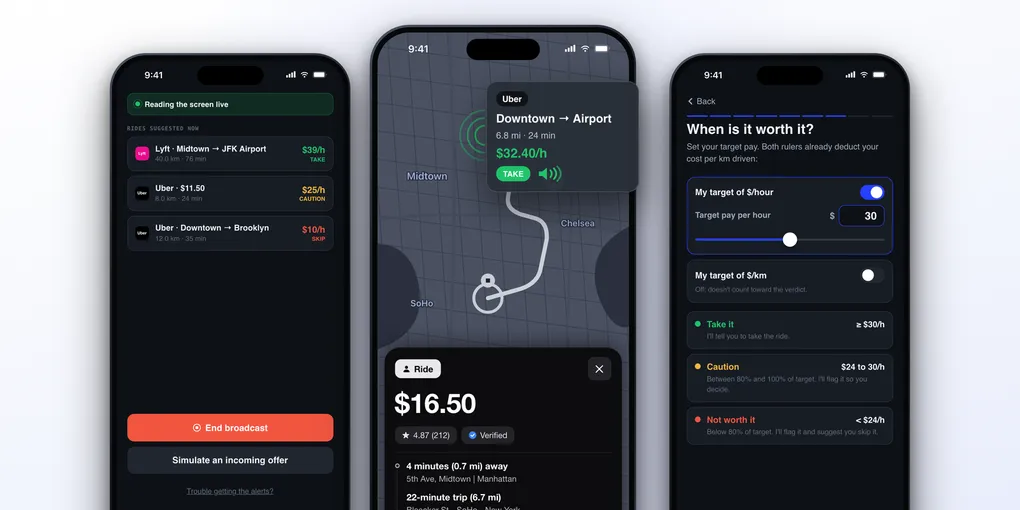
ProfitDriver Review: The Rideshare App That Tells You If a Ride Is Worth It
A ride offer gives you about ten seconds. In that time you see a fare, a distance and a time, and you have to decide while driving. The fare is the number that catches your eye, and it is the wrong one to look at.
What matters is what is left after the trip. A ride that pays well on paper can cost you fifteen minutes just to reach the passenger, burn fuel the whole way, and add wear to your car. Divide what remains by the time it took and some “good” rides pay less per hour than waiting for the next one. Nobody can do that math in ten seconds, in traffic, dozens of times a day.
Why ProfitDriver Is Different
Most apps for rideshare drivers work after the fact: they track mileage, log expenses, and add up the week. ProfitDriver works at the moment of the decision. It reads the offer on your screen, subtracts your cost, and gives you a verdict before you accept.
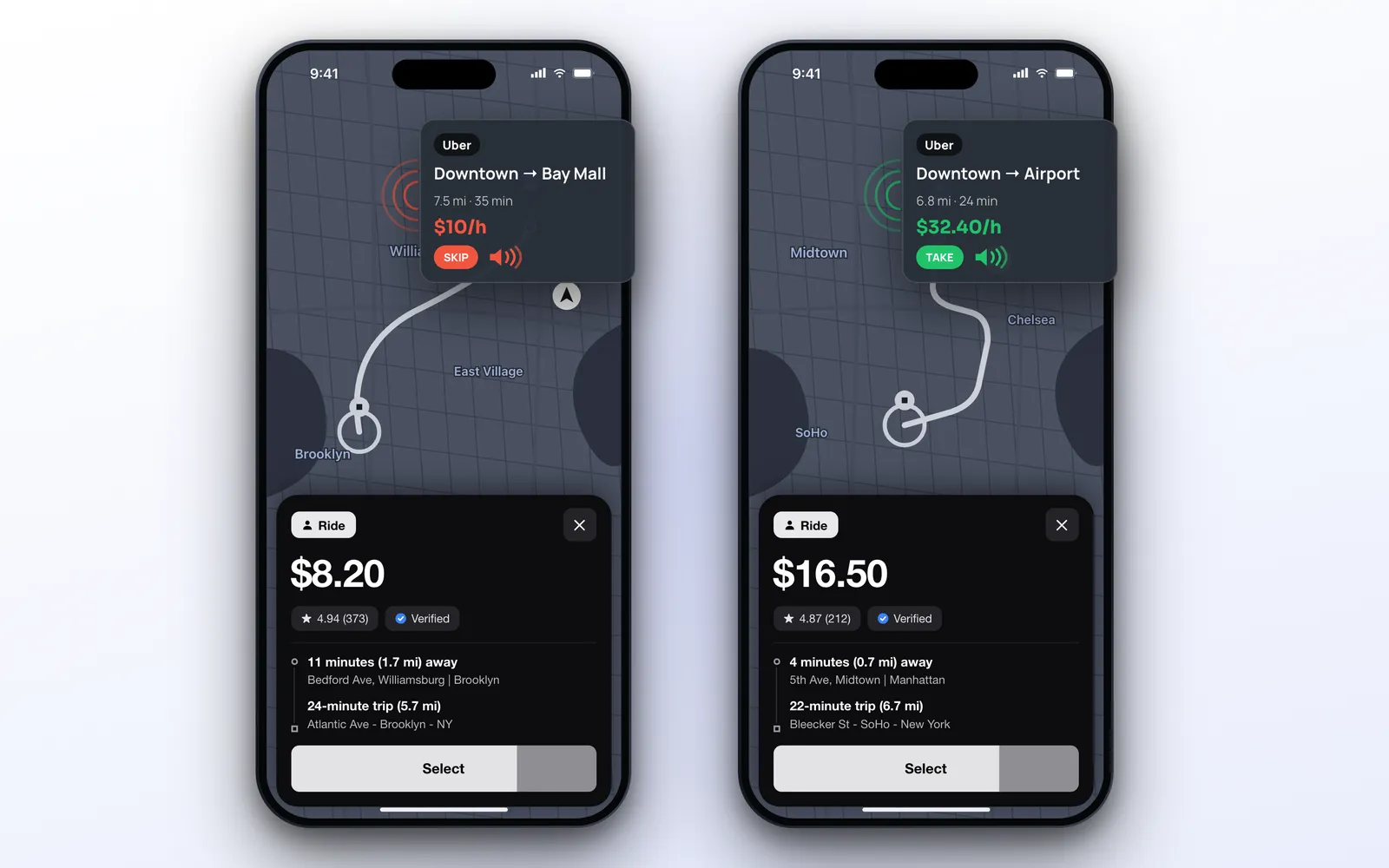
The two offers above show the idea. The $8.20 ride takes 35 minutes in total and works out to $10 per hour: SKIP. The $16.50 ride takes 24 minutes and works out to $32.40 per hour: TAKE. There are three verdicts, each with its own color:
- Take it (green): the ride meets your target
- Caution (yellow): between 80% and 100% of your target, so you decide
- Not worth it (red): below 80% of your target
ProfitDriver never accepts or declines for you and never taps anything in another app. It reads and advises. The choice stays with you.
One note about the picture: the verdict card is drawn over the offer to show the moment. On a real iPhone the verdict reaches you by voice, in Notification Center, on the Dynamic Island and on CarPlay, as explained below.
Table of Contents
- Why ProfitDriver Is Different
- Reading Offers Live
- Your Targets: Per Hour and Per Distance
- Your Real Cost
- The Verdict by Voice
- CarPlay
- Dynamic Island & Lock Screen
- Privacy
- Apple Ecosystem Score
- Pricing
- Alternatives
- Verdict
Reading Offers Live
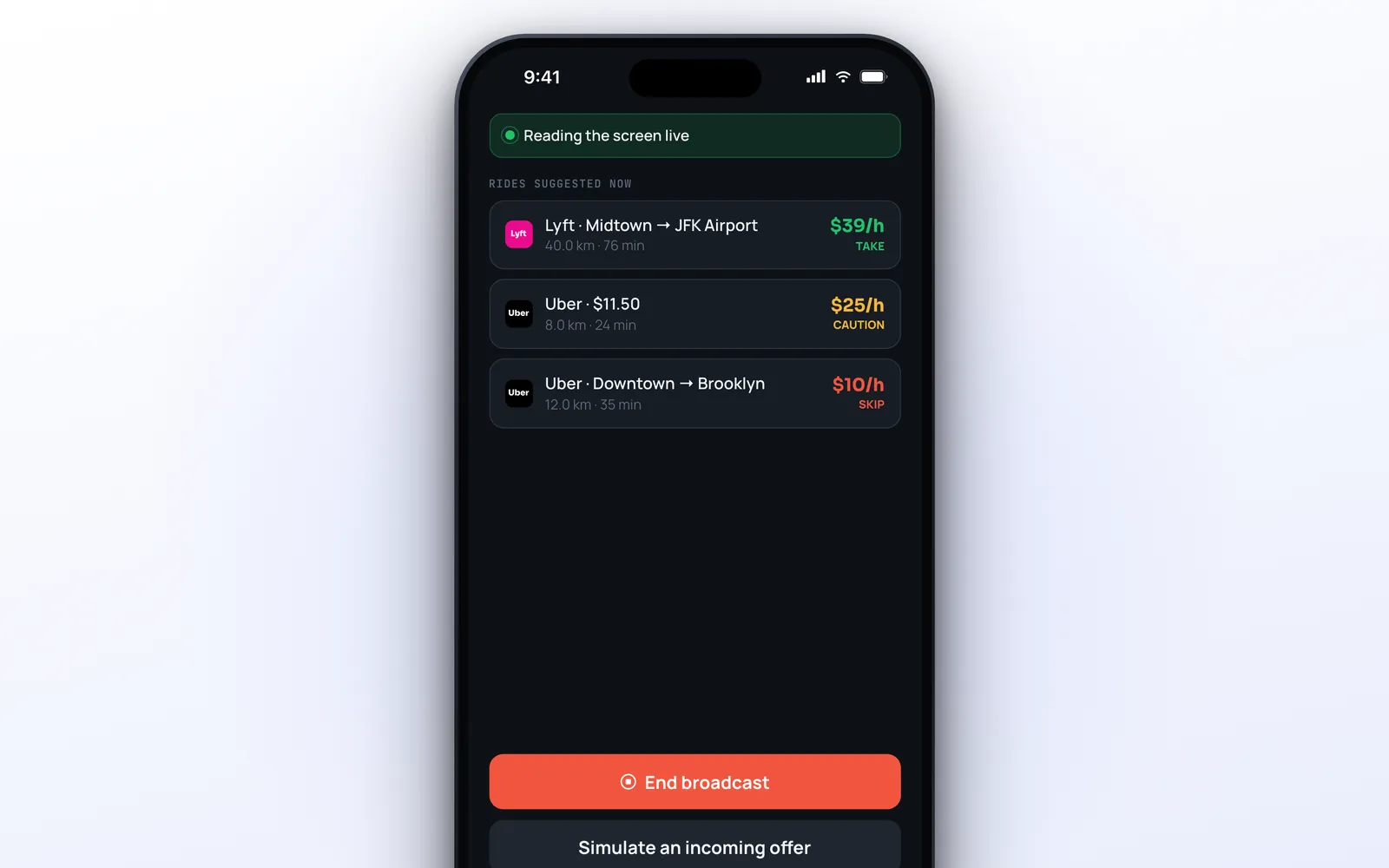
You tap Start session, iOS asks you to start a screen broadcast, and you switch to your driver app. From then on ProfitDriver looks at the screen about once per second. When an offer shows up, it finds the fare, the total distance (pickup plus trip) and the total time, and calculates the verdict. Back in the app, the Home screen lists the offers it read, each with its value per hour and its tag.
The reading works with Uber, 99, Lyft, Bolt and inDrive. If you drive for another app, or in a currency that is not on the list, you can teach it: you send two to five screenshots of the offer screen, confirm which number is the fare, and ProfitDriver starts reading that layout.
A few details show the care that went into it:
- If the reading is not reliable, it does not guess. You hear “Couldn’t calculate this offer’s value” instead of a wrong number
- The same offer is not announced twice, and a list of past trips on screen is not mistaken for new offers
- When no driver app is on screen, it slows down to save battery, and it eases off if the phone gets hot
- You can try everything with Simulate an incoming offer before starting a real session
While a session is running, iOS shows its screen recording indicator. That is how the system signals any screen broadcast.
Your Targets: Per Hour and Per Distance
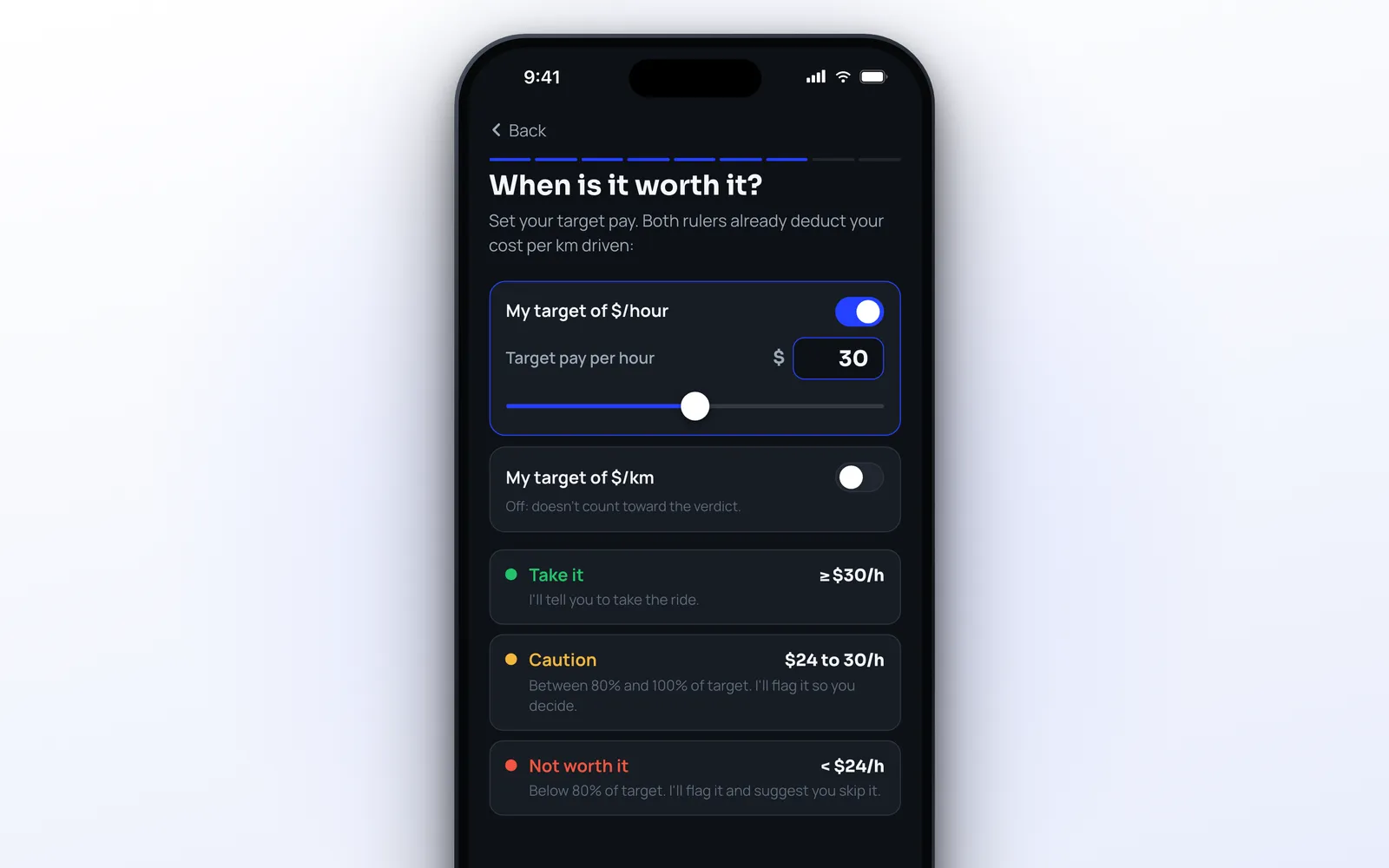
The verdict compares each ride with your own target, so the first thing you set is how much an hour of your work is worth. There are two rulers, and both already deduct your cost:
- Target per hour: on by default. This is the one that catches rides with a long pickup or heavy traffic
- Target per km or mile: off by default. Useful for long trips that take you far from where the demand is
With both on, you choose the rule: the ride has to hit both targets, or either one is enough.
There is also an optional passenger rating filter. You set a minimum rating, and a passenger below it lowers the verdict to Caution or Skip. It only ever lowers the verdict. A ride that does not pay stays red no matter how good the rating is.
Your Real Cost
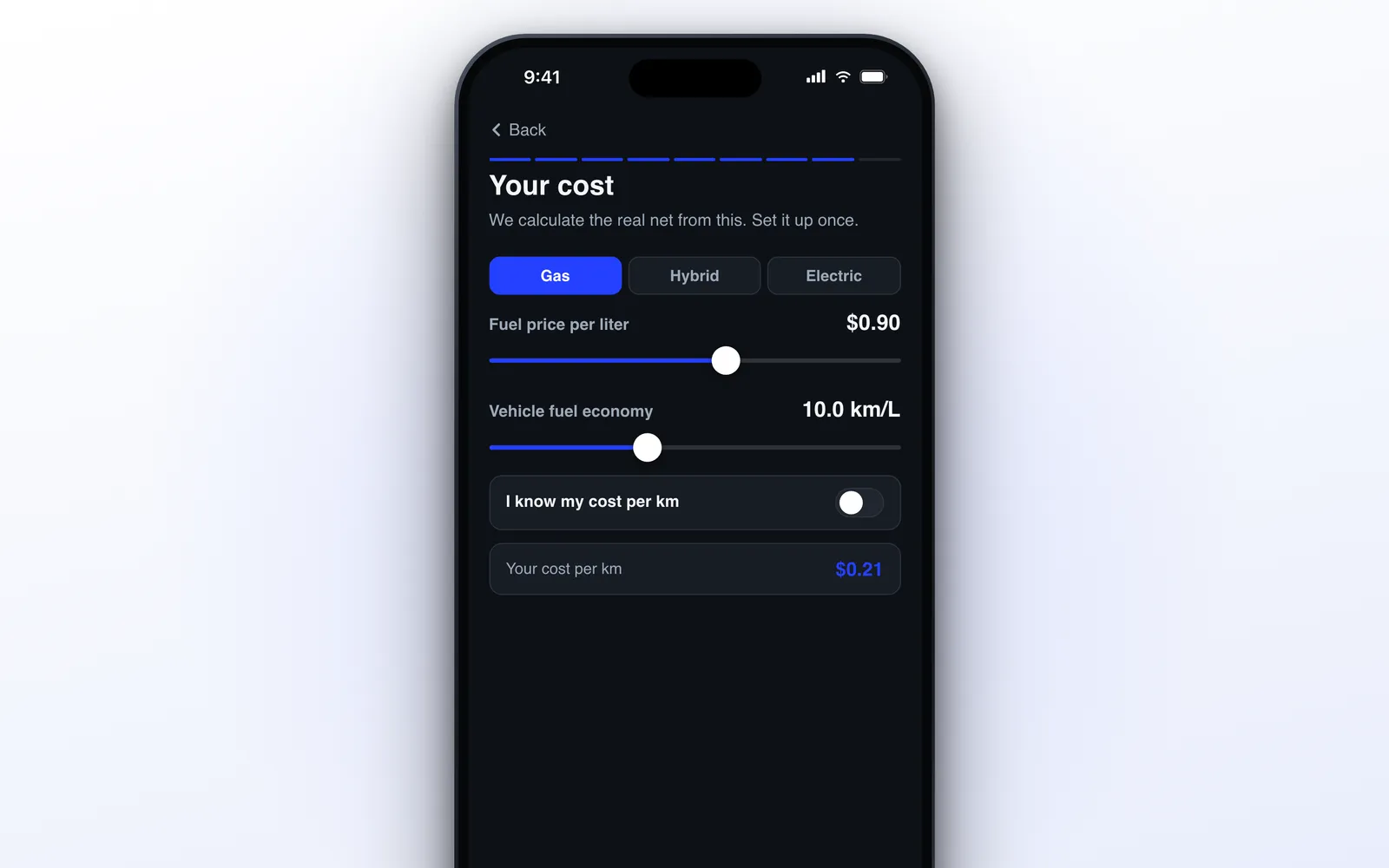
This is what separates profit from revenue. You tell ProfitDriver what kind of vehicle you drive (gas, hybrid, electric or motorcycle), the price of fuel or of a kWh, and how far the vehicle goes on it. From that it calculates your cost per km or mile, including an estimate for wear.
If you want a more exact number, you can add your monthly fixed costs: rental or car payment, maintenance, taxes, insurance and cleaning, plus how far you drive per month. And if you already know your cost per km, you can just type it.
The Expenses tab takes it one step further. Log two full fill-ups with the odometer reading and ProfitDriver calculates your real fuel consumption, replacing the estimate. Tolls, parking and car washes can be logged there too. This part of the app is marked as beta.
Every verdict uses this cost. When fuel goes up, you change one number and the same rides start being judged by the new math.
The Verdict by Voice
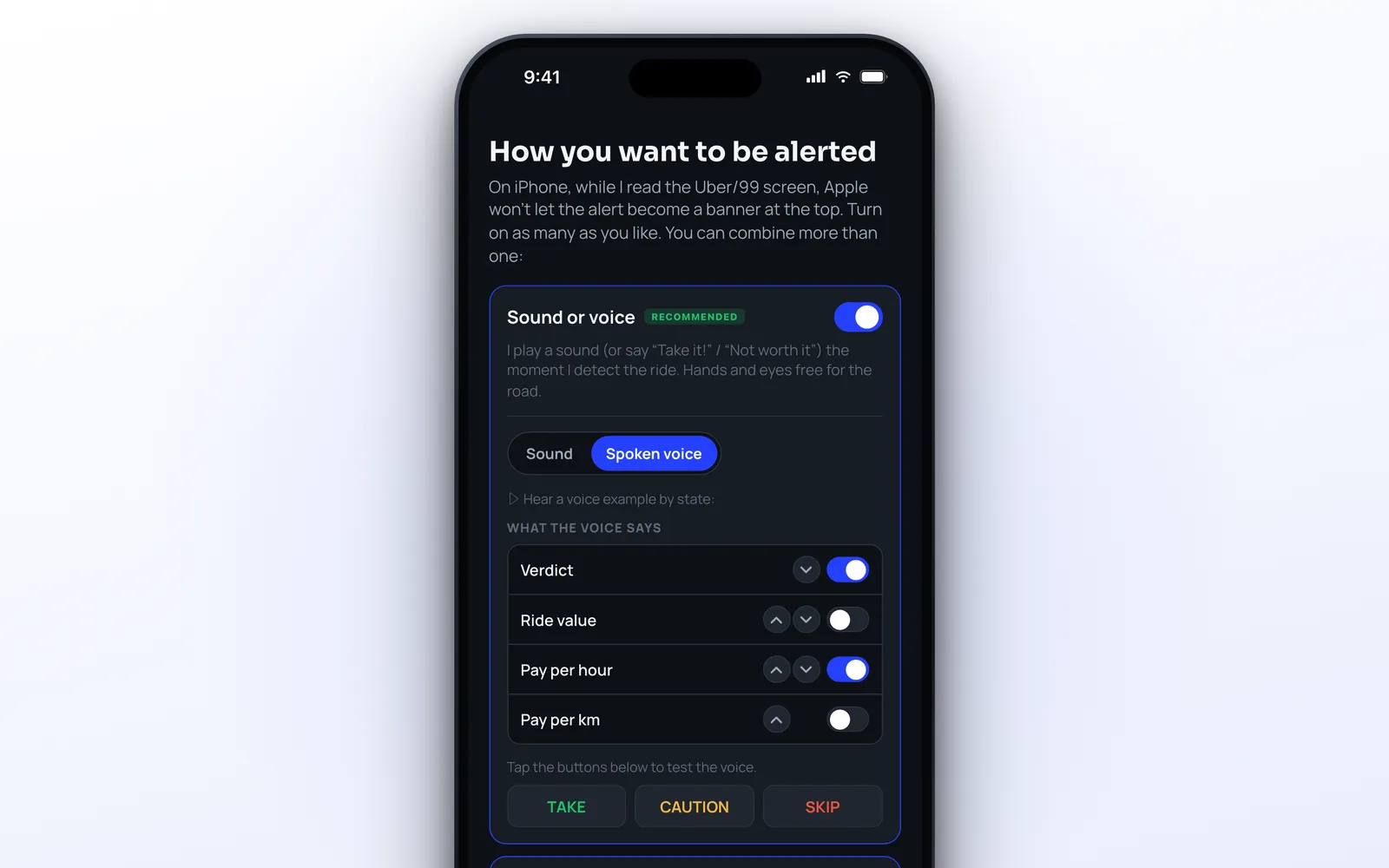
There is a catch on iPhone: while an app is reading the screen, iOS does not show notification banners at the top. ProfitDriver is upfront about it and offers other ways to reach you, and the main one is sound.
You choose between a short tone, different for each verdict, and a spoken voice. With voice, you decide what it says and in which order: the verdict, the ride value, the pay per hour, the pay per km. Something like “Thirty-two per hour. Take it!” while your eyes stay on the road.
The voice is the iPhone’s own, generated on the device, so it works without a connection. It plays even in silent mode and lowers your music for a second instead of stopping it. In Settings you can raise the alert volume and pick a higher quality voice.
One thing to check before you start: the microphone in the screen broadcast must be off, or iOS mutes the app’s audio. ProfitDriver has a troubleshooting screen that walks you through it.
CarPlay
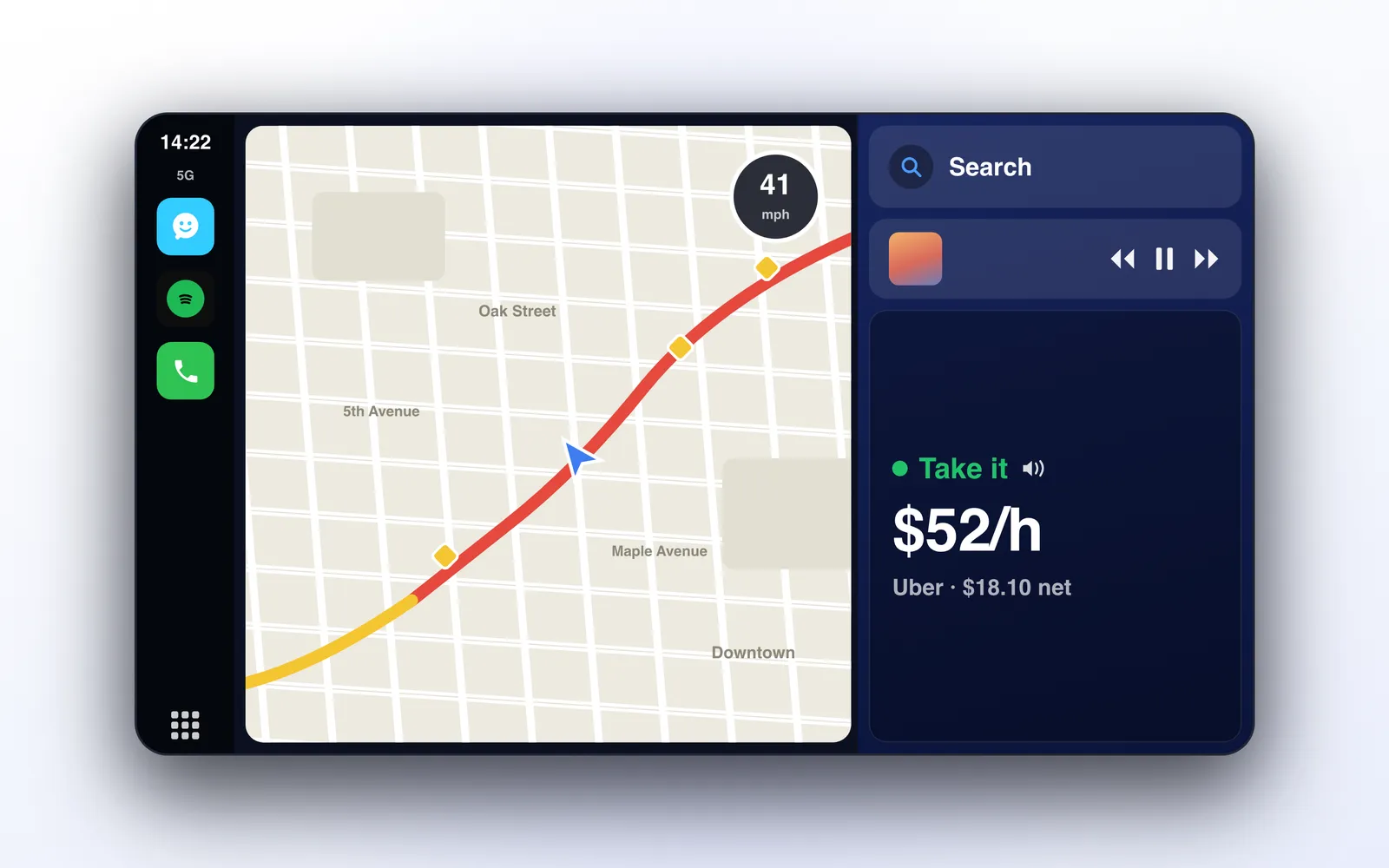
If your car has CarPlay, ProfitDriver shows the verdict there: the color, the value per hour and the net amount of the ride. It is a read-only screen. To see the full breakdown you use the iPhone.
A limitation worth knowing: iOS decides what appears on the car screen, and when the driver app itself is in front on CarPlay, the system may not show another app’s alert on top of it. Voice remains the most reliable channel.
Dynamic Island & Lock Screen
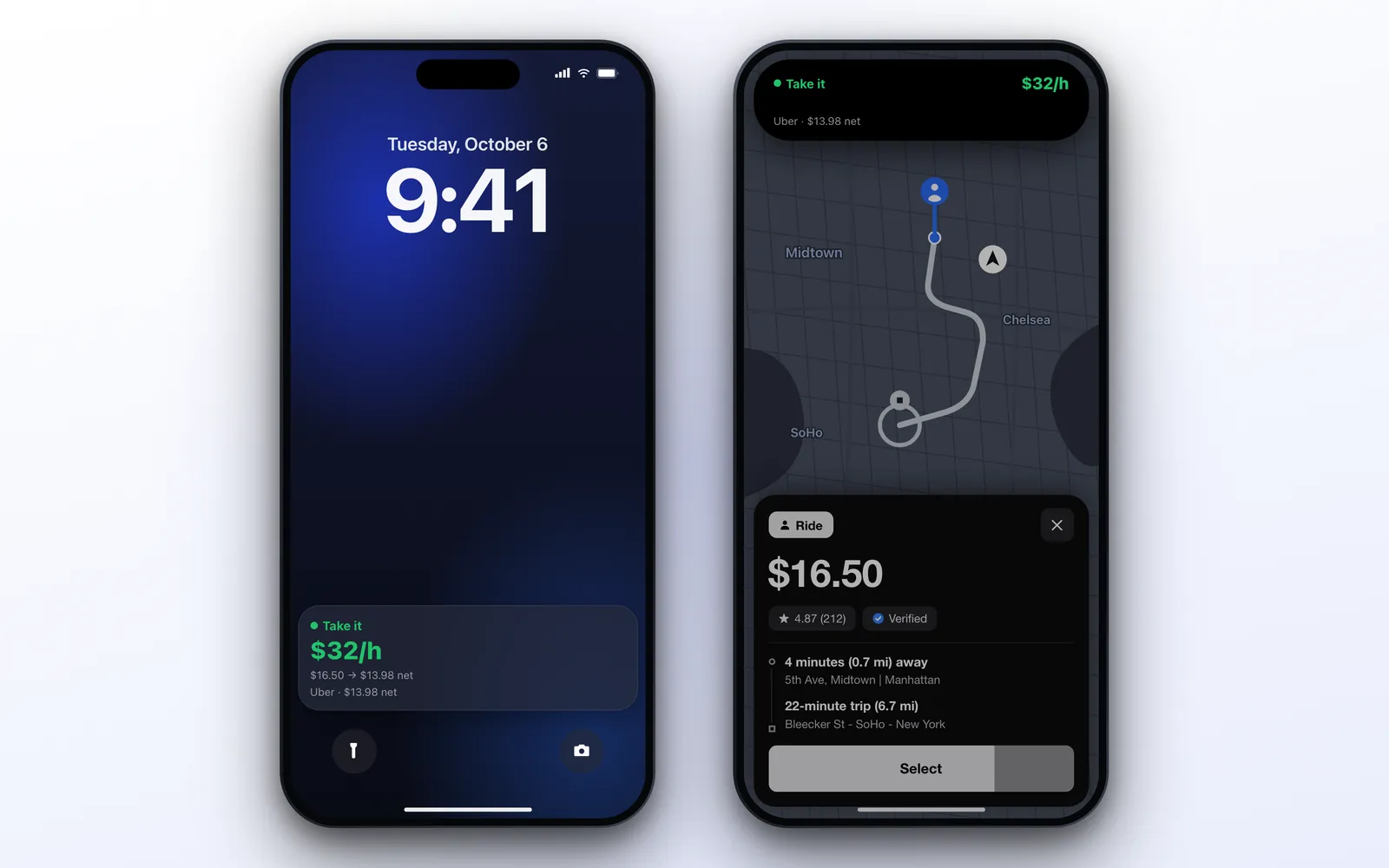
On iPhones with iOS 18 or later, the session runs as a Live Activity. On the lock screen you see the verdict, the value per hour, and the gross and net amounts of the ride. On the Dynamic Island the same verdict sits above your driver app: a colored dot and the value in the compact view, and the full line when expanded.
After about a minute and a half without a new offer, it goes back to “Monitoring” and shows your target, so an old verdict does not linger.
Two things to know. The app runs on iOS 17, but the Live Activity needs iOS 18. And while you are in the driver app, the Dynamic Island is updated through the internet, so it needs a connection. The voice alert does not.
Privacy
An app that reads your screen deserves a clear answer here, so here is what the app does.
The reading happens on the iPhone, using Apple’s own text recognition. Screen images are analyzed in memory and discarded. They are not saved and not uploaded. The microphone is not used. There is no login and no account.
What does leave the phone is data derived from the reading, not the screen itself. Each verdict (the app name, the fare and the calculated value) is sent to a server so it can be pushed to the Dynamic Island. The app also sends anonymous usage statistics and the answers from the setup, and subscribers have their earnings and expenses records backed up under an anonymous ID. If you teach the app a new driver app and tick the consent box, it sends sample screenshots to improve the reading. Without that box, no screen image leaves the phone.
Apple Ecosystem Score
| Feature | Available | Notes |
|---|---|---|
| iPhone | ✅ | iOS 17 or later |
| iPad | ✅ | Runs the iPhone app |
| Apple Watch | ❌ | No Watch app |
| CarPlay | ✅ | Read-only verdict screen |
| Live Activity & Dynamic Island | ✅ | iOS 18 or later |
| Home Screen widgets | ❌ | Not yet |
| On-device text recognition | ✅ | Apple Vision, no cloud |
| On-device voice | ✅ | The iPhone’s own voices |
| Siri / Shortcuts | ❌ | Not yet |
Score: 6/9. ProfitDriver uses the parts of the iPhone that matter in a car: on-device reading, voice, CarPlay and the Dynamic Island. An Apple Watch app would be the natural next step.
Pricing
ProfitDriver is free to download. Setting your targets and cost, logging expenses and simulating offers are free. Reading your screen live requires ProfitDriver Pro, a subscription with weekly, monthly, quarterly and annual plans that vary by region. Some plans start with a free trial, and the app shows the plans and prices for your country before you subscribe.
Alternatives
| App | Price | Best For |
|---|---|---|
| Gridwise | Free download | Tracking earnings and mileage across gig apps |
| Para | Free download | Tools for gig and delivery drivers |
| Solo | Free download | Running your gig work as a business |
| Stride | Free download | Mileage and tax tracking |
| Everlance | Free download | Mileage tracking |
These apps are mostly about the record: what you drove, what you earned, what you can deduct. ProfitDriver answers a different question, at a different moment: should I take this ride, right now?
Verdict
4.8 / 5 ⭐
ProfitDriver solves a real problem with a simple output: a color and a number, spoken while you drive. The math behind it is honest, because it uses your own cost and your own target, and it prefers saying “couldn’t calculate” to guessing.
The downsides: you need a subscription to read offers live, the Dynamic Island needs iOS 18 and a connection, there is no Apple Watch app, and iOS itself limits how alerts appear while the screen is being read.
Recommended for: rideshare drivers who want to stop accepting rides on instinct and start choosing them by what they really pay per hour.
