iPhone or Android for Uber, Lyft, 99 and inDrive Drivers: Which Phone Is Best?
Before the first ride, a driver needs a car, a license and a phone. The car gets all the attention, but the phone is the tool you look at all day: the offer, the map, the payout, the support chat. The question comes up in every driver group: iPhone or Android?
This guide looks at it from the side that matters for a driver. What the Uber, Lyft, 99 and inDrive apps ask of the phone, what they offer in the car, how long a phone keeps getting updates, and what changes if you want an app that helps you decide on each offer. It does not rank phone models, which change every few months. It answers which operating system.
Prices, versions and rules change. Check the stores before deciding.
Table of Contents
- The Short Answer
- How the Apps Run on Each System
- Which Apps Exist on iPhone and Android
- What the Driver Apps Ask For
- CarPlay and Android Auto
- How Long the Phone Keeps Updating
- Who Uses What
- Helper Apps: Where iPhone and Android Differ
- What to Check Before Buying
- Verdict
- Suggestion: a Helper for Your iPhone
- Sources
The Short Answer
For most drivers, the iPhone. It is the more uniform and predictable platform for an app to run on, and it is where a helper app can warn you about an offer with a Live Activity at the top of the screen, without you opening anything. More on that at the end.
If you only open the driver apps and your budget is tight, an Android phone that still gets updates does the same job. The sections below show where that is true and where it is not.
How the Apps Run on Each System
This is the technical side, and it favors the iPhone for a simple reason: it is the more uniform platform. An app team has to make the driver app work on every system version and every phone its drivers use. The fewer combinations, the fewer surprises.
| iPhone | Android | |
|---|---|---|
| Versions Uber Driver must run on | 3: iOS 18, 26 and 27 | 9: Android 8.1 up to 16 |
| Share on the newest version in the US, Sep 2026 | iOS 26 or 27 on at least 88% of devices | Android 16 on 45.39% of devices |
| Who delivers the update | Apple, to every compatible iPhone | Each phone maker, with its own commitment per model |
| What the driver app can add on top | Live Activities, Dynamic Island, CarPlay | Android Auto and notifications |
Reading the table: on the iPhone almost everyone is on the current system, so what works on one phone works on the others. On Android, the same app has to deal with phones spread from Android 11 to Android 16, in the same city, in the same driver group.
That is also what a helper app feels. A helper that reads the offer on the iPhone uses the iPhone’s own screen broadcast, a system feature with the same behavior on every compatible model. And the warning can reach you as a Live Activity, without you opening anything.
One honest note: this makes the iPhone the more predictable system, not proof that every app runs better on it. The store ratings of the same driver apps are split: Uber Driver is 4.42 on the App Store and 4.6 on Google Play, Lyft Driver 4.64 and 4.8, inDrive 4.83 and 4.8, and 99 Motorista 3.81 and 3.7. A rating measures the whole experience, not the system.
Which Apps Exist on iPhone and Android
Before choosing a system, check that your app exists on it. We checked the driver apps of the main platforms, the delivery apps and the helper apps on the App Store and on Google Play, each in its home market. ✅ means it is on the store. ❌ means we did not find it.
Ride apps
| App | Where | iPhone | Android |
|---|---|---|---|
| Uber Driver | Global | ✅ | ✅ |
| Lyft Driver | US, Canada | ✅ | ✅ |
| Bolt Driver | Europe, Africa | ✅ | ✅ |
| inDrive | Global | ✅ | ✅ |
| DiDi Driver | Latin America | ✅ | ✅ |
| 99 Motorista | Brazil | ✅ | ✅ |
| Cabify Driver | Spain, Latin America | ❌ | ✅ |
| FREENOW Driver | Europe | ✅ | ✅ |
| Grab Driver | Southeast Asia | ✅ | ✅ |
| Gojek Driver | Indonesia | ❌ | ✅ |
| Careem Captain | Middle East | ✅ | ✅ |
| Ola Driver | India | ❌ | ✅ |
| Rapido Captain | India | ❌ | ✅ |
| Yandex Pro | Russia | ✅ | ✅ |
| Empower Driver | US | ✅ | ✅ |
| Curb Driver | US | ✅ | ✅ |
Delivery apps
| App | Where | iPhone | Android |
|---|---|---|---|
| DoorDash Dasher | US | ✅ | ✅ |
| Instacart Shopper | US | ✅ | ✅ |
| Spark Driver | US | ✅ | ✅ |
| Amazon Flex | US | ✅ | ✅ |
| Shipt Shopper | US | ✅ | ✅ |
| Grubhub for Drivers | US | ✅ | ✅ |
| iFood Entregador | Brazil | ✅ | ✅ |
| Rappi Entregador | Latin America | ❌ | ✅ |
| Lalamove Driver | Asia | ✅ | ✅ |
| Glovo Courier | Europe | ✅ | ✅ |
| Deliveroo Rider | UK, Europe | ✅ | ✅ |
| Just Eat Courier | UK | ✅ | ✅ |
| Wolt Courier Partner | Europe | ✅ | ✅ |
| Keeta Courier | Hong Kong | ✅ | ✅ |
Helper apps
| App | Where | iPhone | Android |
|---|---|---|---|
| Mystro | US | ✅ | ✅ |
| Gridwise | US | ✅ | ✅ |
| Para | US | ✅ | ❌ |
| Solo | US | ✅ | ✅ |
| Stride | US | ✅ | ✅ |
| Everlance | US | ✅ | ✅ |
| Hurdlr | US | ✅ | ✅ |
| MileIQ | US | ✅ | ✅ |
| DriverPal | US | ✅ | ❌ |
| GigU | Brazil | ✅ | ✅ |
| Mobai | Brazil | ✅ | ✅ |
| Rota Pro | Brazil | ✅ | ✅ |
| GiraLucro | Brazil | ✅ | ✅ |
| Corridex | US | ✅ | ❌ |
| ProfitDriver / Corrida Lucrativa | US, Brazil | ✅ | ❌ |
Reading the three tables:
- Of 30 ride and delivery apps, all 30 are on Android and 25 on iPhone. The five that are Android only in our check are Cabify Driver (Spain and Latin America), Gojek Driver (Indonesia), Ola Driver and Rapido Captain (India) and Rappi Entregador (Latin America). For each one, we also looked at the company’s other App Store listings in the countries where it works, and found rider or consumer apps only
- The big names are on both: Uber, Lyft, Bolt, inDrive, DiDi, 99, DoorDash, Instacart, Amazon Flex, iFood and the rest of the list
- The helpers go the other way. Four of the 15 helper apps are only on the iPhone in this check: Para, DriverPal, Corridex and ProfitDriver. The app we suggest at the end of this post is one of them: ProfitDriver is iPhone only
Availability changes by country and by month. The tables are a photo of October 21, 2026: confirm on the store of your country.
What the Driver Apps Ask For
None of the four apps requires one system. They all run on iPhone and Android, and they ask for a recent version of each.
| Uber Driver | Lyft Driver | 99 Motorista | inDrive | |
|---|---|---|---|---|
| iPhone: minimum on the App Store | iOS 18 | iOS 17 | iOS 16 | iOS 15 |
| iPhone: minimum on the help page | iOS 17 | iOS 17 | Not stated | Not stated |
| Android: minimum on the help page | Android 8.1 | Android 9 | Not stated | Not stated |
Two things in the table matter. The store asks for more than the help page in Uber’s case (iOS 18 against iOS 17), so the real minimum rises as the app updates. And Lyft says new drivers on an old iOS may not find the app in the App Store at all. An old phone, on either system, is the first risk.
Uber’s Play Store listing also notes that the app uses about 2 GB of data a month and that navigation can drain the battery. Lyft’s says that GPS running in the background can drain the battery a lot. That is true on any phone: the battery is part of the equipment.
CarPlay and Android Auto
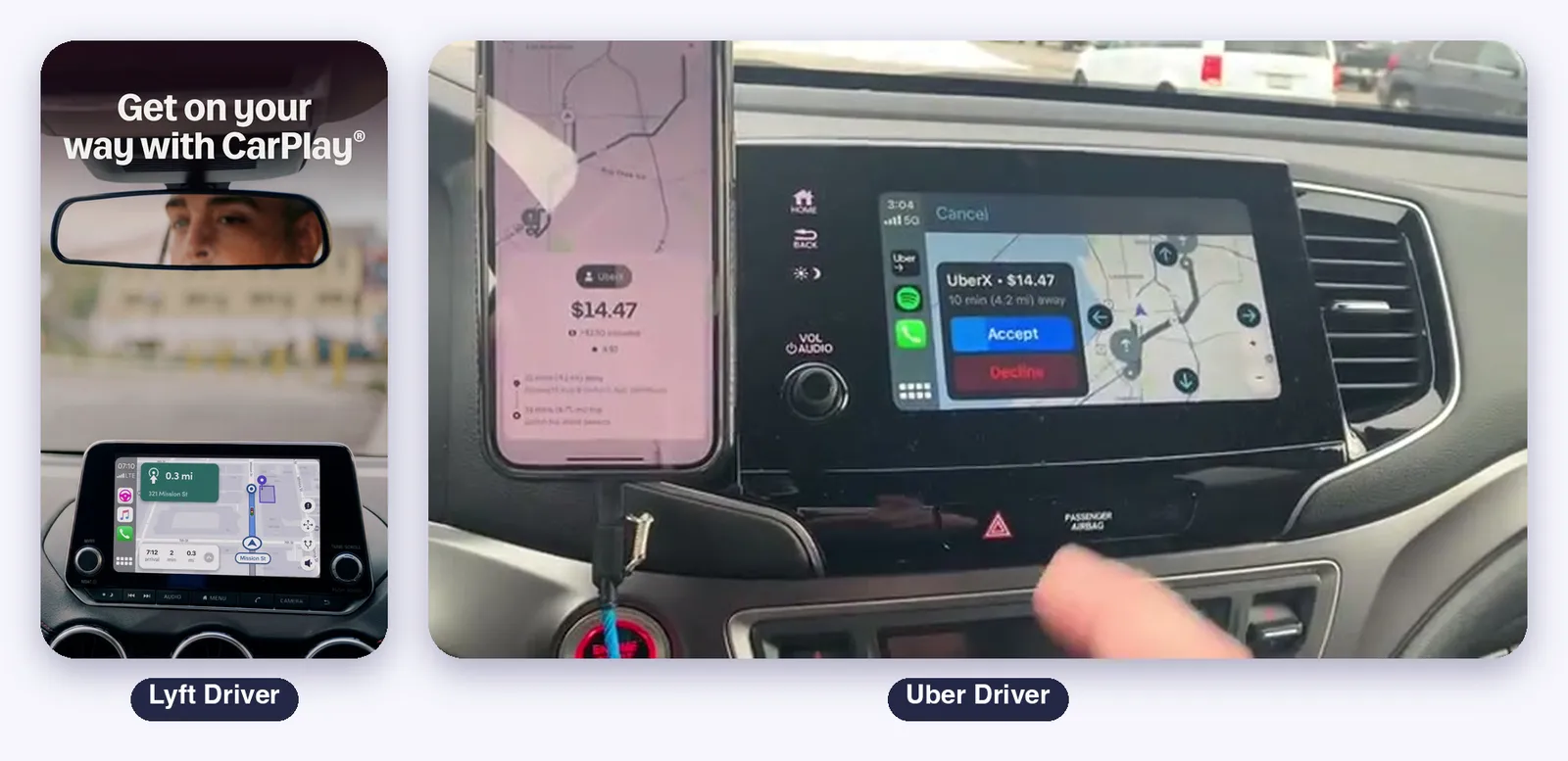
In the car, the two systems are almost equal for the big two:
- Uber Driver: the Play Store listing says full integration with Apple CarPlay and Android Auto
- Lyft Driver: Lyft Maps connects to the car on both. On Android Auto, Lyft says you need Android 8 or higher and a data plan
- 99 Motorista and inDrive: their listings that we read do not mention CarPlay or Android Auto
So the car screen does not decide it. What decides is whether your car has a screen with one of the two, and whether the app you drive for uses it.
How Long the Phone Keeps Updating
A driver buys a phone to use it for years, and the driver apps drop old versions. So the update window matters more than the first price.
- iPhone: Apple’s guide for iOS 27 lists the iPhone 11 and the iPhone SE (2nd generation) as the oldest models that run it. The same iPhone keeps receiving the new system for several years
- Google Pixel: Google commits to 7 years of updates for the Pixel 8 and later, counted from launch. Earlier models have 5
- Samsung Galaxy: Samsung commits to 7 years for its flagships from 2024 onwards. Mid-range models get less, and Samsung’s own pages say it varies by model
The honest reading: a recent Pixel or Samsung flagship matches an iPhone on years. The difference is in the cheaper Android phones, where the window is shorter and changes by model. On the iPhone, the question is only whether your model still runs the current iOS.
Who Uses What
The market changes the answer. In September 2026, Statcounter measured Android at 78.78% of mobile traffic in Brazil and iOS at 21.21%. In the United States it was the opposite: iOS 53.59% and Android 46.39%.
Two consequences. In Brazil, most of the drivers you will meet in a 99 or inDrive group are on Android, so most of the tips you read there come from Android. In the United States, the iPhone is the majority phone.
Neither number says which one earns more. A driver earns by choosing the right offers, not by the logo on the phone.
Helper Apps: Where iPhone and Android Differ
This is the real difference, and the one a driver can feel.
On Android, an app can read what another app shows on the screen. It is an accessibility feature: Android’s documentation describes accessibility services as apps that inspect the screen content on behalf of the user, and the user has to turn the service on in the settings. That is why many helper tools for drivers started on Android.
On iPhone, the system does not allow it. Apple’s security guide says all third-party apps are sandboxed, so that an app cannot gather or modify what another app stores. A helper cannot simply look into the Uber screen.
What the iPhone offers instead is the screen broadcast. You start it, you open the driver app, and the helper sees the screen with the system’s recording indicator on. It reads and advises. It does not tap anything in the other app.
This is how helper apps work on the iPhone. The warning can use a Live Activity at the top of the screen, the Dynamic Island and the CarPlay screen, besides voice and notification.
What to Check Before Buying
You do not need a list of models. You need five checks:
- The system version: it must be above what the app asks for today, with room to rise. On an iPhone, check that it runs the current iOS. On Android, check the update commitment of that model, not of the brand
- The update window: how many more years it will be supported
- The battery: navigation and GPS are the main drain, so buy for battery life and keep a charger in the car
- The car screen: if your car has CarPlay or Android Auto, make sure the driver app you use works with it
- Data: Uber says about 2 GB a month for its own app, before music and anything else
Verdict
iPhone or Android for a driver? iPhone. The driver apps run on both, so the reasons are not in the app. They are the more uniform system (3 iOS versions to support against 9 on Android), years of system updates for every model that runs the current iOS, and helper apps that can warn you about an offer with a Live Activity, on the Lock Screen and in the car, besides the Dynamic Island and CarPlay.
One condition before you decide: check that your driver app exists on the iPhone. In the table, five of the 30 do not, and all of them work in markets where Android is the usual phone.
When Android is the right choice: a tight budget, a market where the people you learn from use Android (like Brazil), or a flagship Pixel or Galaxy with a 7-year commitment. Android is also where helper tools that read the screen of other apps started.
What does not matter: the logo. A driver on any phone, with the cost per mile or kilometer in mind, beats a driver on the best phone who accepts everything.
Suggestion: a Helper for Your iPhone
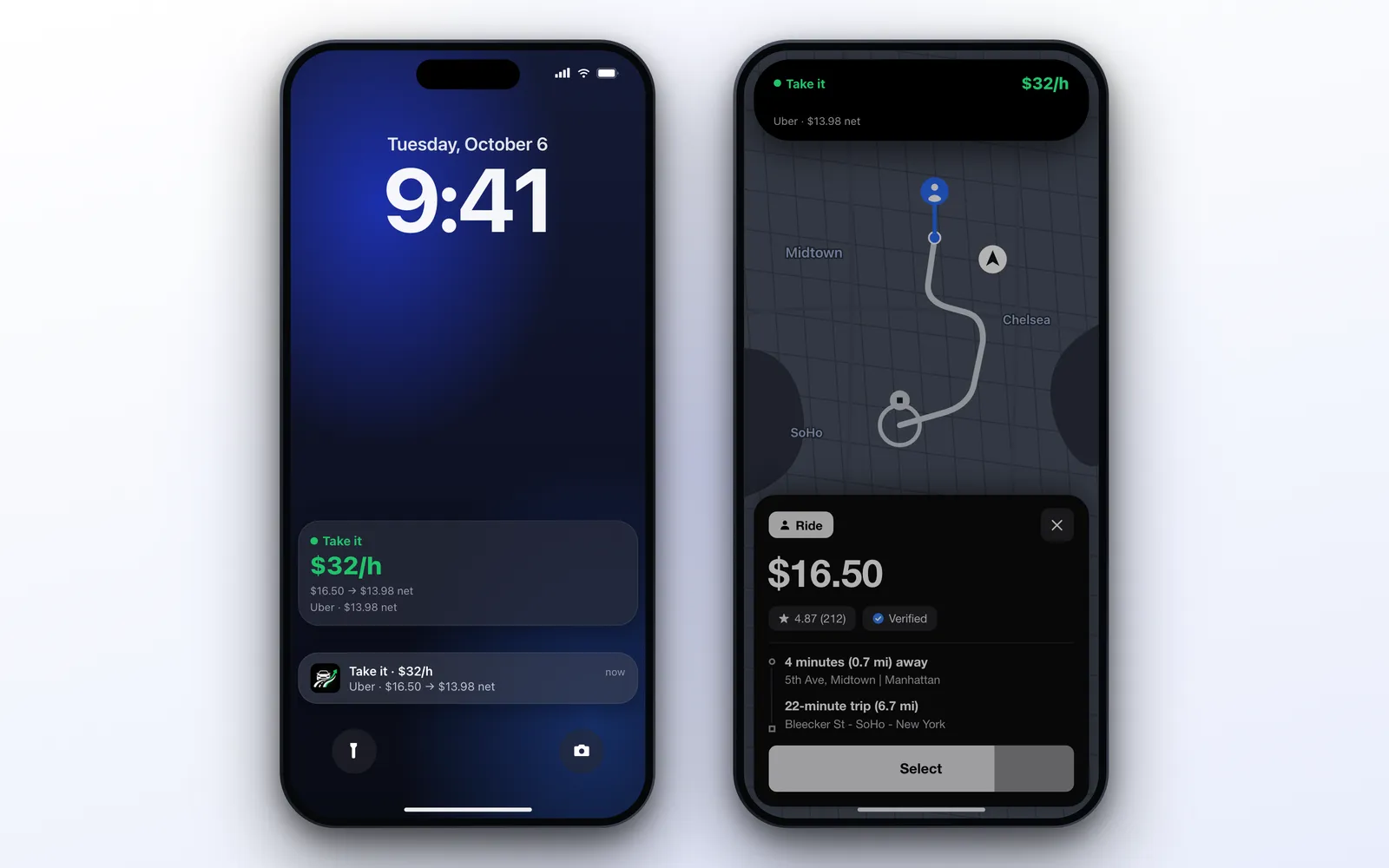
If you choose the iPhone, the next step is to stop deciding on each offer by feel. You have about ten seconds, the fare is the number that catches your eye, and it is the wrong one to look at.
ProfitDriver reads the offer on your screen, subtracts your real cost and tells you if it is worth it: take, caution or skip. When you set it up, it asks how you want to be alerted and recommends two ways:
- Live activity: the verdict at the top of the screen. On CarPlay it is the main one
- Spoken voice: it says the verdict out loud
You can also use the notification over the driver app and the Dynamic Island, on the iPhones that have it, and more than one at a time.
Then you set your target per hour, your cost by vehicle, and the app adds up your real profit of the day and how far you are from your goal. It works with Uber, 99, inDrive, Lyft, Bolt and more, and it never accepts anything: the decision stays with you. It needs iOS 17 or later.
Recommended for the iPhone driver: ProfitDriver. Or read the full review.

Sources
Consulted on October 21, 2026.
- Driver app requirements: Uber, downloading the Driver app, Lyft, phone software recommendations, and the minimum iOS on each App Store listing: Uber Driver, Lyft Driver, 99 Motorista and inDrive
- Google Play listings: Uber Driver, Lyft Driver, 99 Motorista e Entregador and inDrive
- Updates: iPhone models compatible with iOS 27, Pixel update policy and Samsung’s seven years of updates
- Statcounter version share: Android versions and iOS versions, United States, September 2026. Statcounter notes that some iOS 26 versions appear as 18.x, so the iOS 26 or 27 share is at least the 88% of the six versions listed
- App availability: the Apple lookup API and the developers’ App Store catalogs, and the Google Play page of each app, checked on October 21, 2026. The list of apps and packages is in the post archive
- Market share: Statcounter, Brazil and United States, September 2026
- Reading other apps: Android accessibility services and Apple, security of runtime process in iOS
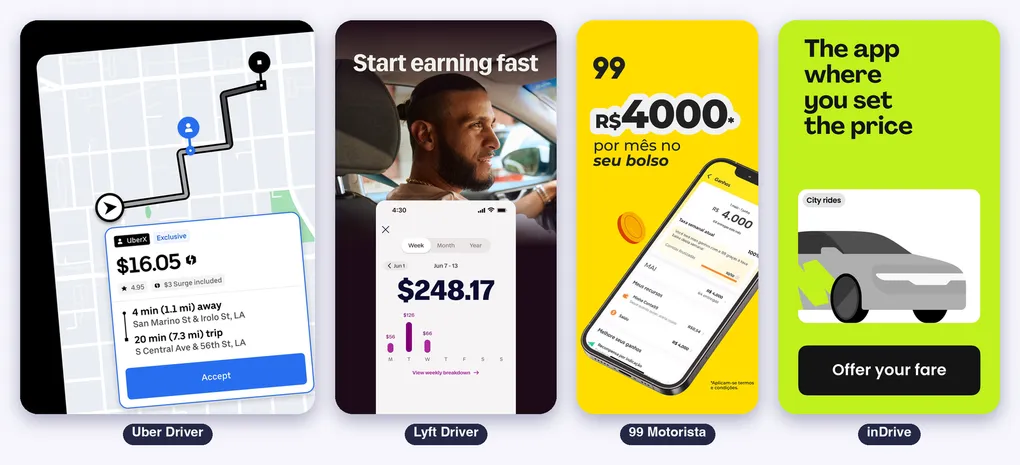
The Uber Driver, Lyft Driver, 99 Motorista and inDrive images are screenshots from their official store listings, used here to illustrate the analysis. The ProfitDriver image shows the app with sample data.