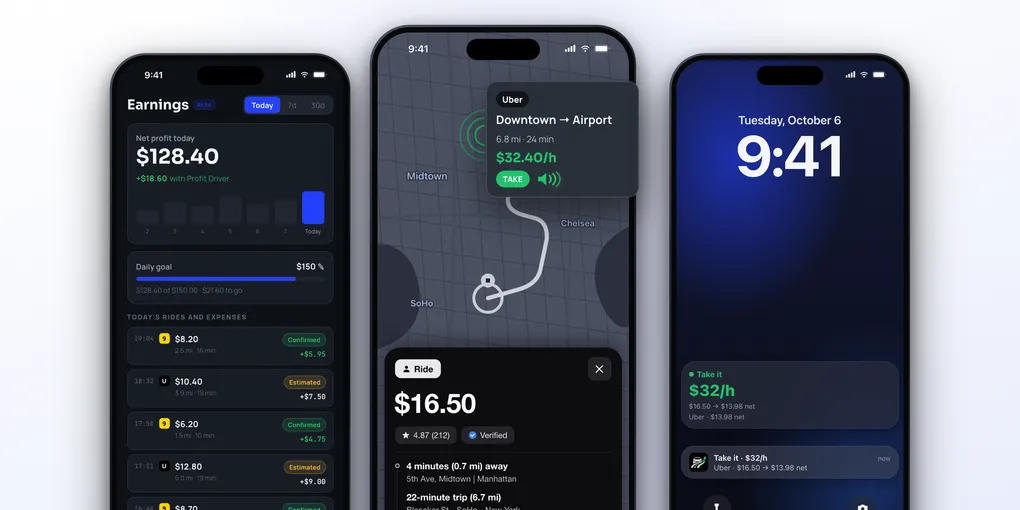
Rideshare Earnings Calculator for Uber, Lyft, 99 and inDrive Drivers on iPhone
The number on the offer card is not what you earn. It is what the platform pays for the trip, before your fuel, before the wear on the car, and before the minutes you spent driving to the passenger.
Two rides with the same fare can leave very different amounts in your pocket. The only way to know is to run the numbers, and an earnings calculator does that in seconds.
This guide shows the formula, what the Uber, Lyft, 99 and inDrive apps tell you about earnings, and the iPhone apps that calculate it for you. We used the apps, tested every feature and did a full review.
Table of Contents
- Why the Fare Is Not Your Earnings
- The Formula, Step by Step
- A Worked Example
- What Uber, Lyft, 99 and inDrive Show You
- Calculator Apps for iPhone
- How ProfitDriver Does the Math
- Your Daily Result: the Earnings Tab
- Apple Ecosystem Score
- Pricing
- Verdict
Why the Fare Is Not Your Earnings
Four things sit between the fare and your real result:
- Fuel. Every mile costs money, including the ones you drive empty
- Wear. Tires, oil, brakes and maintenance grow with distance
- The pickup. The drive to the passenger is almost never paid, but it takes time and fuel
- Your time. What matters is the money per hour of work, not per ride
A short ride that pays little but ends near the next request can beat a long one that leaves you far from demand. You only see that when you count the pickup and the minutes.
The Formula, Step by Step
You need three numbers about your car and the ride, and one about your work.
- Cost per mile = fuel price ÷ miles per gallon + wear per mile
- Total distance = the pickup distance + the trip distance
- Ride cost = total distance × cost per mile
- Net amount = fare − ride cost
- Net per hour = net amount ÷ total time in hours. Net per mile = net amount ÷ total distance
Then compare the net per hour with the target you set for your work. If a ride pays at least your target, take it. If it pays less than 80% of it, it is not worth it.
For wear, use your own number. If you know your monthly car payment or rental, maintenance, insurance and taxes, divide them by the miles you drive per month and use that instead.
A Worked Example
Our example car: gas at $3.50 per gallon, 25 miles per gallon, and $0.06 per mile for wear. That is $0.14 + $0.06 = $0.20 per mile. The wear value is only an assumption for the example. Our target is $30 per hour.
| Ride A | Ride B | |
|---|---|---|
| Fare | $16.50 | $8.20 |
| Pickup + trip | 0.7 + 6.7 = 7.4 mi | 1.5 + 3.0 = 4.5 mi |
| Total time | 24 min | 35 min |
| Ride cost | $1.48 | $0.90 |
| Net amount | $15.02 | $7.30 |
| Net per hour | $37.55 | $12.51 |
| Net per mile | $2.03 | $1.62 |
| Against the $30 target | 125%: take it | 42%: not worth it |
Ride B has half the fare of Ride A, but the real difference is bigger: Ride A pays three times more per hour of your time. The fare alone would never show that.
Three mistakes that make the result look better than it is:
- Leaving the pickup out. It is distance and time you spend
- Using the fare per hour. Without the cost, a ride can look fine and lose money
- Forgetting the wear. It is small per mile and large per month
What Uber, Lyft, 99 and inDrive Show You
Each driver app has an earnings area. This is what the official material says about it, and where it stops.
| App | What it shows about earnings |
|---|---|
| Uber | Earnings tab; a tracker with earnings, Uber Pro status and active Quests; estimated earnings in the trip guide; heatmap areas colored by estimated hourly earnings above the city median |
| Lyft | Earnings tab and an earnings figure on the home screen; an estimated hourly rate before accepting (not in New York City, Portland and Washington state); post-ride summary with tips, tolls and bonuses |
| 99 | Tapping the earnings value at the top opens an earnings panel, with the earnings goal you choose; the offer card shows the value per kilometer; the receipt lists dynamic price, pickup fee, incentives and the 99 fee |
| inDrive | You propose the fare and the passenger accepts or counters; inDrive says its fee is about 10% on average; a value per hour on the offer is not listed |
| Bolt | Today’s earnings on the home screen, a weekly screen split into in app, cash and other, daily or weekly goals, and a monthly summary with commission |
| DiDi | An earnings figure on the map and an Earnings Coach to set a goal |
The pattern is the same: the apps show what you received, after their own fee. In the official material we reviewed, none of them asks for your fuel price or the cost of your car.
That is why a driver app cannot tell you if a ride was good for you. For that you need the calculation with your own cost.
Calculator Apps for iPhone
There are two kinds of app that help with the numbers.
Apps that read the offer and answer before you accept. On iPhone they read the offer on the screen of your driver app, do the math and tell you if it is worth it:
- ProfitDriver: net per hour and per mile with your cost, a verdict by color and by voice. More below
- DriverPal: reads each offer and rates it Good, Fair or Bad against your per hour and per mile targets. iPhone only, iOS 18 or later
- Mystro: shows the pay per hour and per mile and can accept or decline for you with filters. It also has a free cost per mile calculator on its website
- GigU and Corridex: read the offer and compare it with your per kilometer and per hour targets, with a cost calculator inside
Apps that track after the fact. They add up what you already did:
- Gridwise: automatic mileage, earnings download from linked apps and expenses. The free version has a mileage tracker
- Solo: earnings from linked accounts, expenses, mileage and tax projections
- Everlance: mileage, expenses and tax reports
The second group is useful at the end of the week or at tax time. It does not tell you what to do with the next offer. For the decision you need the first group.
How ProfitDriver Does the Math
ProfitDriver turns the formula above into a verdict you hear in a second, without opening a spreadsheet.
You set it up once:
- Your cost. Vehicle type (gas, hybrid, electric or motorcycle), fuel or kWh price and how far the car goes on it. It calculates the cost per mile with an estimate for wear
- Your exact cost, if you want. Add the monthly fixed costs and the app uses them instead of the estimate. Or type the cost per mile you already know
- Your targets. A target per hour, on by default, and a target per mile, off by default. With both on, you choose if a ride has to hit both or either one
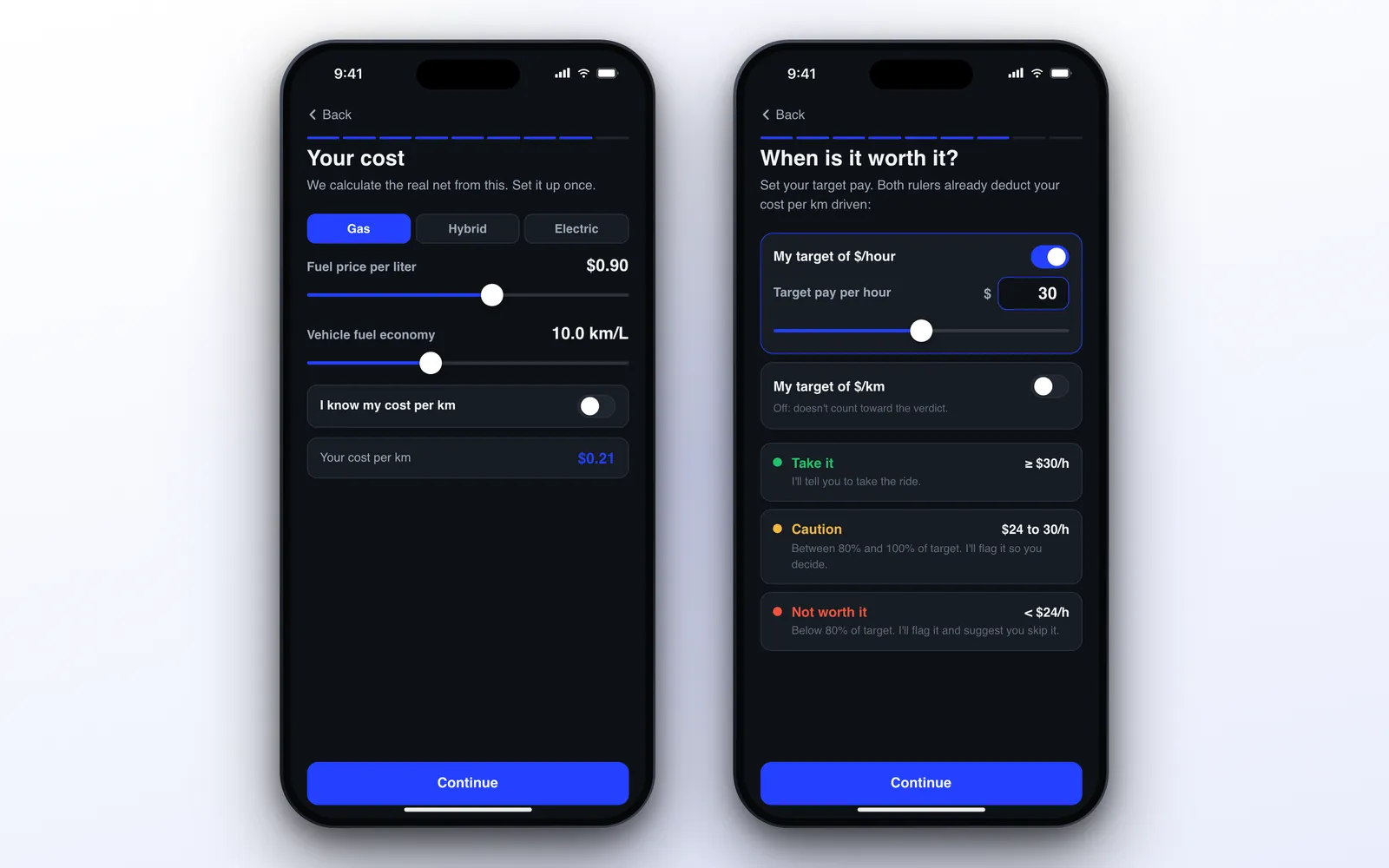
When an offer appears, the app finds the fare, the total distance (pickup plus trip) and the total time, subtracts your cost and compares the result with your targets:
- Take it (green): at least 100% of your target
- Caution (yellow): between 80% and 100%, so you decide
- Not worth it (red): below 80%
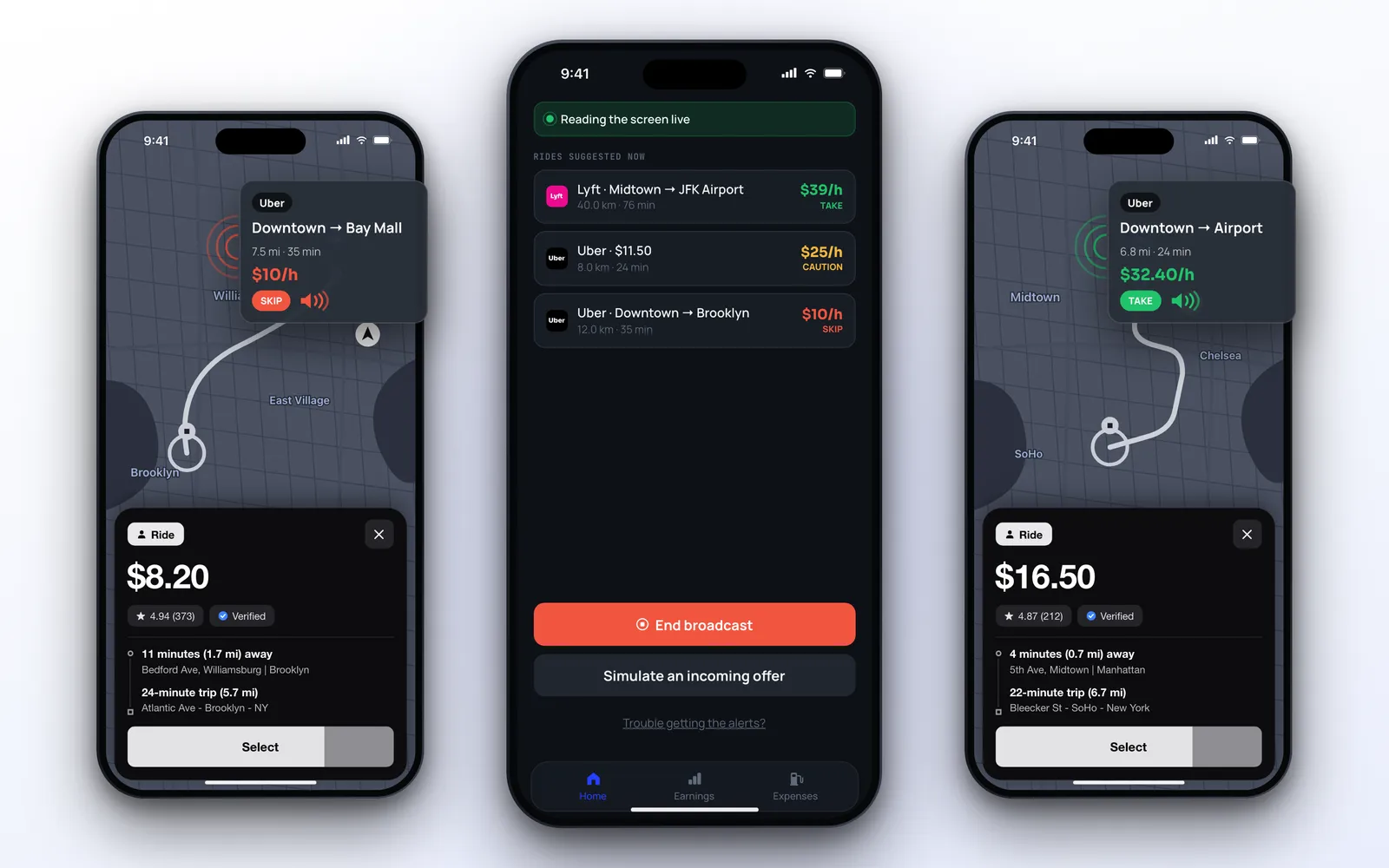
ProfitDriver never accepts or declines for you and never taps anything in another app. It works with Uber, 99, Lyft, Bolt and inDrive, and you can teach it another driver app with a few screenshots.
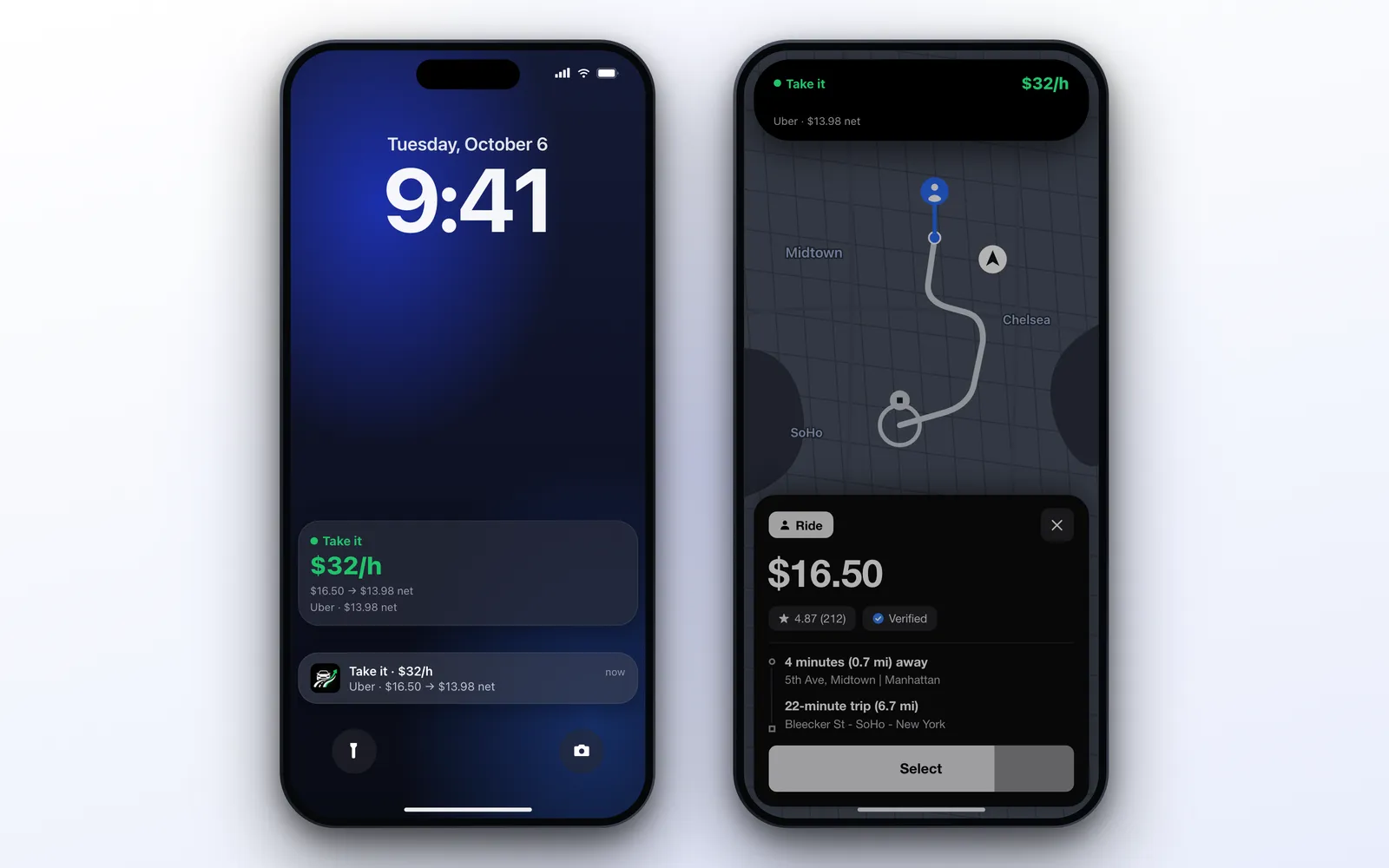
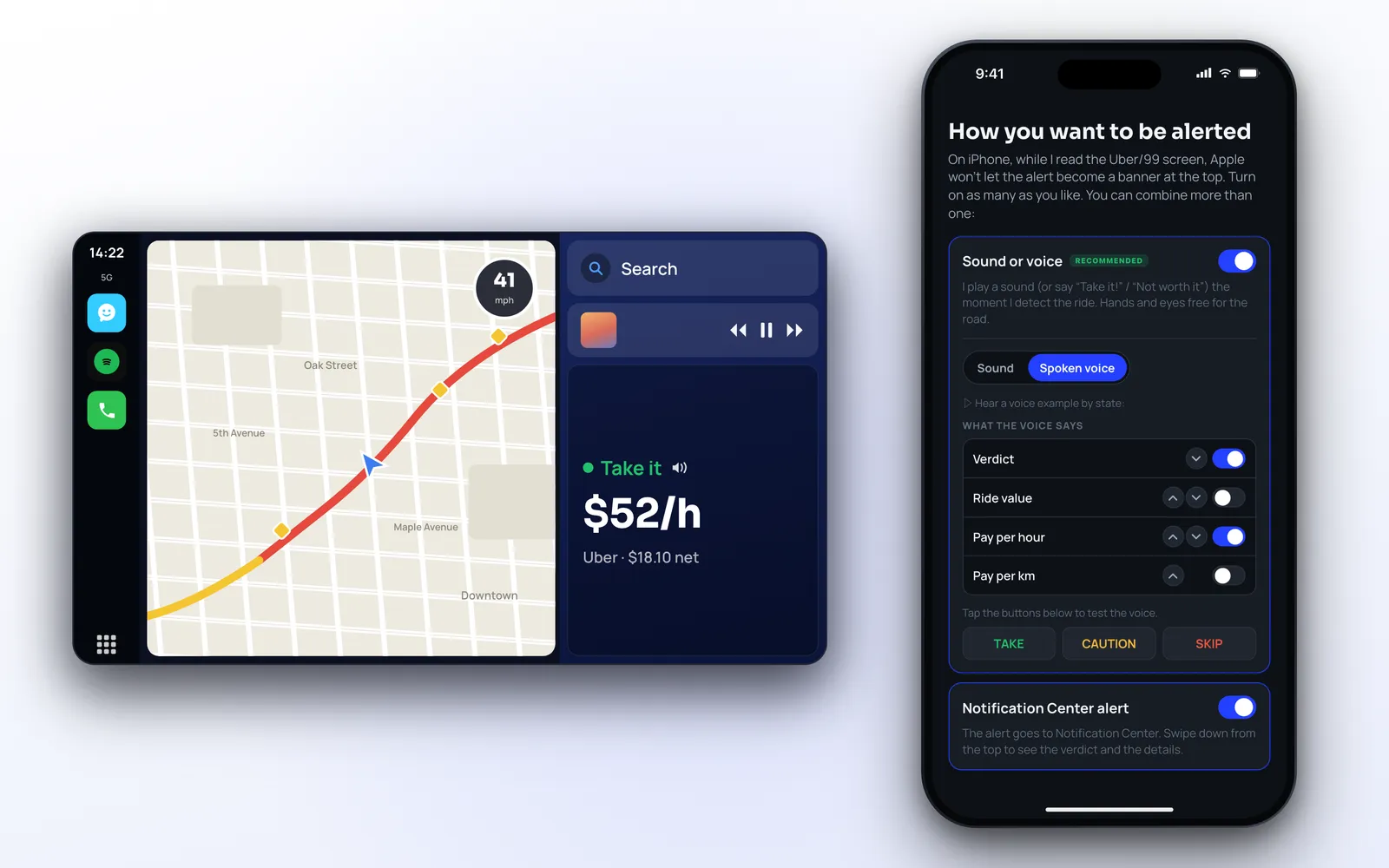
The verdict reaches you by spoken voice, live activity on the lock screen, notification, Dynamic Island and CarPlay, so your eyes can stay on the road. Our full review of ProfitDriver covers each channel.
Your Daily Result: the Earnings Tab
The calculation does not stop at the offer. The Earnings tab (marked as beta) adds up your day: the net profit for today, your daily goal and a list of rides and expenses.
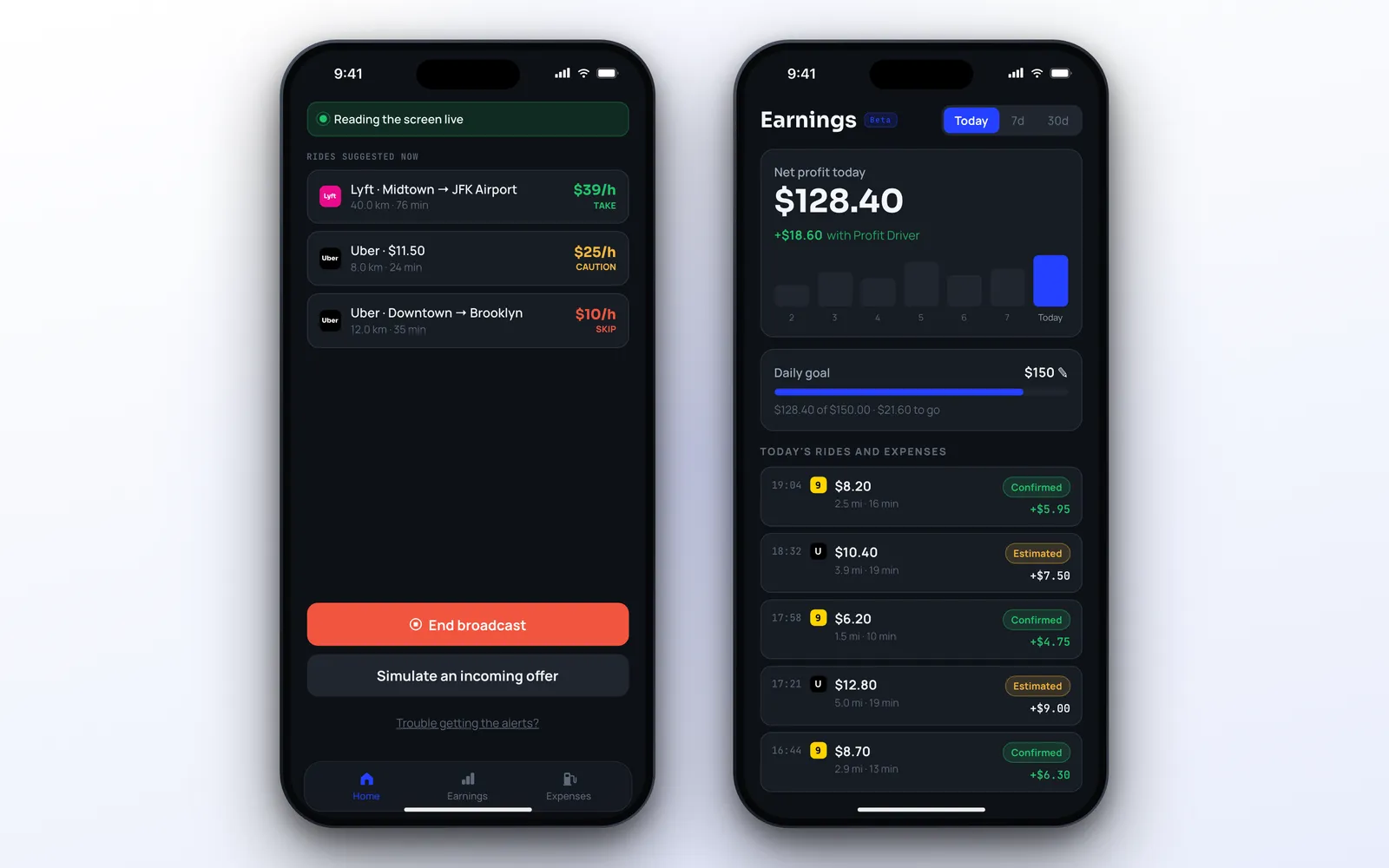
- Daily goal. The app suggests your target per hour times an 8 hour workday, and shows how much is left or how far over you are
- Periods. Today, 7 days and 30 days
- Confirmed and Estimated. Each ride is tagged, and you can confirm the amount you actually received
So the same cost that judges the offer also shows, at night, if the day beat your goal.
Apple Ecosystem Score
| Feature | Available | Notes |
|---|---|---|
| iPhone | ✅ | iOS 17 or later |
| iPad | ✅ | Runs the iPhone app |
| Apple Watch | ❌ | No Watch app |
| CarPlay | ✅ | Read-only verdict screen |
| Live Activity & Dynamic Island | ✅ | iOS 18 or later |
| Home Screen widgets | ❌ | Not yet |
| On-device text recognition | ✅ | Apple Vision, no cloud |
| On-device voice | ✅ | The iPhone’s own voices |
| Siri / Shortcuts | ❌ | Not yet |
Score: 6/9. The parts that matter in a car are there: on-device reading, voice, CarPlay and the Dynamic Island.
Pricing
ProfitDriver is free to download. Setting your targets and cost, logging expenses and simulating offers are free. Reading your screen live requires ProfitDriver Pro, a subscription with weekly, monthly, quarterly and annual plans that vary by region. Some plans start with a free trial, and the app shows the plans for your country before you subscribe.
Verdict
An earnings calculator is only as good as the cost you give it. Fuel, wear and the pickup are what separate a good ride from a bad one, and no driver app counts them for you.
If you want to do it by hand, the formula above works with any phone. If you want the answer before you accept, with your own cost and your own target, ProfitDriver is the one that does the whole thing on the iPhone: the offer, the verdict by voice and the day’s result.