Lean vs Hevy vs Strong: Which Gym Workout Tracker Is the Most Complete on iPhone?
Every gym tracker does the basics: you pick an exercise, type the weight and the reps, and a rest timer starts. After a few months, the question changes. You no longer want to know what you lifted on Tuesday. You want to know if you are getting stronger, and what to do next if you are not.
This comparison puts Lean next to the two apps that lead the gym tracker searches on the US App Store: Strong, first for “workout tracker” and “gym log”, and Hevy, second for both and first for “progressive overload”.
We used the apps, tested every feature and did a full review.
Prices and limits change. Check the store before deciding.
Table of Contents
- Three Ideas of a Workout Tracker
- Side by Side
- Logging a Workout
- Exercises and Library
- Plans and Programs
- Measuring Progress
- Widgets and Live Activity
- Apple Watch
- Friends and Community
- Apple Health, Data and Languages
- Pricing and Free Plan Limits
- What People Who Use Them Say
- Which One to Choose
- Verdict
- Sources
Three Ideas of a Workout Tracker
Strong is the logbook. Its listing says it has the simplest interface of any fitness app and promises no gimmicks. It is built for progressive barbell training, with the tools heavy lifters ask for: a plate calculator, a warm up calculator, one rep max and records.
Hevy is the logbook with a community and, now, a trainer. It logs everything Strong logs, has a strong social layer and now Hevy Trainer, which builds a program for you inside the Pro plan.
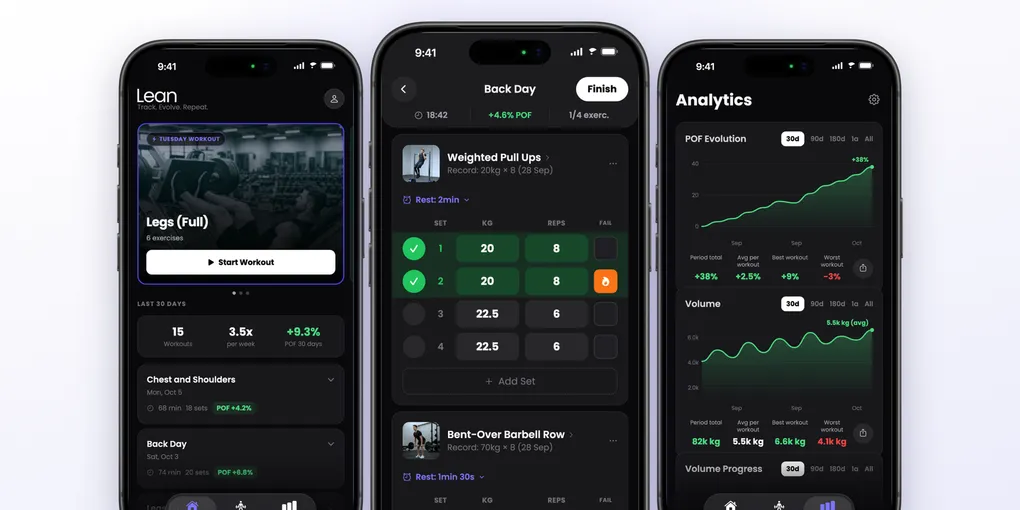
Lean is the coach with a score. It logs the same sets, but turns every workout into a progress score (the POF), builds a plan with a goal and reviews it when the cycle ends.
Side by Side
| Lean | Hevy | Strong | |
|---|---|---|---|
| Store version (Oct 14, 2026) | 1.5.1 | 3.2.0 | 6.5.1 |
| Minimum iOS | 17 | 15.1 | 15.0 |
| iPad | Runs the iPhone app | Full iPad app | Runs the iPhone app |
| Plan built for you | Lean Trainer: 4 weeks of consistency and 8 of load, review at the end | Hevy Trainer (Pro): program by level, goal, equipment, time and muscles, with automatic load adjustment | None. You create routines and group them in folders |
| How it shows progress | POF score per workout, live record banner | Progress indicator per exercise in Trainer, live PR notification, charts | Focus metric per exercise (compares with last time), records screen |
| Home Screen widgets | None | Calendar, routine of the day, weekly streak and aggregate data | Workouts per week (with a target) |
| Live Activity | Yes, with -15, +15 and skip, and set check | Yes, with -15, +15 and skip, and set check | Not listed |
| Apple Watch | Rest timer. Does not log sets | Logs sets, heart rate, complications | Logs workouts, with heart rate and calories, with or without the iPhone |
| Plate calculator (which plates go on each side of the bar) | None | Yes, free | Yes, Pro only |
| Warm up calculator (builds the lighter sets before your working weight) | None. The Lean Trainer notes say how many warm up sets | Yes, in Pro | Yes, Pro only |
| Set types | Normal and failure | Warm up, normal, drop, failure | Warm up, drop, failure |
| Supersets | None | Yes | Yes (circuit with 3 or more) |
| Friends | Challenges with ranking and feed | Follow, feed, ranking among friends, compare, copy workouts | Share routines and workouts by link |
| Import history | From Hevy, Strong, a screenshot or text | Not listed | Not listed |
| Export data | Not listed | CSV | CSV, but the file cannot go back into Strong |
| Apple Health | Sends the workout to Health. Does not bring Health data (like body weight) into the app | Exports the workout | Reads and writes Health data, with sync |
| Free plan | None for training: starting a workout needs Pro | Unlimited workouts, 4 routines, 7 custom exercises, 3 months of charts | Unlimited workouts, 3 routines. Full charts, measurements and calculators are Pro |
Logging a Workout
All three are fast at the job that matters most: sets between rests. The difference is in the details.
Lean
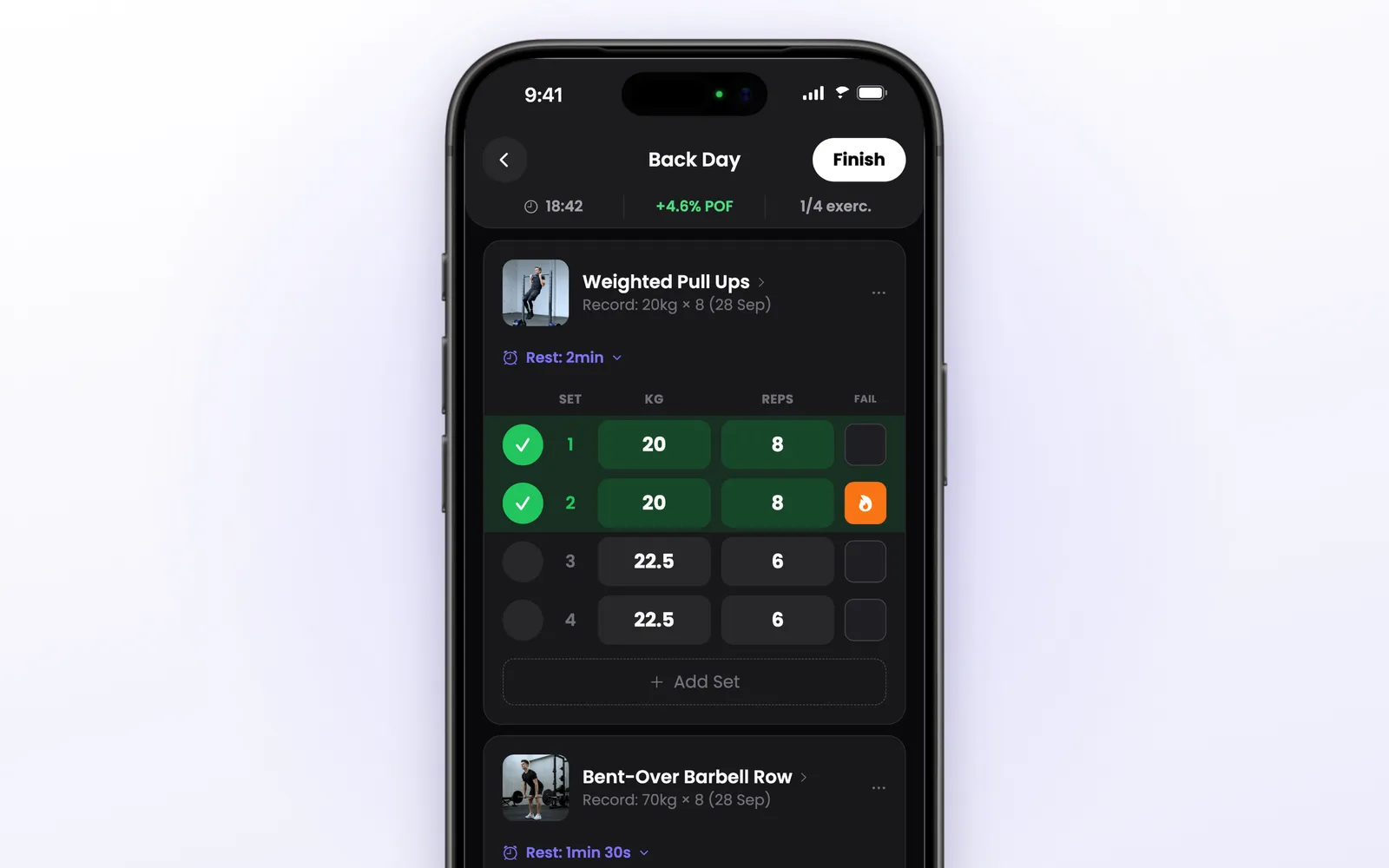
- Each set comes pre-filled with the weight and reps from the last time. Most of the time you just tap the check.
- Your record for the exercise sits under its name.
- The FAIL column marks a set taken to failure, and it counts in the POF.
- The rest timer starts when you complete a set, with -15, +15 and Skip, and each exercise remembers its own time.
- The header shows elapsed time, the live POF and how many exercises are done.
- A record banner appears during the workout when a completed set is heavier than your previous best for that exercise: “New record”.
Hevy
- Set types: warm up, normal, drop and failure, plus supersets and RPE.
- The automatic rest timer is configurable per exercise, from 5 seconds to 5 minutes, and fires when you mark a set as done.
- When you add an exercise, the “previous” column shows what you did last time, as a target to beat.
- Live PR notification (optional): the app tells you during the workout when you hit a new one rep max, heaviest weight for reps, set volume or most reps, without waiting for the end.
- In a video comparison, changing an exercise to a superset mid workout was simpler in Hevy: you just tap it.
Strong
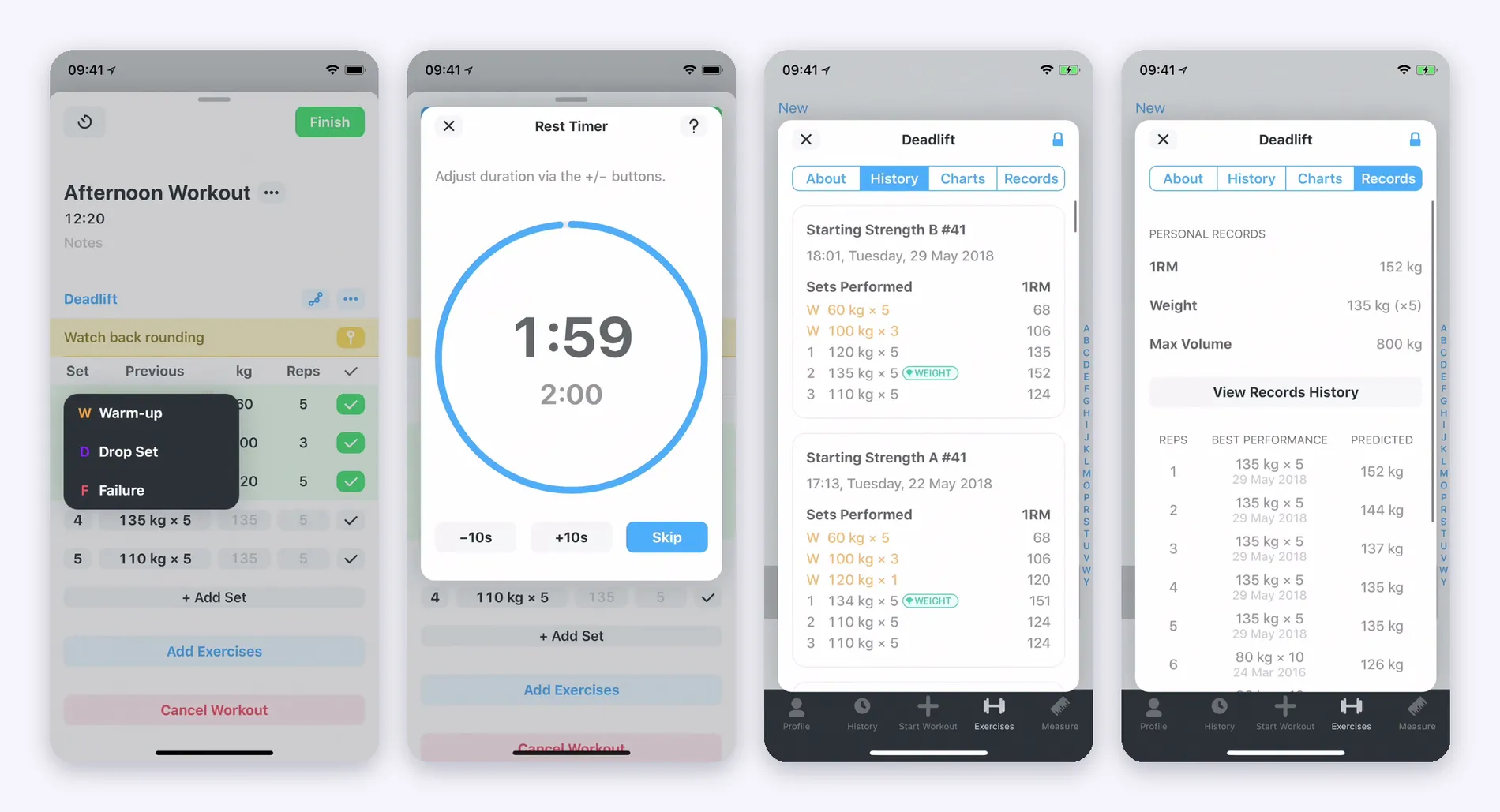
- The workout screen has the “previous” column and lets you tag each set as warm up, drop set or failure by tapping the set number.
- The rest timer starts at 2:00 by default, can be changed per exercise, and you can have different times for warm up sets and working sets. In full screen it has -10s, +10s and Skip.
- Workout and exercise notes with no length limit, and a pinned warning per exercise (“watch back rounding”, as in the official video).
- Supersets and circuits (3 or more exercises), with a vertical line tying the exercises together, and the next button jumps to the right set of the right exercise. In a video comparison, undoing a superset meant deleting both exercises and adding them again.
Calculators. The plate calculator tells you which plates to put on each side of the bar to reach the weight you chose. The warm up calculator builds the warm up sets that lead to your working weight, with the weight and reps of each one. In Strong, both are part of the Pro plan, and warm up sets are kept out of the charts. In Hevy, the plate calculator is free and the warm up calculator is Pro. Lean has neither calculator, but the Lean Trainer plan already says how many warm up sets each exercise needs.
Exercises and Library
- Lean: more than 880 exercises in the catalog, each with a photo, and you can create your own. The exercise page shows muscles worked, instructions, your progression chart and, for many, a video demonstration.
- Hevy: a large library with high quality videos, filters by equipment and muscle, custom exercises (7 on the free plan) and a more detailed muscle breakdown than Strong: quads, hamstrings and calves appear separately, according to the video comparison. It also has pinned notes per exercise.
- Strong: the exercise detail screen has four tabs: About (step by step written instructions and a video or image), History (every workout where the exercise appeared), Charts and Records. The written instructions help beginners. Muscles are shown in a more grouped way (“legs”). Per exercise charts are Pro.
Plans and Programs
This is the part that changed the most, because Hevy stopped being only a logbook.
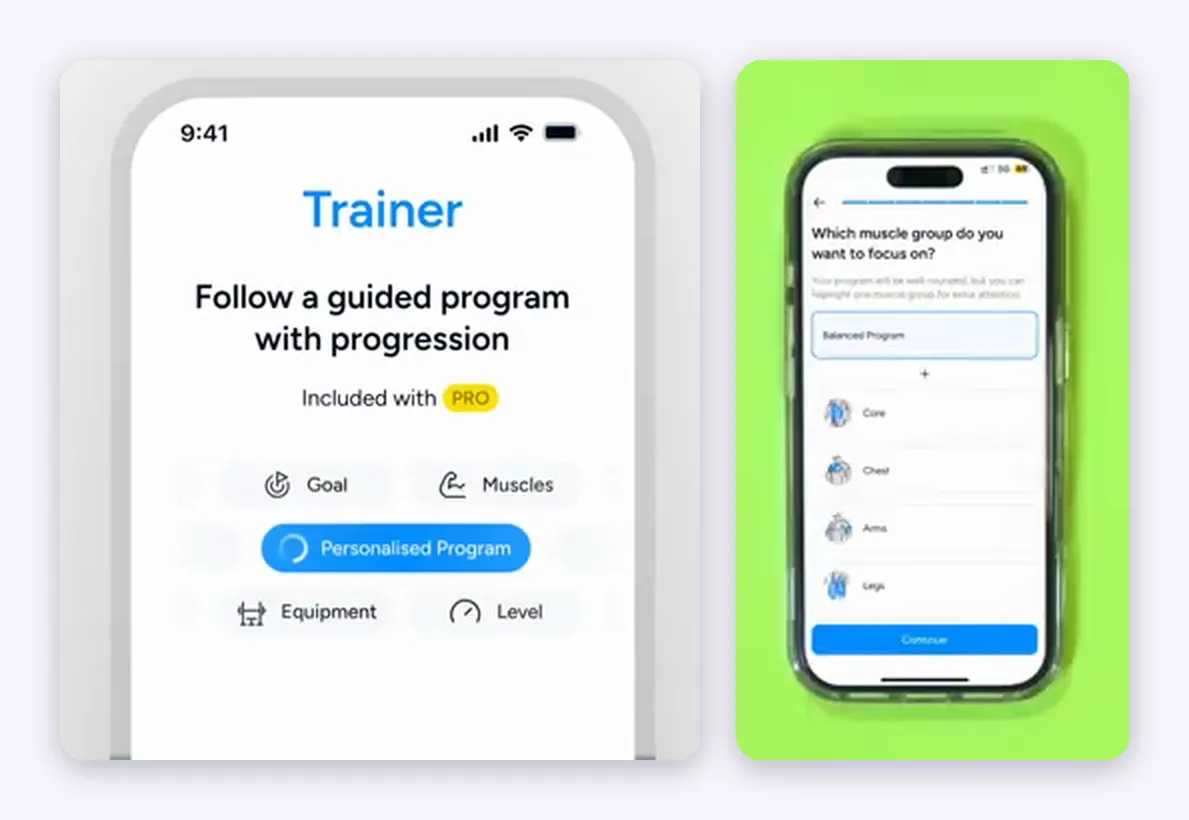
Hevy Trainer (Pro, no extra cost). The official page describes it as an adaptive programming system, based on an algorithm (the co-founder says in the launch video that it uses no AI) built on scientific evidence and learnings from coaches.
- Initial questions: experience level, goal, equipment available, how often per week, how long each workout should be and whether you want extra attention on a muscle group. It works for a full gym and for home training with little equipment.
- What it delivers: each workout comes with exercises, number of sets, rep ranges and a target effort. If you have logged the exercise before, it suggests the starting weight.
- Automatic weight adjustment based on your performance, how to instructions and animations, and an indicator next to the exercises you progressed on.
- Editing: you can add, remove, swap and reorder exercises. When swapping, the app shows four alternatives and asks whether the change is for the session only or permanent. You can also ask to never see an exercise again.
- Settings: equipment, focus muscle, duration, frequency, preferred rest time, variety (focused 6 week blocks, the same training continuously, or a plan that changes some exercises every week), cardio and injuries: when you mark an injury, the program swaps higher risk exercises or adds warnings.
- Progress report: week to week consistency, training time, volume load, sets per muscle group against the recommended range, and average weekly body weight.
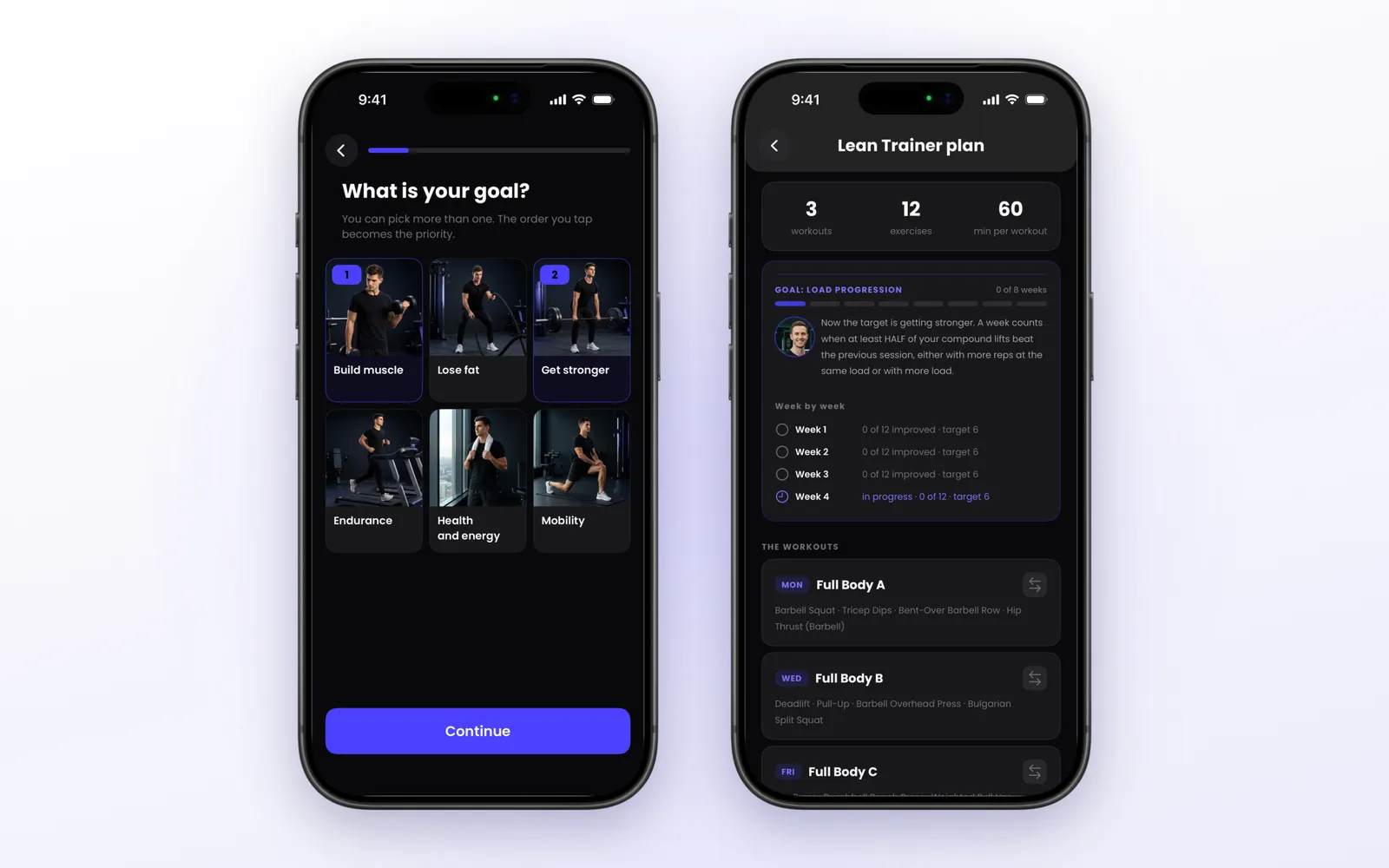
Lean Trainer. It asks your goal (you can pick more than one, and the order becomes the priority), experience, where you train, equipment, days, time per session, rest, sports, limitations and muscles to emphasize. It builds the week (full body, upper and lower, or push pull legs, depending on days) and lets you swap any exercise before saving. The plan has two phases: four weeks of consistency, where the week only counts if you hit your days, and eight weeks of load progression, where the week counts when at least half of the compound lifts beat the previous session. At the end, the app reviews the cycle, keeps what progressed, swaps what stalled and proposes the next plan.
Strong. It builds no plan. The listing says it is optimized for programs such as Starting Strength and StrongLifts 5x5, and that you create and choose your routines (called templates). In exchange, on iPhone you can organize templates in folders, archive the ones you do not use and share a workout or template by link (the recipient needs Strong). Unlimited templates are Pro. Hevy also has routine folders, which you can share by link or image, and the link opens a page on hevy.com where the person sees the routine and saves it to their profile.
What Lean adds: ready-made routines (16, with filters for men, women and muscle group, and a three session a week Minimalist program with an e-book), and importing your history from Hevy and Strong through their CSV, or from a screenshot or pasted text. With the past in place, the POF and records work from day one.
What Hevy adds: the Hevy app inside ChatGPT, free for every Hevy user and working with a free ChatGPT account. You type @hevy in any conversation and can ask for a plan built around your goal, equipment, schedule, injuries, exercises you like or dislike, session length and warm up sets; ask for the next workout based on your last sessions; or ask for an analysis, such as a chart of your bench press over six months with insight on stagnation or fast progress. ChatGPT reads your training history to suggest loads and progression, and the plan is saved straight to your Hevy account. It replaces the old HevyGPT, which was a separate chat.
There is also Hevy Coach: a personal trainer assigns plans, reviews your performance and chats with you inside the Hevy app, and your measurements and progress photos are shared with them automatically. The trainer can even log your sets on their own phone while coaching you in person, so you can leave yours in the locker room.
In short: today Hevy and Lean have a coach, Strong does not. Hevy Trainer delivers a program with automatic load adjustment, injuries and variety. Lean delivers a cycle with phases, a goal, a review and a score for each workout.
Measuring Progress
The three apps measure progress in different ways.
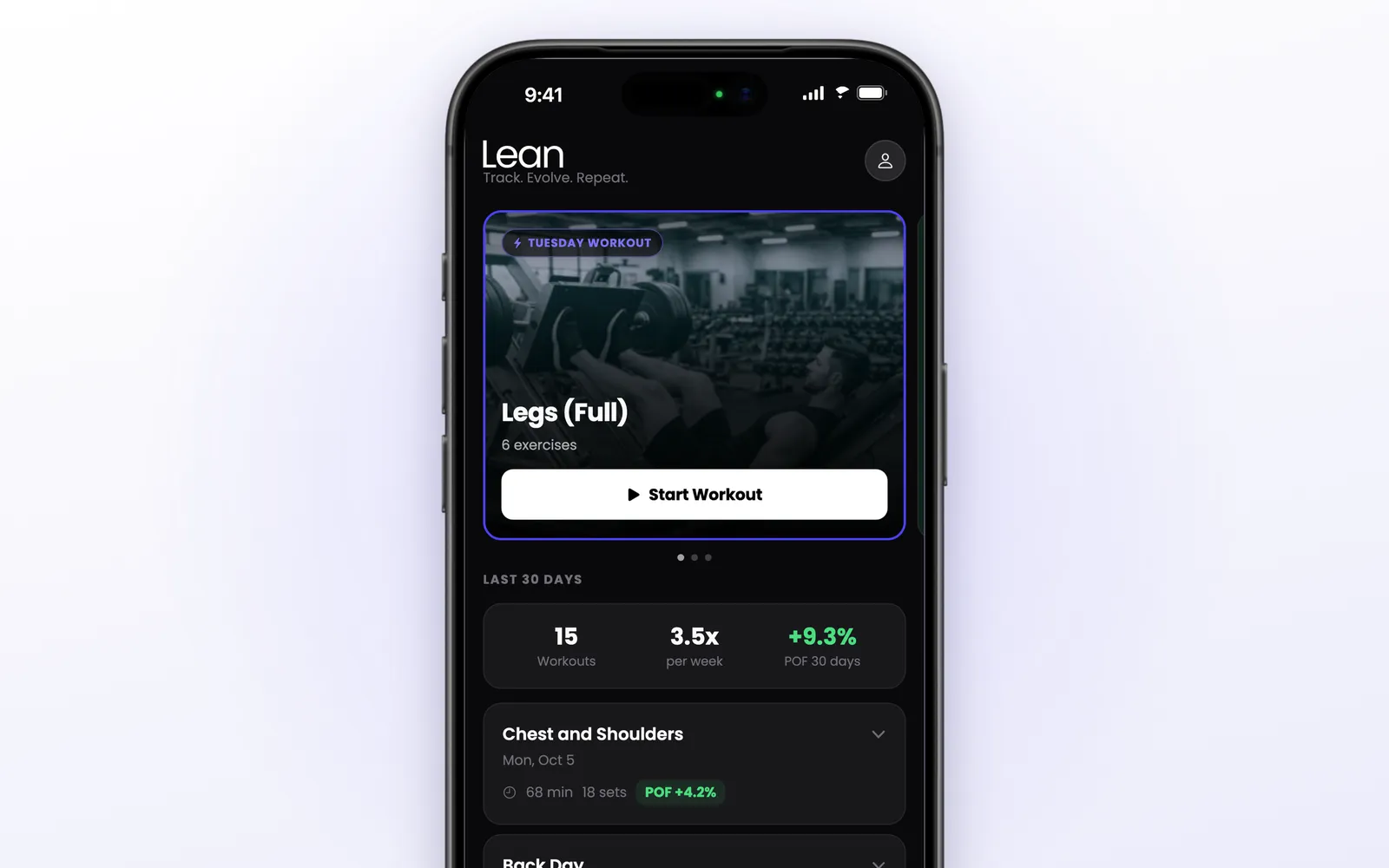
Lean: a score per workout. Every workout gets a POF, the Progressive Overload Factor: a percentage that compares each exercise with the last time you did it, weighing the load heavily, the reps less, and giving a bonus to sets taken to failure. The Home screen shows the POF of each recent workout and of the last 30 days: green when you progressed, red when you went backwards. If you would rather follow total volume, you can pick that as the main indicator.
Strong: a focus metric per exercise. Each exercise has its own focus metric (total volume, volume increase, reps, time or distance), which compares today’s workout with the last time. With “volume increase”, if you did 1,000 lb last time and 900 today, the metric reads -10%. It is not available on the Watch. The records screen shows your best performance for each rep count next to the predicted weight (Strong only accepts sets of up to 12 reps, because above that the one rep max estimate, by the Brzycki formula, loses accuracy).
Hevy: charts, records and reports. Volume, best weight and total reps per exercise, a one rep max, sets per muscle group per week, a monthly report (free, with sets, volume distribution and the month’s records), comparison of your performance with friends and the live PR notification. On the free plan, charts go back 3 months.
In short: Hevy and Strong give you the raw material and some comparisons with the last time, and you draw the conclusion. Lean hands you the conclusion in one number per workout. For someone who wants to know at a glance whether the last month worked, that is the main reason to choose Lean. For someone who prefers to read the curves per exercise, Hevy and Strong give more control.
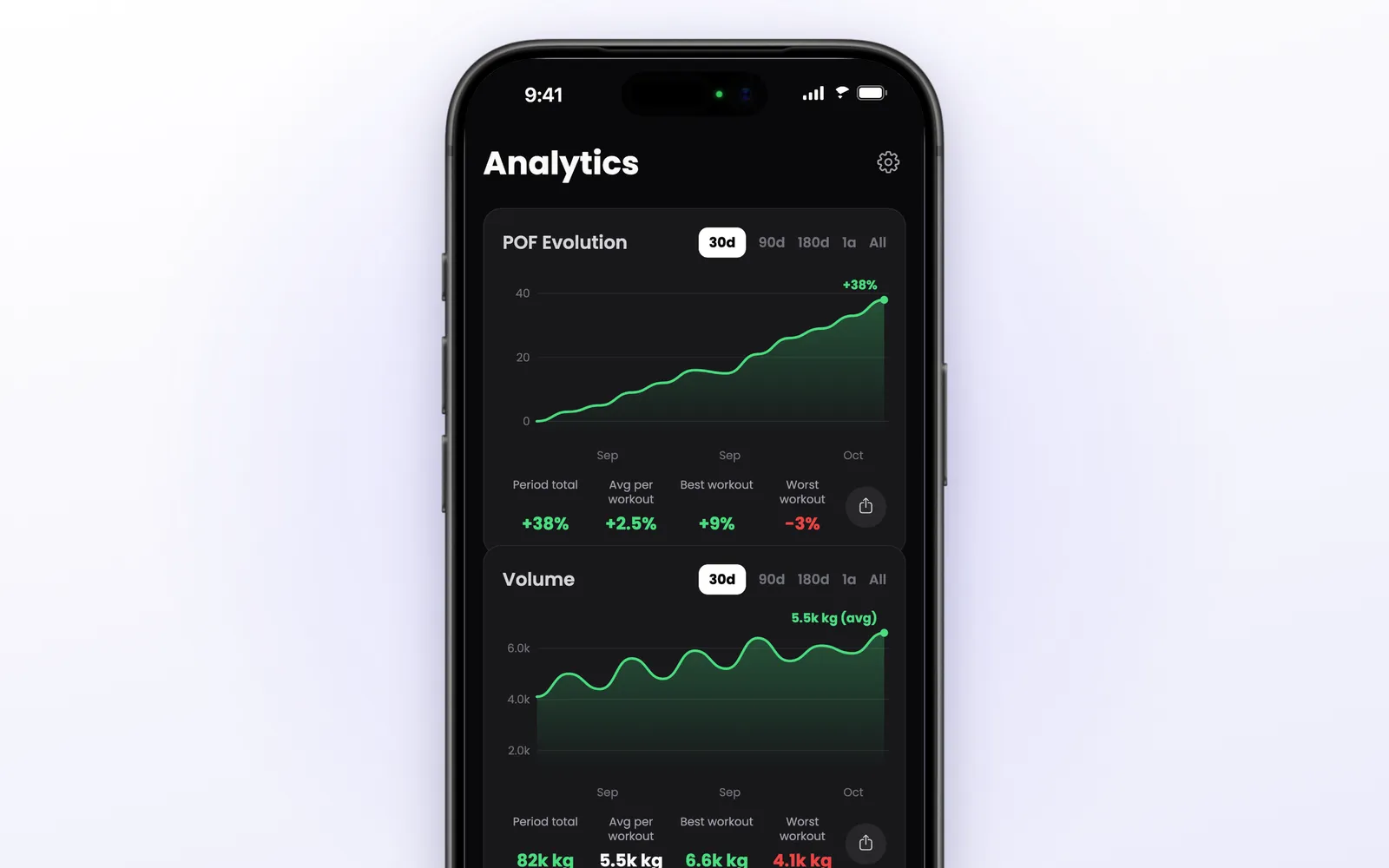
Lean’s Analytics tab has four charts: POF evolution, volume, volume progress and frequency (a calendar and a year heatmap), each with its own period, from 30 days to all time, and a share button. Body measurements live in the profile, with a chart and an optional goal.
Widgets and Live Activity
Home Screen widgets
- Hevy: four kinds, according to the official page. A calendar with the last seven days of data, routine of the day (you schedule routines by weekday, and tapping the routine starts the workout), a weekly streak with rest days, and aggregate data (you choose the data and period, such as weekly volume). Tapping each widget opens the related screen.
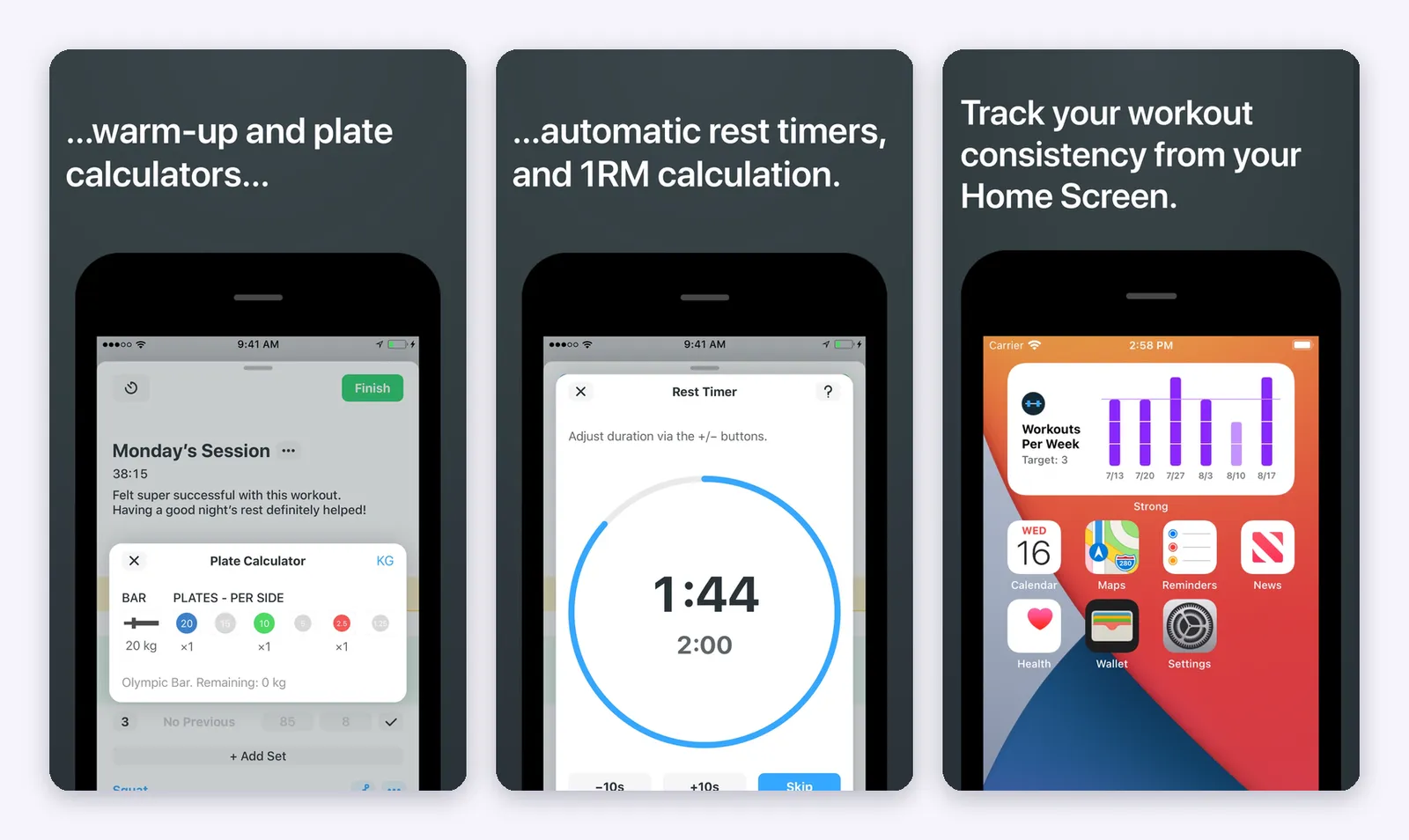
- Strong: the workouts per week widget, with the target you set. Inside the app, the Profile tab is a dashboard you build with widgets (workouts per week, calories this week, daily macros, exercises and measurements).
- Lean: no Home Screen widget.
Live Activity (lock screen and Dynamic Island)
- Hevy: shows the next exercise, sets done, the prescribed weight and reps and the training time. When you mark a set, the rest appears there, with -15, +15 and skip. You mark the set done without unlocking the phone. It asks you to allow access when locked in Settings.
- Lean: does the same: exercise, next set and rest, with -15s, +15s and Skip, and the set check on the lock screen. On the Dynamic Island, the exercise name and the timer in compact view, and the set with the complete button when expanded.
- Strong: the official sources we found do not mention a Live Activity.
Here Lean has no advantage over Hevy: both do the same thing. And Lean has none of the widgets Hevy and Strong have.
Apple Watch
| Lean | Hevy | Strong | |
|---|---|---|---|
| Logs sets on the watch | No | Yes | Yes |
| Works without the iPhone nearby | No | Saves and syncs on reconnect | Yes, with or without iPhone |
| Rest timer | Yes, large, with -15 and +15 | Yes | Yes |
| Heart rate and calories | Not listed | Heart rate | Heart rate and calories |
| Watch face complications | Not listed | Yes | Not listed |
| Live sync with the iPhone | Follows the iPhone workout | Yes | Yes (Live Sync, uses more battery) |
Lean’s Watch app is a companion. It shows the exercise, set, weight and reps, and a large rest timer with -15 and +15, and taps your wrist when the rest ends. But you complete sets on the iPhone or from the Live Activity.
Hevy lists a Watch app that logs sets, uses your routines, tracks heart rate, shows timers for duration exercises, marks set types and saves the workout when it reconnects. Strong describes an app that focuses on one set or timer at a time: it has warm up sets, timers, weight and rep editing, heart rate and calories, supersets and exercise replacement, and Live Sync lets you track the same workout on iPhone and watch at once. Some features, such as the focus metric, are not on the watch.
If the idea is to leave the phone in the locker and train with just the wrist, Hevy and Strong do that and Lean does not.
Friends and Community
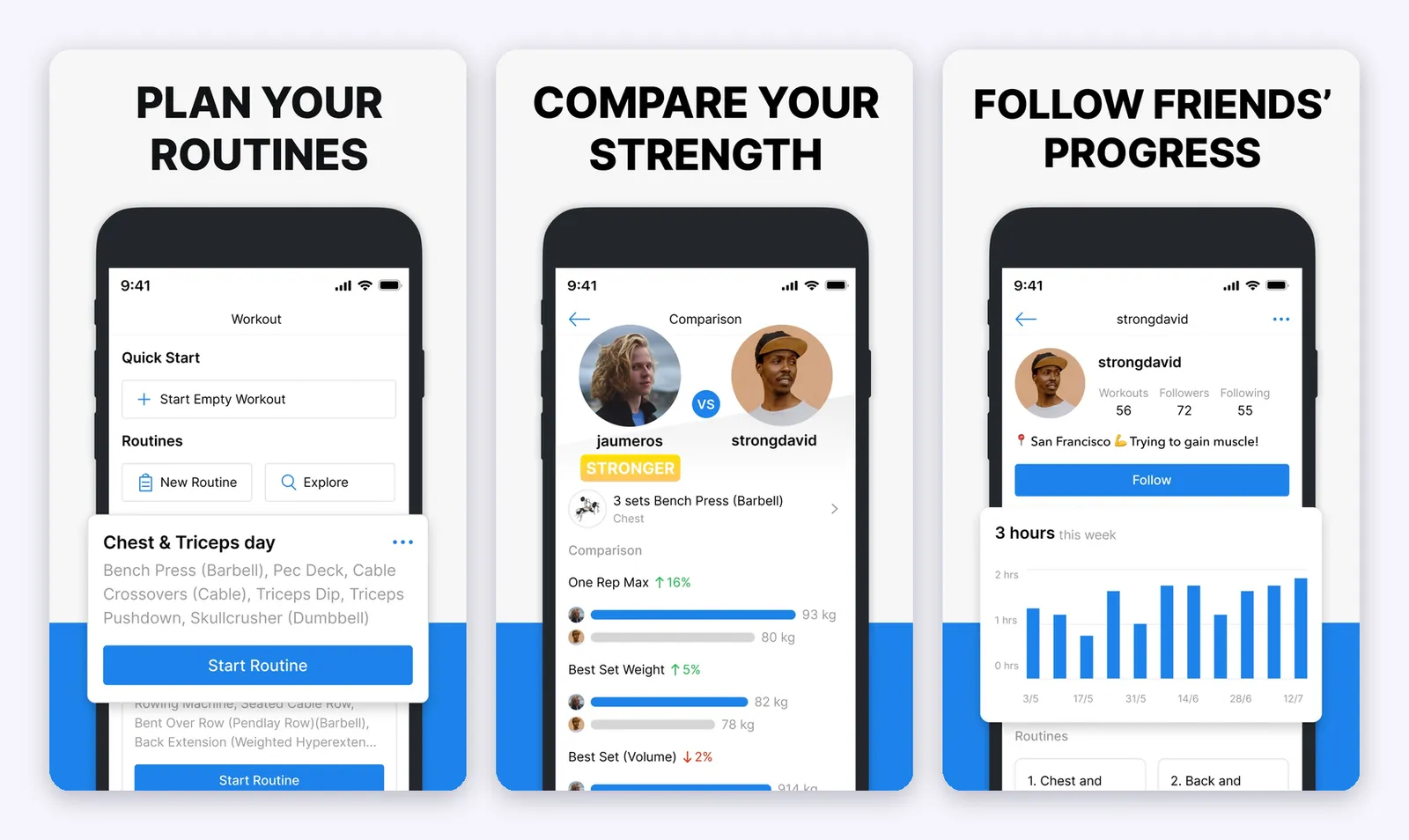
- Hevy: the social one of the three. You follow friends, see their workouts in a feed, like, comment and copy their routines, with a public or private profile. It has exercise leaderboards among the people you follow, comparison of your performance with another user, progress photos and the Strava integration, which posts your workout to your feed there. If you do not want the social part, you cannot remove the feed, according to one review.
- Strong: no social component. You can share a workout or template by link, and the recipient needs Strong to import it. For people who want to train privately, that is a point in its favor.
- Lean: has challenges. You choose how they are scored (workouts in the period, POF, volume progress or total volume), the duration (7, 15, 30 or 90 days), public or private, and invite by link. There are optional fairness rules, such as counting at most one workout a day and only workouts of 30 minutes or more. The challenge shows a podium, the full ranking and a feed. Scored by POF, a beginner who improves a lot can beat someone much stronger who is standing still.
Apple Health, Data and Languages
- Apple Health:
- Strong syncs both ways: it reads nutrition (calories and macros from apps such as MyFitnessPal, Lifesum and Lose It), weight and body fat, and shows your workouts in the Activity rings when you use the Watch.
- Hevy exports workouts to Health.
- Lean saves each workout as strength training with estimated calories and reads nothing from Health.
- Works offline: Lean saves everything on the phone first and syncs when there is a connection, so you can train and finish with no signal. The first launch, challenges and photo import need internet.
- Account: Lean lets you start without an account and keeps your history in the cloud if you sign in with Apple, Google or email. In Strong, the account is free and your data stays accessible even without Pro.
- Languages: Hevy’s listing shows 16 languages and Strong’s 11. Lean has 10, including Portuguese and Spanish.
- Export: Strong exports everything as CSV (Settings, Export Strong Data), but the file cannot be imported back into Strong. Hevy also exports its history. We did not find an export for Lean in the sources.
Pricing and Free Plan Limits
This is where the three differ the most, and what weighs most in the decision.
Lean: it is paid, full stop. The app is free to download, and you can build routines and answer the Lean Trainer questions without paying, but starting a workout requires Lean Pro, a subscription. Some plans start with a 14 day free trial, and the app shows the plans and prices for your country before you subscribe.
Hevy: really free, with ceilings. No ads. The free plan logs unlimited workouts, but limits you to 4 routines, 7 custom exercises and 3 months of history in the charts. Hevy Pro unlocks unlimited routines and custom exercises, all history, advanced measurements, the warm up calculator and Hevy Trainer. The official pages cite $2.99 a month, and other sources cite between $2.99 and $3.99 a month, $23.99 a year and $74.99 lifetime, but the numbers vary between sources.
Strong: free, with a clearly defined Pro. The free plan saves unlimited workouts, and your data is never locked. Strong Pro unlocks, according to the help center: unlimited templates (free allows 3), body part measurements, all charts, plate calculator, warm up calculator, icons and themes. The US listing shows $4.99 a month or $29.99 a year.
| Lean | Hevy | Strong | |
|---|---|---|---|
| Train for free | No | Yes, no ads | Yes |
| Free ceiling | Not applicable | 4 routines, 7 custom exercises, 3 months of charts | 3 templates, no per exercise charts, no calculators |
| Paying unlocks | Training, Lean Trainer, POF, challenges | No limits, warm up, Trainer | Unlimited templates, charts, measurements, calculators, themes |
| Subscription | Weekly to annual plans, some with a 14 day trial | Monthly, annual and lifetime | Monthly and annual |
One fact that changes the math: in Strong, the calculators and the full charts are paid, so “free Strong” is much leaner than the listing text suggests. Free Hevy is more generous, in both logging and statistics.
What People Who Use Them Say
We cannot test everything, so we looked at what users report in long usage videos.
- Someone who used Strong for 100 days came from a Notion spreadsheet and said his workouts dropped from an hour and a half to between 45 minutes and an hour once he started logging everything. For him, the main value of logging is knowing whether you are applying progressive overload, and the app is convenient but not essential: pen and paper would give a similar result.
- A long comparison concludes that both are excellent, stable loggers with no data glitches, and that the choice depends on wanting community and a bigger library (Hevy) or privacy, written instructions and calculators (Strong). The author notes that Hevy’s developers are active in the community and fix bugs quickly.
- Someone who tested Hevy’s free plan highlights that the interface is simple and fluid, and that the four routine limit is enough for many people.
Which One to Choose
- You train with a simple split and want to spend nothing: Hevy. The free plan covers four routines, with no ads, and still gives the monthly report.
- You want the cleanest, most private log, with written instructions, and accept paying for calculators and charts: Strong.
- You like training with friends and following what others do: Hevy.
- You want a program built for you with automatic load adjustment, injuries and variety, for little money: Hevy Trainer.
- You want to know, in one number, whether training is working and be led by a cycle with a goal: Lean.
- You come from Hevy or Strong with years of history: Lean, for the import.
- You train with only the wrist, without the phone: Hevy or Strong.
- You want Home Screen widgets: Hevy or Strong.
Verdict
Most complete overall: Hevy. A free plan with no ads, community, a Watch app that logs, widgets, Live Activity, a full iPad app, a coach with automatic load adjustment, and ChatGPT and Strava integrations. If “complete” means the longest list, it is Hevy.
Best logbook: Strong. Simple, private, with written instructions, a focus metric per exercise, records and a Watch app that works on its own. The cost: the calculators and the full charts are Pro.
The simplest and most direct: Lean. You open the app and see the workout of the day and a single number that tells you if you are progressing. With Lean Trainer, you do not have to build anything or interpret charts: the plan says what to do, and the POF says if it worked. The price of that simplicity is clear: it is paid from the first workout, it has no widgets, and the Watch does not log sets.
4.8 / 5 ⭐ for Lean.

Sources
Consulted in October 2026.
- App Store listings: Hevy, Strong and Lean
- Hevy, official pages: Hevy Trainer, Home Screen widgets, Live Activity, rest timer, set types, live PR, monthly report, performance comparison, sharing folders and routines, Strava integration, Hevy on ChatGPT and Hevy Coach
- Strong, official help center: what is Strong Pro, Strong for Apple Watch, Live Sync, profile widgets, focus metric, records screen, exercise detail, rest timer, plate calculator, warm up calculator, set tags, supersets, templates and folders, Apple Health and export data
- Official videos: Hevy Trainer, your digital coach and the Strong demo video on its App Store listing
- Usage videos: Strong vs Hevy, AJ Faith & Fitness, Hevy App Review, Knowledge By Marcus, 100 days with Strong, Evan Argenal and Strong widgets, AJ Faith & Fitness
- More reading: Hevy Review 2026, Hevy vs Strong vs Fitbod, Hevy Pro vs Free and Hevy vs Strong
The Hevy and Strong images are screenshots from their official App Store listings and official videos, used here to illustrate the analysis. The Lean images show the app with sample data.