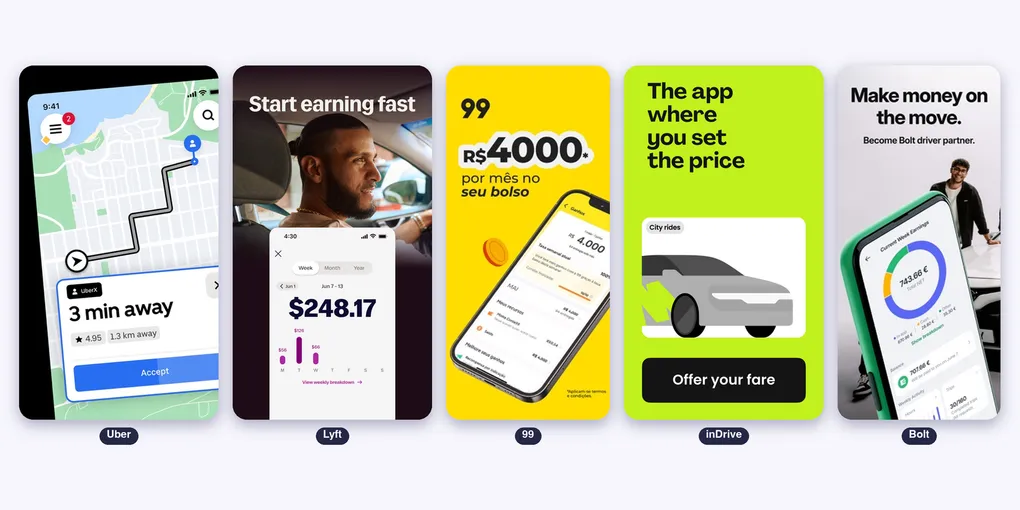
Uber, Lyft, 99, inDrive, Bolt and DiDi on iPhone: Which Rideshare Driver App Is the Best?
Every rideshare platform has its own driver app, and on the iPhone they are not the same. One has CarPlay, another runs on the iPad, one lets you counter the price, another caps the fee.
This is a screen by screen comparison of the driver apps of Uber, Lyft, 99, inDrive, Bolt and DiDi, only for iOS. We used the apps, tested every feature and did a full review.
Table of Contents
- Side by Side on iPhone
- How You Work in Each One
- Uber Driver
- Lyft Driver
- 99 Motorista
- inDrive
- Bolt Driver
- DiDi Driver
- Which One Is Best for What
- Suggestion: a Helper for the App You Drive For
Side by Side on iPhone
| Uber Driver | Lyft Driver | 99 Motorista | inDrive | Bolt Driver | DiDi Driver | |
|---|---|---|---|---|---|---|
| iPhone | Yes | Yes | Yes | Yes | Yes | Yes |
| iPad | Yes | No, iPhone only | Runs the iPhone app | Not listed | Not listed | Not listed |
| Mac (Apple silicon) | Not listed | Not listed | Not listed | Not listed | Yes | Not listed |
| iOS | 18 or later | 17 or later | 16 or later | 15 or later | 17 or later | 16 or later |
| Size | 453 MB | 396 MB | 364 MB | 527 MB | 174 MB | 355 MB |
| Languages | 50 and more | 5 | 7 | 25 | 40 | 8 |
| CarPlay | Yes | Yes, with Lyft Maps | Not listed | Not listed | Not listed | Not listed |
| Apple Watch | Not listed | Not listed | Not listed | Not listed | Not listed | Not listed |
| Widgets and live activity | Not listed | Not listed | Not listed | Not listed | Not listed | Not listed |
| Separate driver app | Yes | Yes | Yes | No, one app for riders and drivers | Yes | Yes |
Uber is the most complete on the Apple side: iPad and CarPlay. Lyft has CarPlay through its own maps. For the others, the official pages do not mention CarPlay, Apple Watch or widgets.
How You Work in Each One
| Uber Driver | Lyft Driver | 99 Motorista | inDrive | Bolt Driver | DiDi Driver | |
|---|---|---|---|---|---|---|
| Where it works | Many countries | US and Canada | Brazil | 48 countries | 850+ cities, mostly Europe and Africa | Latin America, Australia, Japan and Egypt |
| Offers | Exclusive and Trip Radar | Upfront Pay | Exact earnings before accepting | Passenger names the price, you accept or counter | Fixed fare, one tap | Per km and per minute, 15 seconds to accept (Mexico) |
| Pay shown before accepting | Yes, with the destination | Yes, in most cities | Yes, with the destination | Yes, with the route | Not stated | Yes, with the destination |
| Payout | Instant Pay up to 6 times a day, weekly transfer | Express Pay, weekly deposit on Tuesday | Same day with Cartao99 | From the prepaid balance | Weekly, Monday to Sunday | Daily in the wallet (Mexico) |
| Fee | Not stated | Capped at 30% | Capped at 19.99% a week | Varies by location | Varies by market | Not stated |
| Tips | You keep 100% | You keep 100% | Not stated | Not stated | Paid in full | Not stated |
| Incentives | Quests, Boost+, Uber Pro | Turbo, Bonus Zones, Ride Challenges, Rewards | Corra e Ganhe, Rota 99, Taxa Zero | Priority level | Campaigns, Bolt Rewards | DiDiMas+ partner discounts |
Uber Driver
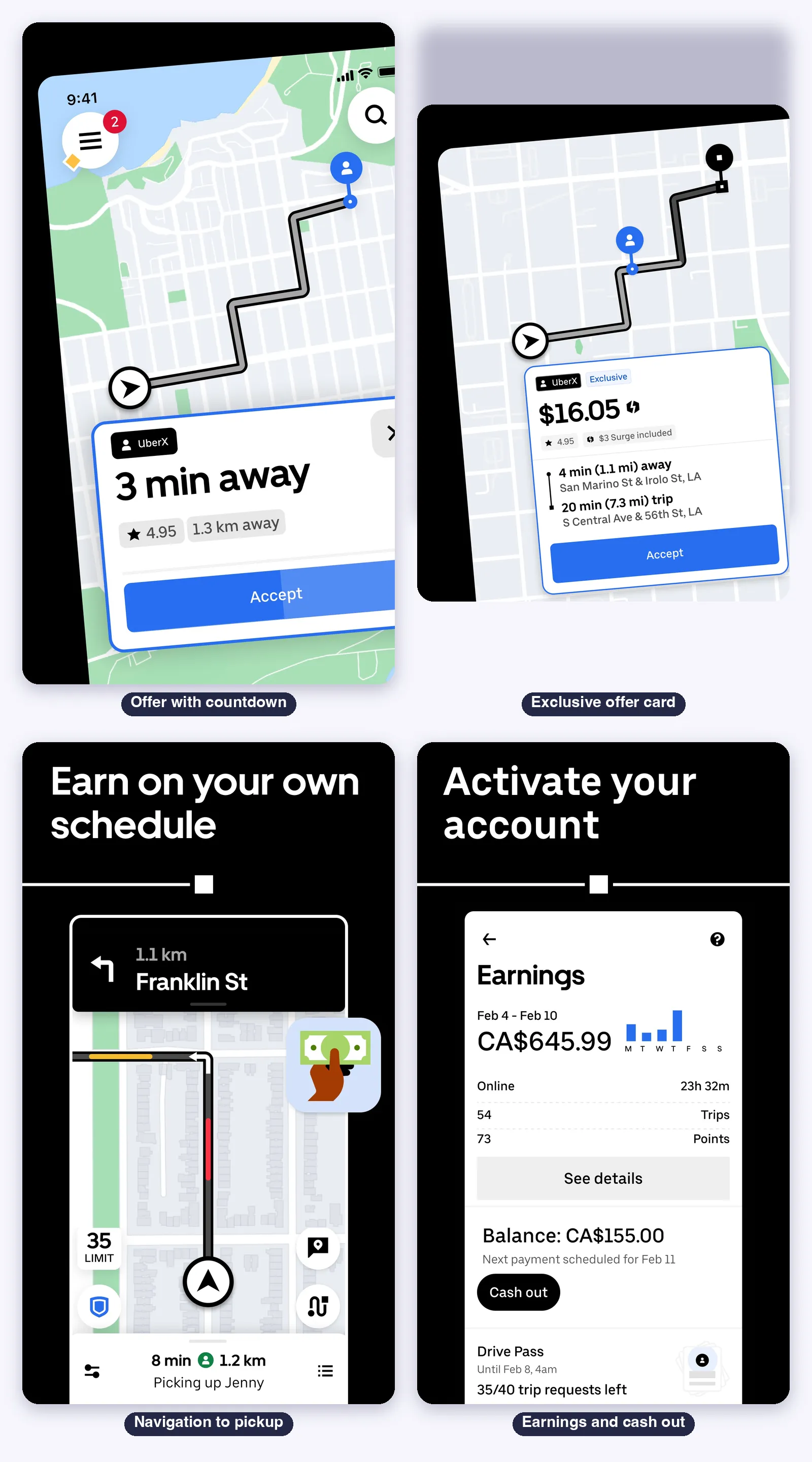
The most complete of the six on the Apple side: iPhone and iPad, CarPlay, 50 languages and the largest set of earning tools.
Getting started
- Sign up in the app: a checklist with background check, driver’s license, vehicle registration and insurance
- Choose how you earn: rides, delivery or both, with the age and vehicle rules of your city
The offer card
- Two kinds: Exclusive (sent only to you, tap Accept) and Trip Radar (sent to several drivers, tap Match). Trip Radar is not in New York, Oregon and Washington
- Fields: product, request type, upfront fare, surge, rider rating, “Verified”, pickup time and distance, trip time and distance, and the destination
- Missing from the card: the rider’s price and Uber’s cut
- Rates: acceptance counts your last 100 Exclusive requests, and cancellation your last 100 accepted trips
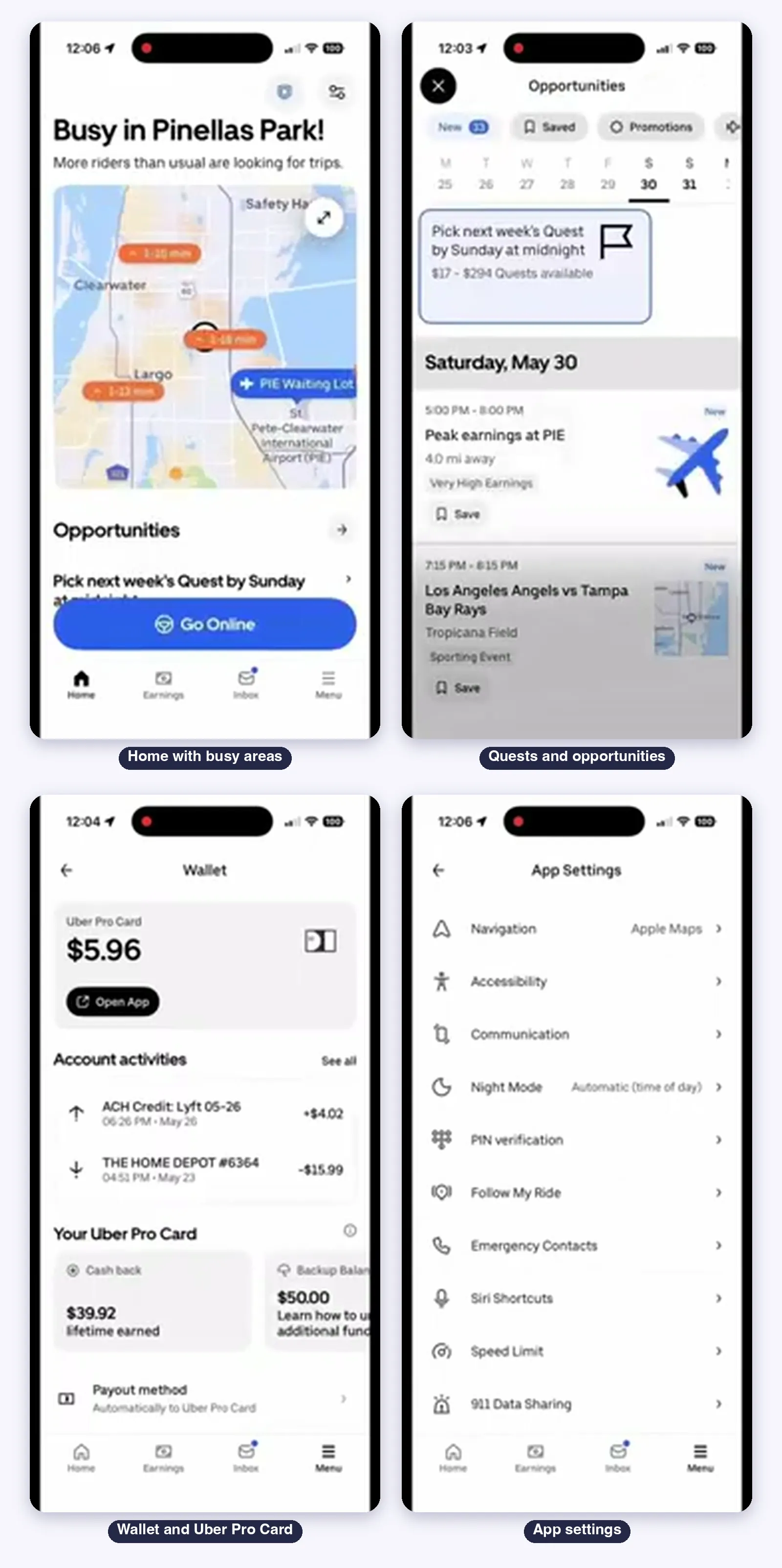
Home, going online and Opportunities
- Home shows busy areas in a heatmap, hourly earning trends and a “Go Online” button
- Opportunities holds Quests (extra pay for a number of trips) and Boost+ (extra for trips starting in a zone)
- Destination Mode matches you with trips toward an address. The daily limit is 2 or 3, depending on the page
Navigation
- Built-in turn-by-turn with traffic colors, speed limit, lane guidance and night mode
- Third-party navigation is chosen at Account, App Settings, Navigation. The recording shows Apple Maps selected
Earnings and payouts
- Earnings tab with the week, the balance and Cash out
- Instant Pay: up to 6 cash outs a day to a debit card. The fee is $1.25 on the marketing page and $1.75 in the help article, so check the app
- Uber Pro Card: automatic payout after each trip, with cash back on gas
- Weekly bank transfer if you do not cash out. You keep 100% of tips
Safety
- Safety Toolkit (the blue shield), Emergency Button with 911 and trip details
- Record My Ride: audio recording, encrypted on the phone and deleted after 7 days if not submitted
- Rider rating preference and Women Rider Preference
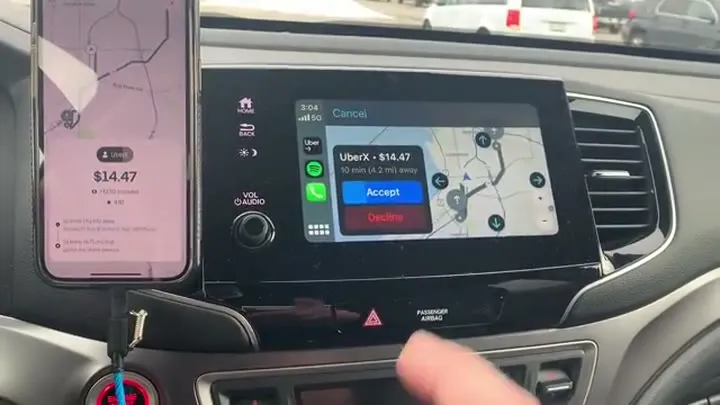
On iPhone and CarPlay
- CarPlay: connect by cable or wirelessly, then pick the Driver app on the car screen. It shows requests you can accept, turn-by-turn and the heatmap
- iPad: the app is listed for iPad with 8 screenshots, and iOS 18 or later is required
- Apple Watch, widgets and live activity for drivers are not stated
Limits
- The take rate is not shown in the app, and independent analyses estimate it well above the 21% Uber reports
- Official pages disagree on the Instant Pay fee and on the Destination Mode limit
Lyft Driver
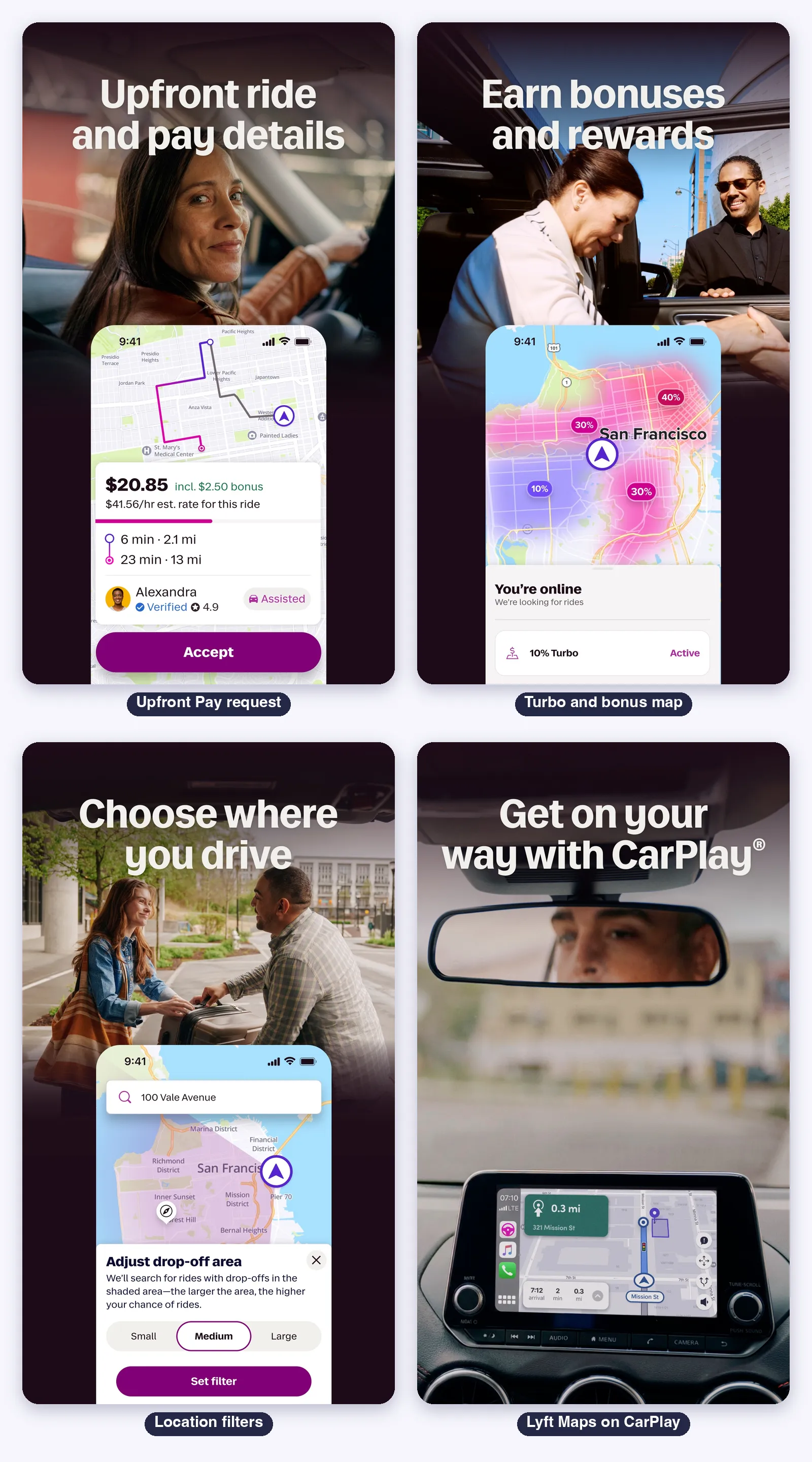
The strongest fee protection of the group and a CarPlay app built on its own maps. It is iPhone only.
The request card
- Fields: the fare with the included bonus, an estimated hourly rate, pickup leg, trip leg, rider name, “Verified”, rating and an “Assisted” label
- Upfront Pay: not available in New York, Washington state and Portland, where pay is per minute and mile
- Not on the card: tips and tolls, which come after the ride
Home, going online and filters
- “Go Online” at the bottom of the home map, with a demand area view
- Priority Mode (standard rides, at select airports) and location filters (arrive on time, head to destination, stay within an area)
- Location filters are limited to 2 a day, and more at higher Rewards tiers
- A mandatory 6 hour break after every 12 hours online
Incentives
- Turbo (10 to 40% more in busy periods), Bonus Zones, Ride Challenges, scheduled rides up to 7 days ahead and Lyft Rewards tiers
- Lyft says its fee is capped at 30% of the passenger payments
Earnings and payouts
- Earnings tab with week, month and year, a weekly goal and best times to drive
- Express Pay: $1.75 per transfer, $6.75 minimum, up to 5 times in 24 hours, free with the Lyft Direct debit card
- Weekly deposit on Tuesday. You keep 100% of tips
Safety
- Safety tools in the navigation: location sharing with up to 5 contacts, audio recording and emergency help through ADT (US)
- Smart Trip Check-In monitors the ride, and Women+ Connect is for women and nonbinary drivers
On iPhone and CarPlay
- CarPlay with Lyft Maps: navigation and the actions to arrive, pick up and drop off
- iPhone only, iOS 17 or later and 5 languages. Apple Watch and widgets are not stated
Limits
- Upfront Pay and Turbo are missing in New York, Washington and Portland
- Lyft Maps is the navigation, and third-party map choice is not documented in 2026
99 Motorista
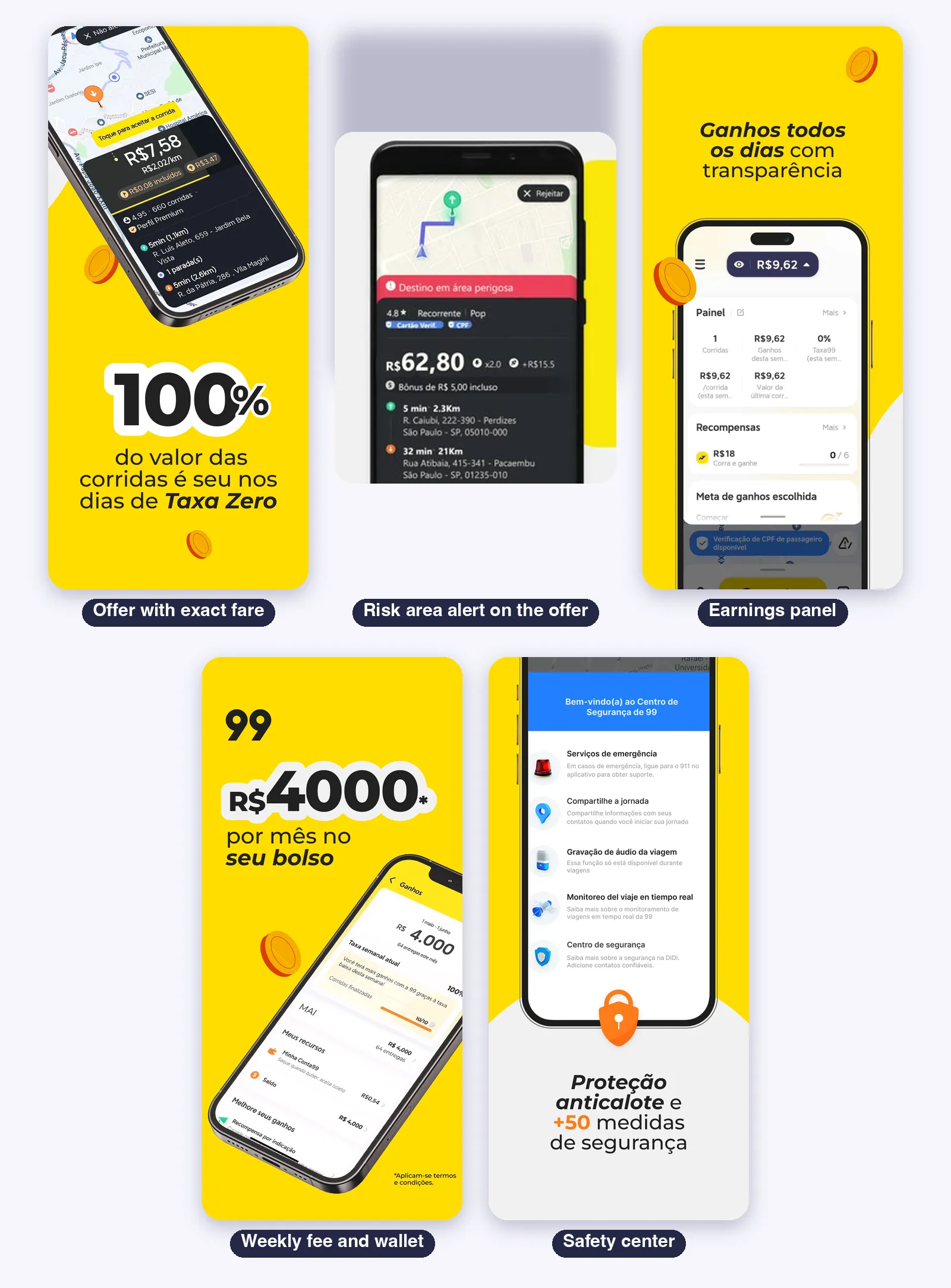
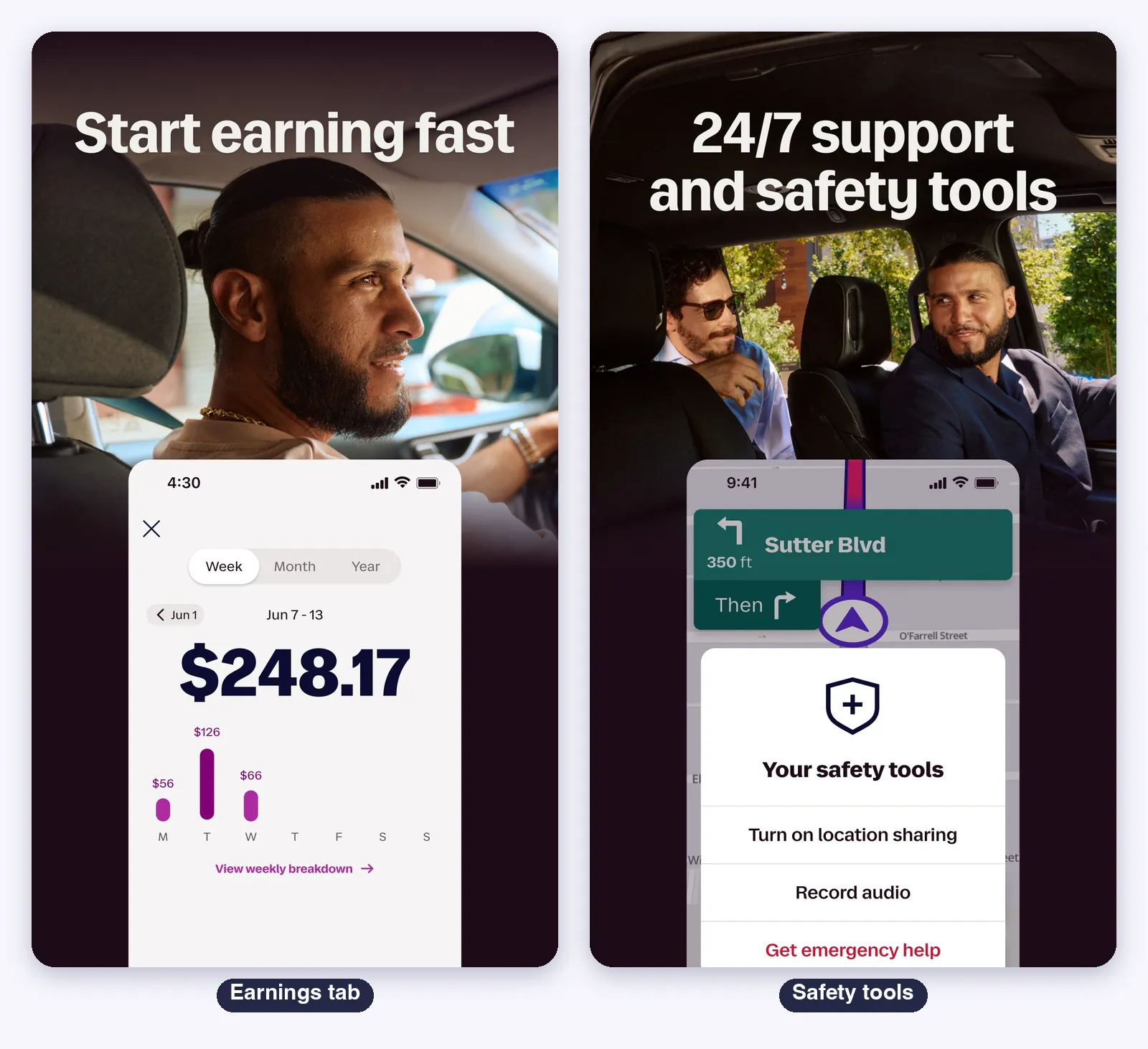
The driver app of Brazil, with the most local tools: same day payout, a weekly fee cap and a safety center with its own features.
The offer card
- Fields: the fare, the amount per km, passenger rating and ride count, time and distance to the passenger, stops and the destination
- Exact fare: the value on the card is what you receive, with three exceptions: the passenger changes the destination, adds stops or the distance and time end up very different
- Risk areas: a red banner marks “Destino em area perigosa”, and declining does not hurt your rates
Rates
- Completion rate: rides finished against rides accepted in the last 30 days
- Acceptance rate: monthly, and declining a risk area ride does not count against it
Earnings and payouts
- Central de Ganhos: the week, the day, the weekly fee and the wallet
- Taxa Garantida: a fee capped at 19.99% a week for drivers with at least 10 rides. Since 2026 it follows your phase in the Rota 99 program
- Cartao99 pays the same day, in up to 20 minutes. Conta99 receives earnings at the end of the day, with one free Pix transfer a week
Incentives
- Corra e Ganhe, Multiplica, Acelera, Completa, Deslocamento Bonus, Taxa Zero and 99Abastece
- Rota 99: four phases with points by kilometer, and a rating of at least 4.85 for cars
Safety
- Botao 99 Mulher: women drivers receive only women passengers
- Passenger photo at boarding, risk area alerts, audio recording and route sharing
Categories and navigation
- POP, Plus, Moto, Entrega, Negocia (the passenger proposes a price), Taxi and Compartilha
- 99 says you can use Google Maps or Waze, and Apple Maps is not stated
On iPhone
- iOS 16 or later, 364 MB. The iPhone app runs on the iPad, and there is no layout for it
- CarPlay, Apple Watch and widgets are not stated
Limits
- The fee transparency was disputed in 2021, and the exact penalties for a low acceptance rate are not published
- Brazil only, and the in person Casa99 hubs shrank to 4 units
inDrive
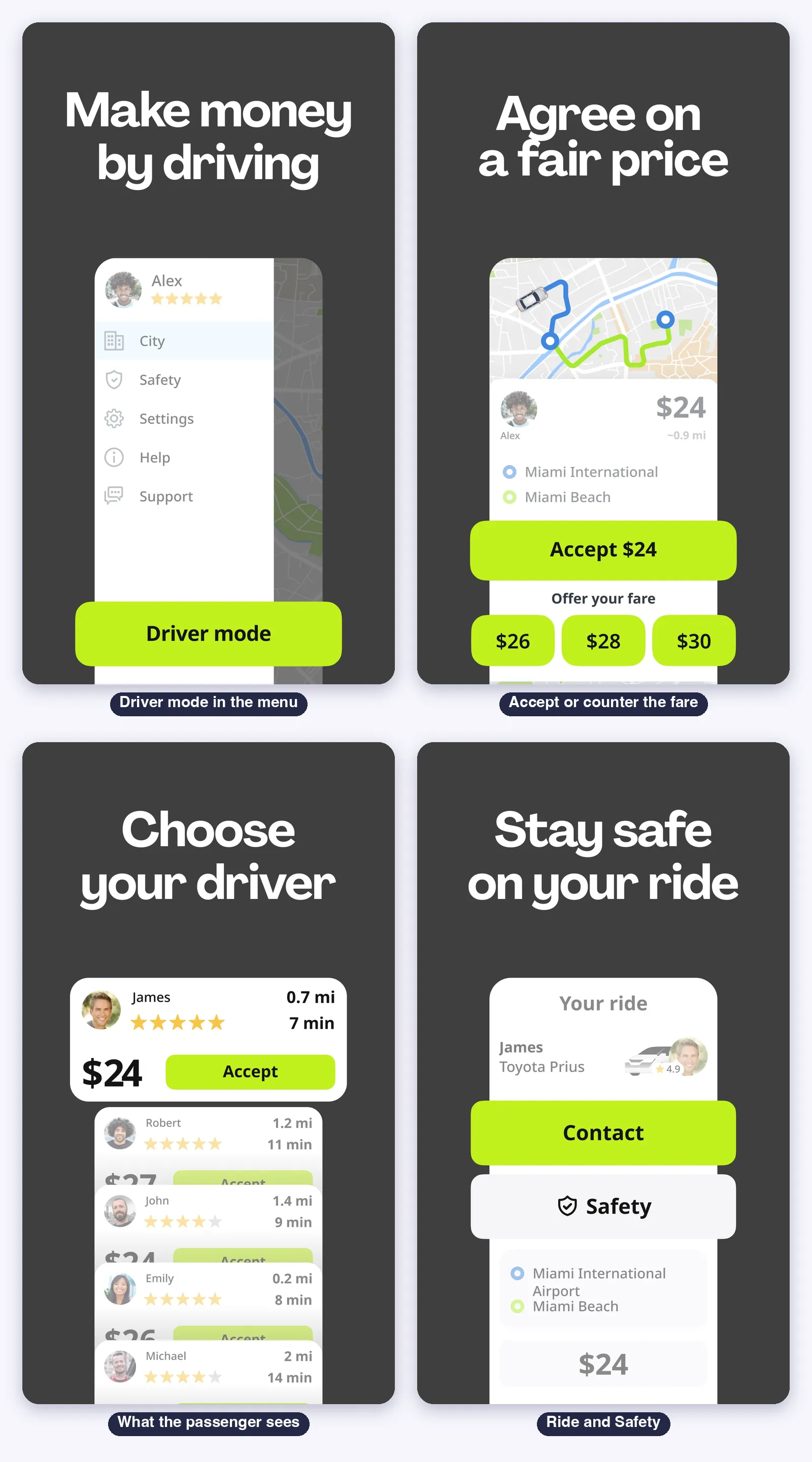
The only one that works as a negotiation, and it is not a separate app. The driver mode lives inside the same app as the rider.
Getting started
- In the side menu, tap “Driver mode” and then Online registration
- Upload your documents and vehicle photos. Verification usually takes up to 24 hours
The request feed
- You see the route, the passenger’s price and comments such as a pet or luggage
- Accept the price, send a counter offer (the store art shows chips of $26, $28 and $30) or decline with no penalty
- After the passenger accepts, the fare is locked. Asking for more money can block your account
- “Priority level” orders the feed: more rides and good ratings move you up, and cancelling accepted rides lowers it
Balance, fee and payouts
- The service fee is a percentage of each fare, shown only to verified drivers
- It comes out of an in-app balance you top up, when you arrive, call the passenger or tap “I’m here”
- Refund to the balance within about 6 hours if the passenger does not show up
- The payout schedule and tips are not stated
Safety and support
- Safety Center, emergency call, 24/7 in-app support and ratings from 1 to 5
On iPhone
- iOS 15 or later, 527 MB and 25 languages. iPad, Apple Watch and CarPlay are not stated
- inDrive says it has no maps of its own and that drivers can use Google Maps, Waze or Apple Maps
Limits
- The US fee is not published. The company stated about 10% in 2023
- The heaviest download of the group
Bolt Driver
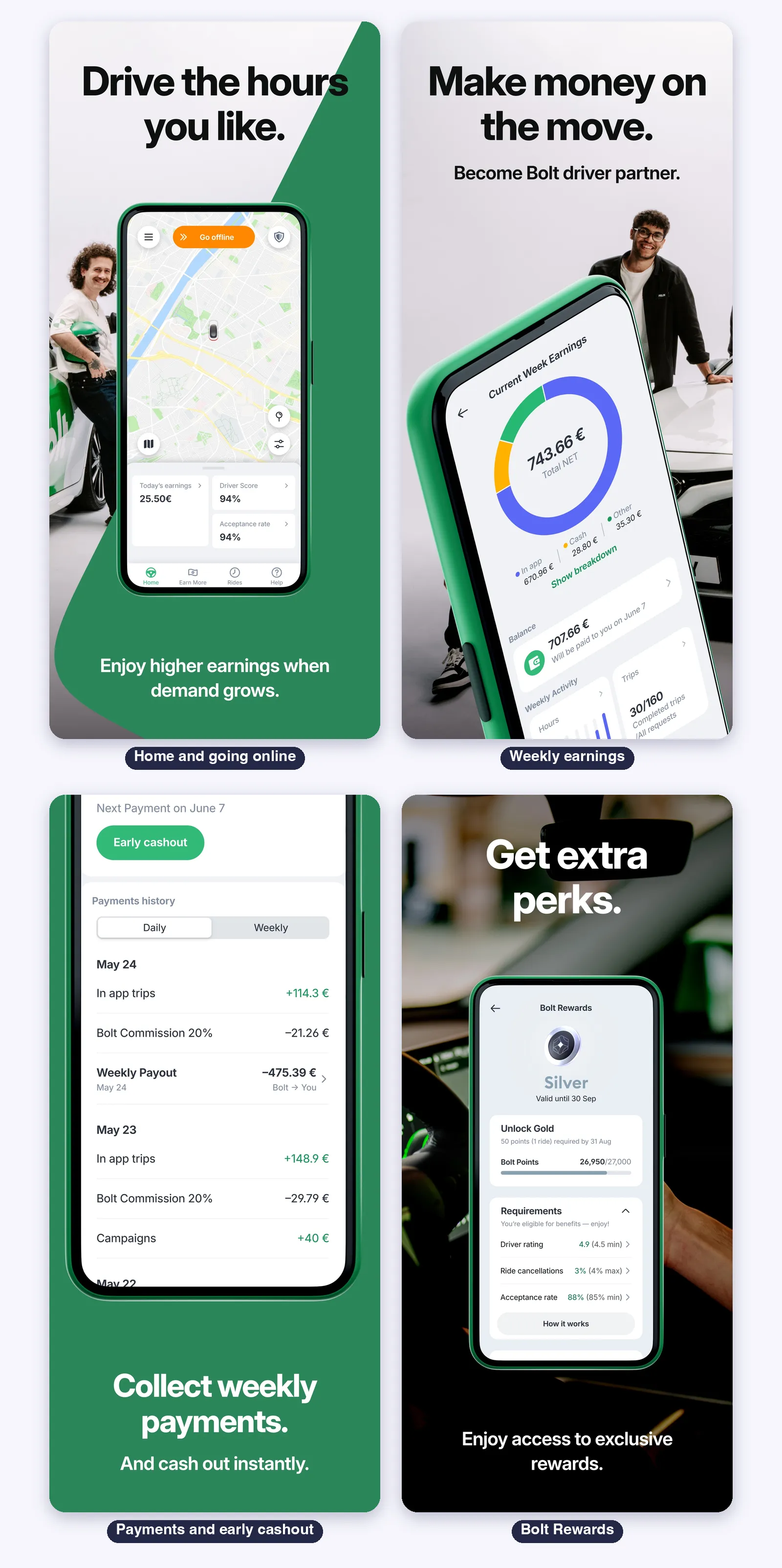
The lightest and with the most languages for its size. It is a separate app and also runs on Apple silicon Macs.
Home and going online
- Home with the “Go online” pill, today’s earnings, Driver Score and Acceptance rate
- Bottom tabs: Home, Earn More, Rides and Help
Requests
- One tap to accept. An orange border marks an optional order, and orders without it are mandatory
- Auto Accept in Driving preferences: filters by pickup distance, price per km and payment method
- Back-to-back rides are on by default, and the hand icon stops them
Earnings and payouts
- Weekly earnings by In app, Cash and Other, with the balance and the next payout date
- Pay cycle from Monday 00:00 to Sunday 23:59. Tips are paid in full
- Early cashout and a payments history by day with the commission line
- The commission is calculated on the gross fare, and it varies by market
Rewards and safety
- Bolt Rewards with Silver and Gold tiers, gated by rating, cancellations and acceptance rate
- Emergency Assist, trip sharing, masked phone number, Ride Check and audio recording
On iPhone
- iOS 17 or later, 174 MB, 40 languages and Apple silicon Mac support
- CarPlay, Apple Watch and widgets are not stated
Limits
- The offer card fields are not documented, and the global commission is not published
- Drivers have protested low fares and commission in some markets
DiDi Driver
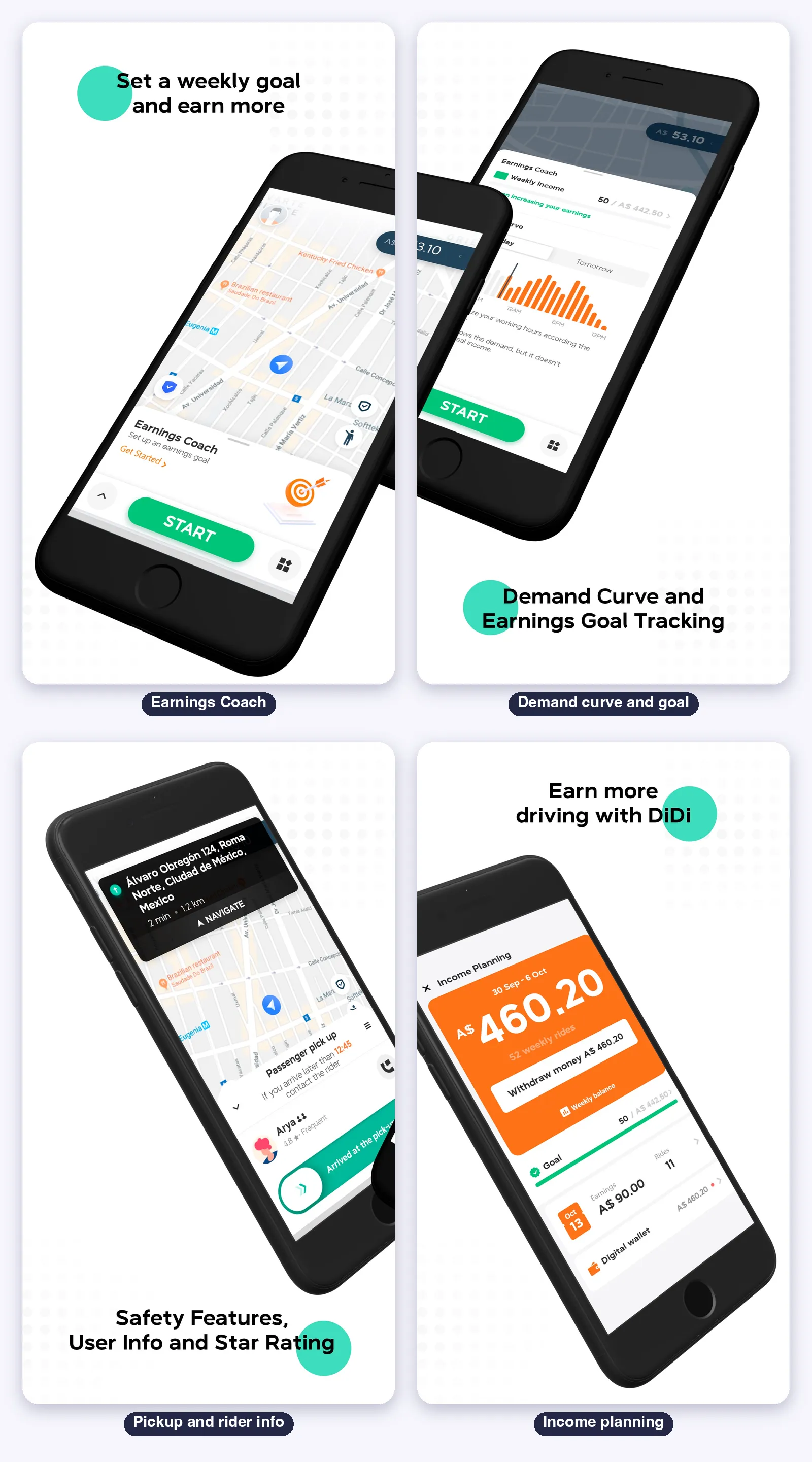
An important note first: the US App Store listing is the Mexican app, and DiDi has no ride service in the United States. In Brazil, the service is the 99 app.
Home and going online
- A large green start button and the Earnings Coach, where you set a weekly goal
- A demand curve by hour for today and tomorrow, and maps of dynamic fare and high demand
Requests
- You have 15 seconds to accept (Mexico). The card shows rating, rider type, time and distance to pickup and to the destination
- Pon Tu Precio: the passenger proposes a fare above the minimum and you can counter up to 200%
Earnings and payouts
- Weekly income planning, daily earnings and a digital wallet with a withdraw button
- Daily payouts in the wallet in Mexico. The service fee is not published
Safety
- A safety button on the home screen, emergency contacts, danger zone alerts and requests only from women
On iPhone
- iOS 16 or later, 355 MB and 8 languages. The same version as 99 Motorista, 7.10.58
- iPad, CarPlay and Apple Watch are not stated
Which One Is Best for What
- Best on the Apple side: Uber Driver, with iPad and CarPlay
- Best fee protection: Lyft (30% cap) and 99 (19.99% weekly cap)
- Best for negotiating the price: inDrive
- Lightest, with the most languages for its size: Bolt Driver (174 MB, 40 languages)
- Best in Brazil: 99 Motorista, with same day payout and a safety center
- Best earnings planning on the home screen: DiDi Driver, with Earnings Coach
Most drivers run two or three of these apps at once. That is where the next section helps.
Suggestion: a Helper for the App You Drive For
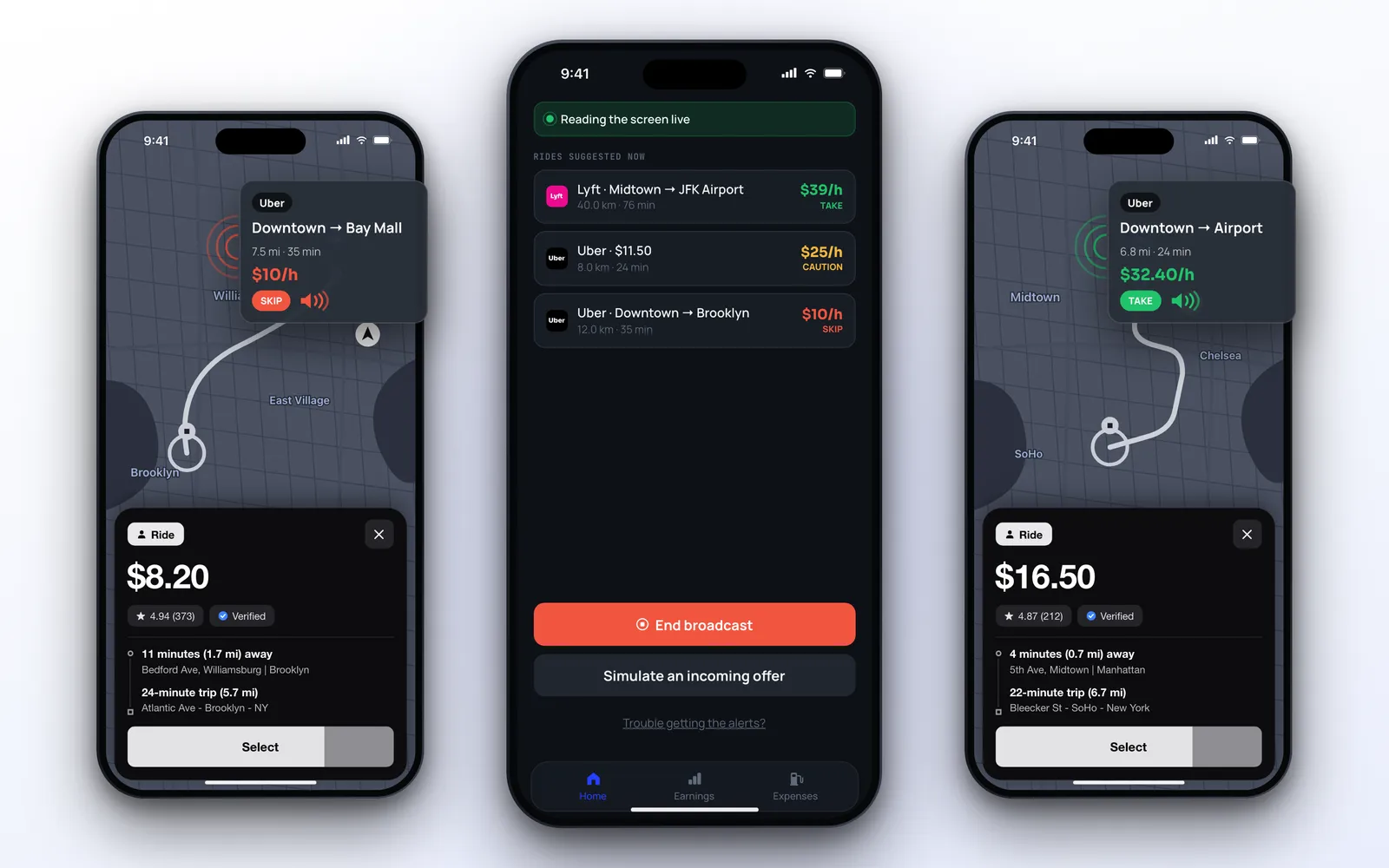
Whichever you drive for, you still have about ten seconds per offer. A helper app reads the offer and tells you if it is worth it.
ProfitDriver reads the offers of Uber, Lyft, 99, Bolt and inDrive, and with “Add another app” you can teach it the offer screen of any other. It subtracts your real cost, so the number you hear is profit, not revenue.
It reaches you by spoken voice, live activity, notification, Dynamic Island and CarPlay. It never accepts anything: the decision stays with you.
Recommended for any driver of these apps: ProfitDriver. Or read the full review.
