Vibr vs Be Focused vs Focus Keeper: Which Pomodoro App Is the Most Complete on iPhone and Mac?
Search for “pomodoro” on the App Store and you get hundreds of timers that look alike: a big countdown, a start button, a break.
The differences only show up after a week of use. You find out where your tasks live, whether the timer follows you from the Mac to the phone, and what you pay to keep it.
This comparison puts Vibr next to the two apps that lead those searches. Be Focused was the first result for “pomodoro timer” on the Mac App Store in the United States, and Focus Keeper was the first on iPhone.
We used the apps, tested every feature and did a full review.
Table of Contents
- Three Different Ideas of a Pomodoro App
- Side by Side
- Where Each One Runs
- Tasks and Sessions
- The Timer on iPhone and Apple Watch
- Reports
- Automation and AI Assistants
- Sync, Accounts and Privacy
- Pricing
- Known Limits
- Which One to Choose
- So Which One Is the Most Complete?
Three Different Ideas of a Pomodoro App
Focus Keeper is the timer with habits. It keeps the classic technique: focus, short break, long break. Around it sit a daily planner, recurring tasks and charts of your progress.
Be Focused is the timer with a task list. You create tasks, estimate how many intervals each one needs, and run the timer on one task at a time. It has the longest feature list of the three.
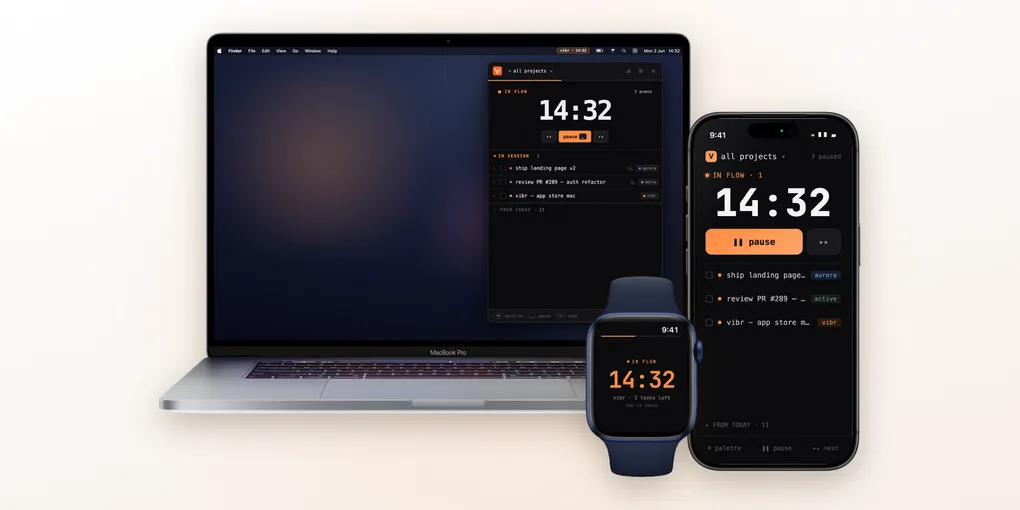
Vibr is the timer for several projects at once. Instead of one task per interval, you pick a few tasks from different projects for the next session and tick them off. It lives in the Mac menu bar.
Side by Side
| Vibr | Be Focused | Focus Keeper | |
|---|---|---|---|
| iPhone | Yes | Yes | Yes |
| iPad | Runs the iPhone app | Yes | Yes |
| Mac app | Native, in the menu bar | Yes, a separate app | No. The iPhone app runs on Apple silicon Macs |
| Apple Watch | Yes | Yes | Yes |
| Android and web | No | No | Yes, both |
| Projects | Yes | Not listed | Not listed |
| Subtasks | Yes | Not listed | Not listed |
| Several tasks in one session | Yes | Not listed | Not listed |
| Planner with a calendar | Not listed | Not listed | Yes, weekly |
| Due dates and tags | Not listed | Yes, tags and filters in Pro | Not listed |
| Live activity and Dynamic Island | Yes | Yes | Not listed |
| Home Screen widgets | No | Yes | Yes |
| Shortcuts app | No | Yes | Not listed |
| Global keyboard shortcuts on Mac | Yes | Yes | No Mac app |
| Blocks distracting apps | No | Yes, on the Mac, in Pro | Listed in the latest update, no details |
| Reports | End of day report with time per project | Day, week or custom period, CSV in Pro | Weekly summary and per task bars |
| AI assistant control (MCP) | Yes, on the Mac | Not listed | Not listed |
| Sync | iCloud, no account | Its own server, with an email account (Pro) | Not stated on iOS. Account on the web |
| Languages in the store | 10 | iPhone English, Mac 8 | 12 |
| Price model | Subscription | Free with ads, Pro by subscription or one payment | Free, Pro by subscription |
Where Each One Runs
Be Focused covers the most Apple devices: iPhone, iPad, Mac and Apple Watch. One Pro purchase unlocks all of them.
Focus Keeper is the only one that leaves the Apple world. It has an Android app and a web version, which is what you use on a computer. There is no native Mac app.
Vibr runs on iPhone, Mac and Apple Watch. On iPad it runs the iPhone app today. On the Mac it is a native menu bar app: the countdown sits at the top of the screen and the panel drops down when you click it.
Tasks and Sessions
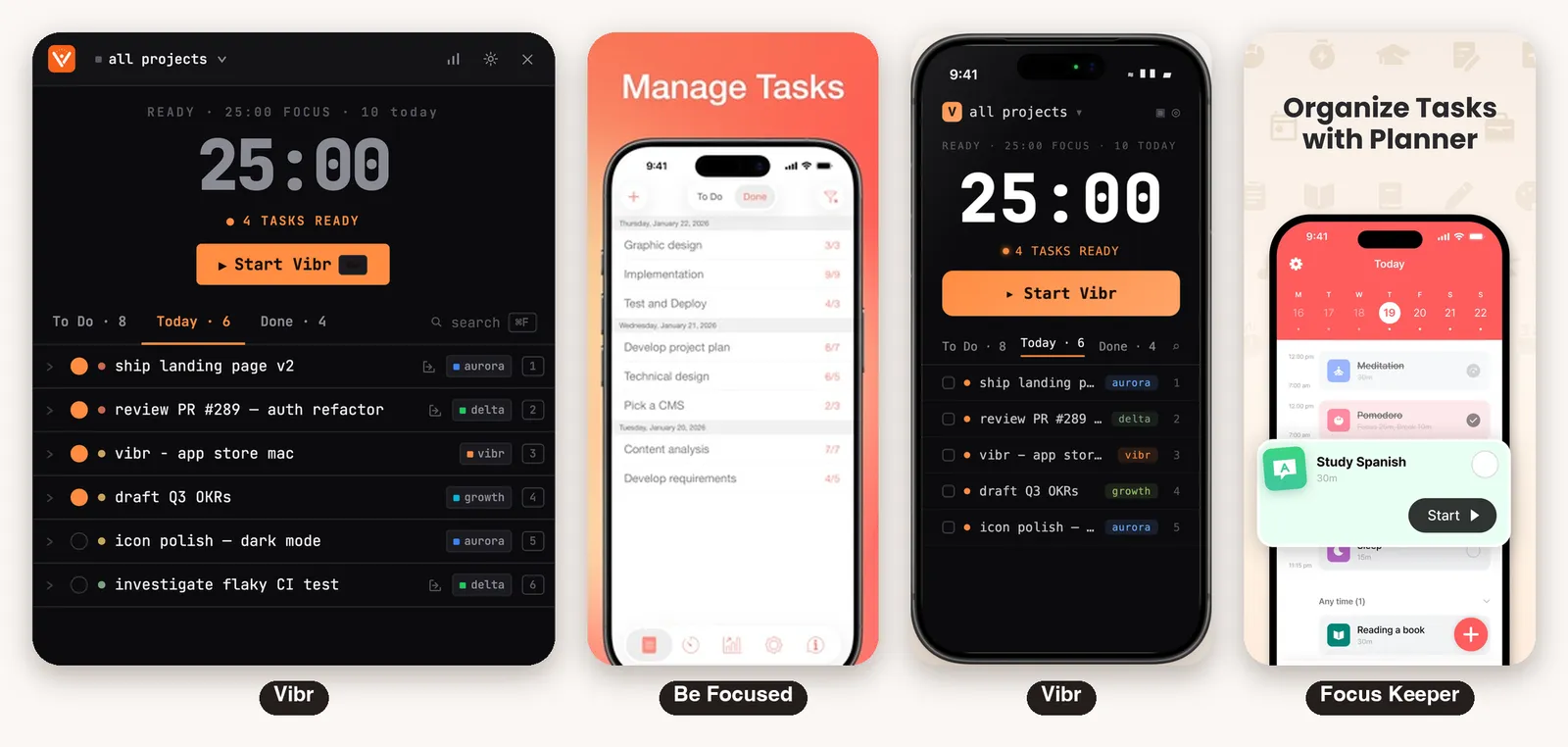
This is the real difference between the three.
In Vibr, every task belongs to a project, and before you start you pick the tasks for that session. When it ends, what is left goes back to the list. Each task can hold subtasks, a formatted description and links.
In Be Focused, the unit is the task. It has notes, due dates, tags and filters, a plan of how many intervals a task should take with a check of how accurate you were, and timer settings per task.
Focus Keeper organizes the day. Its planner shows a weekly strip with each task at a time of day, a duration and a recurrence, with the focused time of each one.
If your work is one task at a time, Be Focused models that well. If your day has fixed habits, Focus Keeper does. If it is many small actions across projects, Vibr is built around that.
The Timer on iPhone and Apple Watch
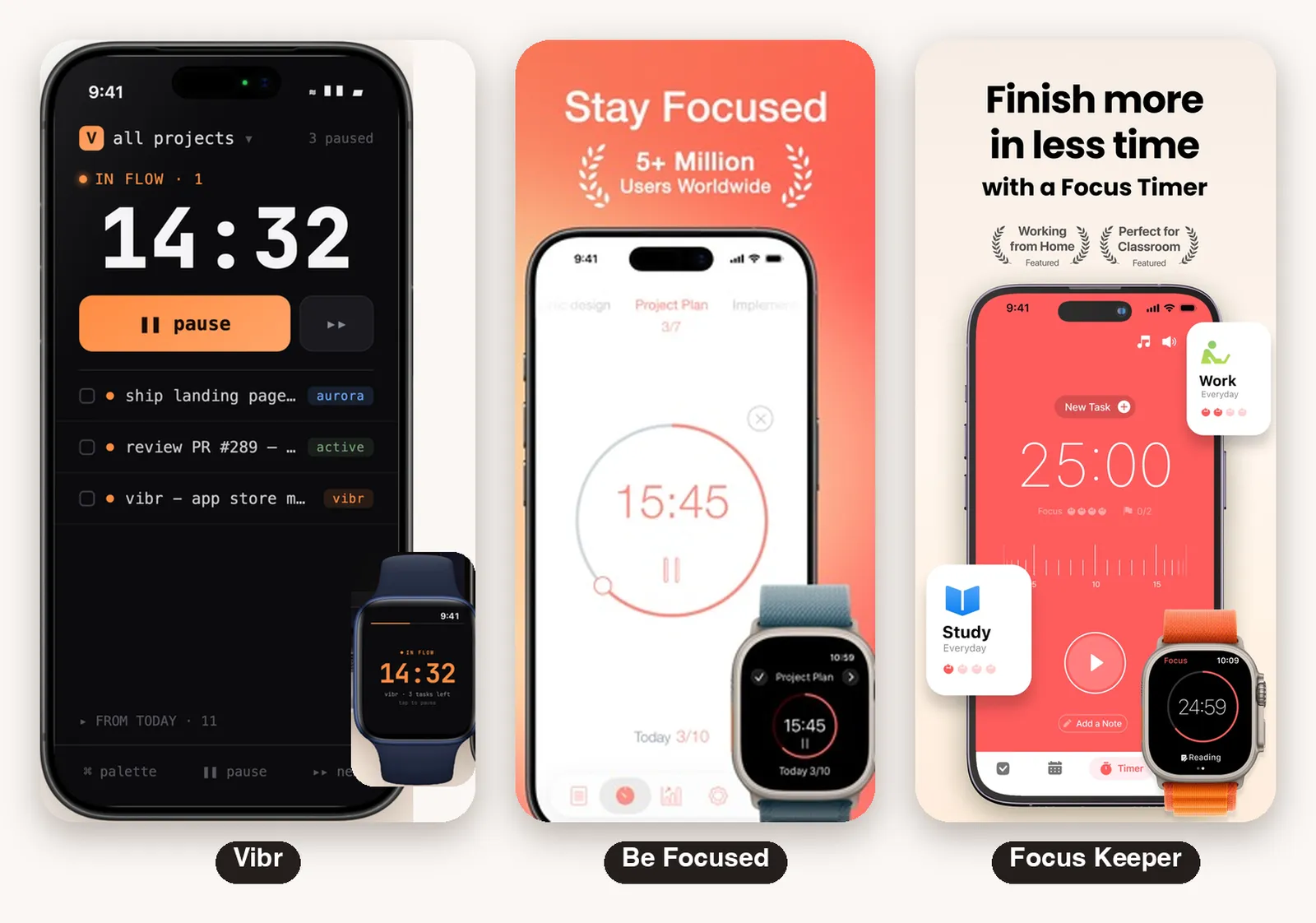
All three have a full iPhone app and an Apple Watch app.
Vibr shows the session as a live activity on the lock screen and in the Dynamic Island, with the countdown and the tasks left. It has no Home Screen widgets.
Be Focused lists the same live activity and Dynamic Island, plus widgets for the Home Screen and Lock Screen. A control starts or stops the timer from Control Center or the Action Button.
Focus Keeper has a ruler style dial where you drag to set the minutes, an optional note per session, and Home Screen widgets with the task list and the day’s summary.
On the phone, Be Focused is the one that uses the most system features.
Reports
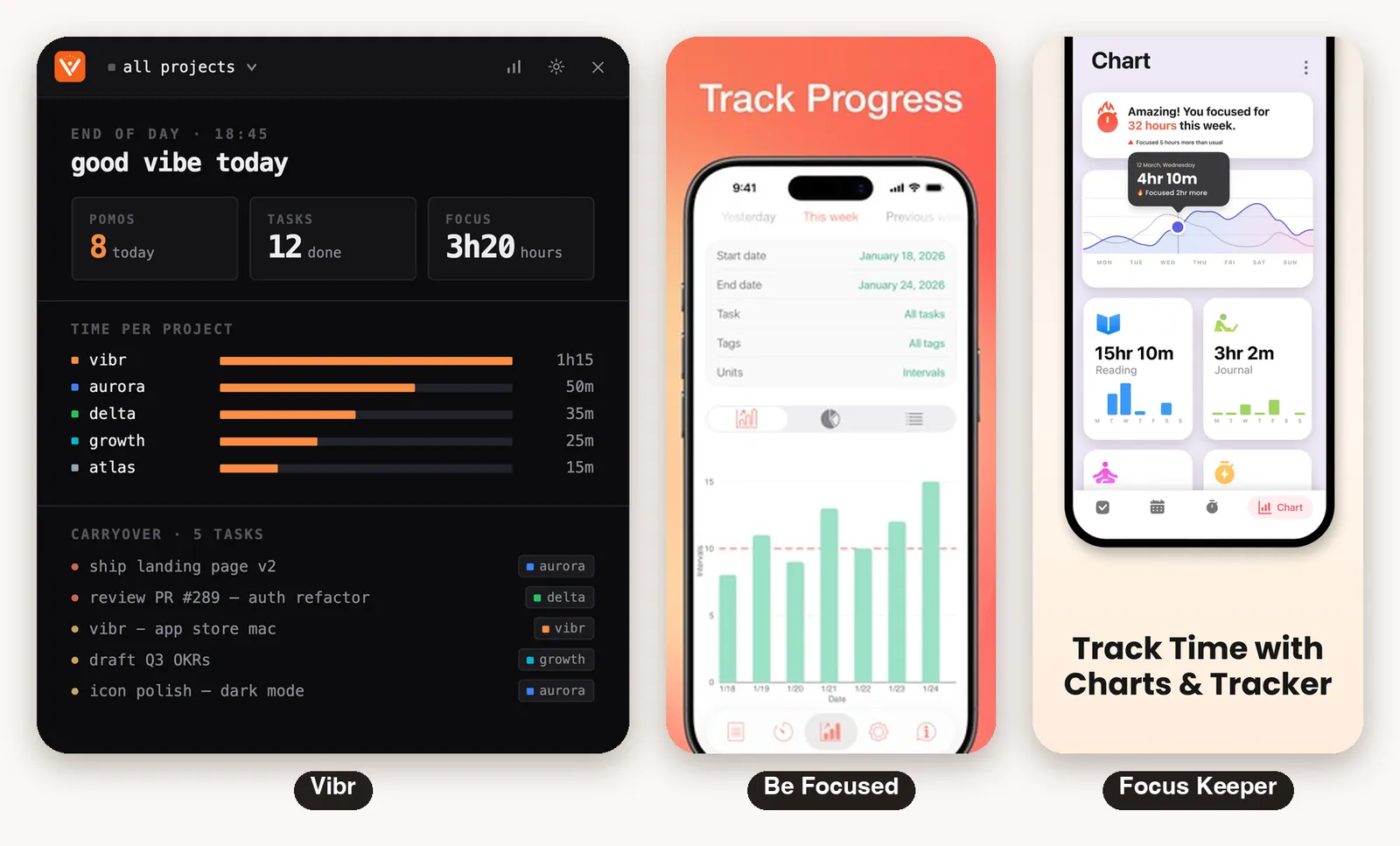
Vibr closes the day with a short report: pomodoros completed, tasks done, hours of focus, a bar with the time spent on each project, and the tasks that carry over to tomorrow.
Be Focused has reports by day, week or a custom period, with a chart of the intervals done and your daily goal. Exporting the data as CSV is a Pro feature.
Focus Keeper shows a weekly focus summary, a curve that compares with the previous period, bars per task and cards you can share.
For people who bill by project, Vibr’s per project view is the most direct. For people who want the raw data in a spreadsheet, Be Focused exports it.
Automation and AI Assistants
Be Focused integrates with the Shortcuts app: you control tasks and timers from a shortcut, and run shortcuts when something happens in the app. On the Mac it has global hotkeys and blocks distracting apps and websites.
Vibr also has global keyboard shortcuts on the Mac, which you can change. It does not support the Shortcuts app.
What it has that the others do not list is a built-in MCP server on the Mac. In plain words: it lets an AI assistant, such as Claude Code, operate Vibr for you.
You ask in a sentence, inside your editor: “create a task for this bug and start a focus session on it”. The assistant creates the task, starts the timer and marks it as done when you finish.
It works only on your own Mac. Be Focused and Focus Keeper do not list anything like it.
Sync, Accounts and Privacy
- Vibr: syncs through iCloud, with no account. Your identity is your Apple ID. The listing says there are no third party servers, no analytics on individual users and no ad SDK
- Be Focused: syncs through its own servers with an email account, and sync is a Pro feature. Its iPhone privacy label declares tracking and third party advertising
- Focus Keeper: the web app needs an account. The listing does not say how sync works on iOS, and its privacy label declares purchases, identifiers and analytics
Pricing
All three are free to download. Prices change by country and over time, so check each app before deciding.
| Vibr | Be Focused | Focus Keeper | |
|---|---|---|---|
| Free part | Download and setup | The timer and tasks, with ads | The timer |
| Paid part | Everything, one subscription for iPhone, Mac and Apple Watch | Pro: no ads, sync, tags, CSV, blocker, Shortcuts events | Pro subscription |
| Store prices (US) | $9.99 a month, $49.99 a year | $2.99 a month, $19.99 a year, or $39.99 once | $3.99 a month, $34.99 a year |
| Trial | Some plans | 7 days on the yearly plan | Not stated |
Known Limits
- Vibr: no Home Screen widgets, no Shortcuts app, and a subscription is required
- Be Focused: ads in the free version, an iPhone app only in English, and sync that goes through its own server
- Focus Keeper: no native Mac app, no live activity or Dynamic Island listed, and a download of about 870 MB
Which One to Choose
- You want one app on iPhone, Mac and Apple Watch, with projects, subtasks and iCloud sync with no account: Vibr
- You want a free timer with a planner and habits, or you also use Android and the web: Focus Keeper
- Your day is many small tasks across several projects, next to a terminal: Vibr
- You want widgets, the Shortcuts app or an app blocker: Be Focused
- You want your AI assistant to start the timer for you: Vibr
- You want a one time payment: Be Focused
So Which One Is the Most Complete?
Most complete: Vibr. One app on iPhone, Mac and Apple Watch, synced by iCloud with no account. It is the only one with projects, subtasks and several tasks in one session, a report with time per project, and an AI assistant that can operate it.
Best for widgets, Shortcuts and a blocker: Be Focused. It has Home Screen widgets, the Shortcuts app, a blocker on the Mac and a free tier with a one time payment option.
Best for daily habits: Focus Keeper. Planner, recurring tasks, charts and a timer that is easy to start. It is also the only one that works on Android and on the web.
In short: Vibr is the most complete for work across projects, Be Focused has the most system integrations, and Focus Keeper is the easiest to start with. For a day with ten small tasks across four projects, Vibr is our pick.
