Vibr Pomodoro Review: The Best Focus Timer for iPhone and Mac
Most of us do not have a time problem. We have an attention problem. A notification here, a quick check of another project there, and by the end of the day there are ten things started and nothing finished. Every switch has a cost: it takes a while to get back to where you were, and that cost adds up quietly.
The Pomodoro technique is one of the simplest ways to fight that. You pick what you are going to work on, set a timer for about 25 minutes, and do only that until it rings. Then you take a short break, and after a few rounds, a longer one. The timer does two jobs: it makes starting easier, because 25 minutes is a small promise, and it protects your focus, because checking something else can wait until the break.
Why Vibr Is Different
A classic Pomodoro timer assumes you work on one thing at a time. That is not how many people work anymore. If you are vibe coding, you may have an agent building a feature in one project, a pull request waiting for review in another, and release notes to write for a third. The work is many small actions across several projects at once.
Vibr is a Pomodoro timer built around that reality. Instead of one timer for one task, you select the tasks for the session: a few items from different projects that you want done in the next 25 minutes. Then you start the timer and tick them off as you go.
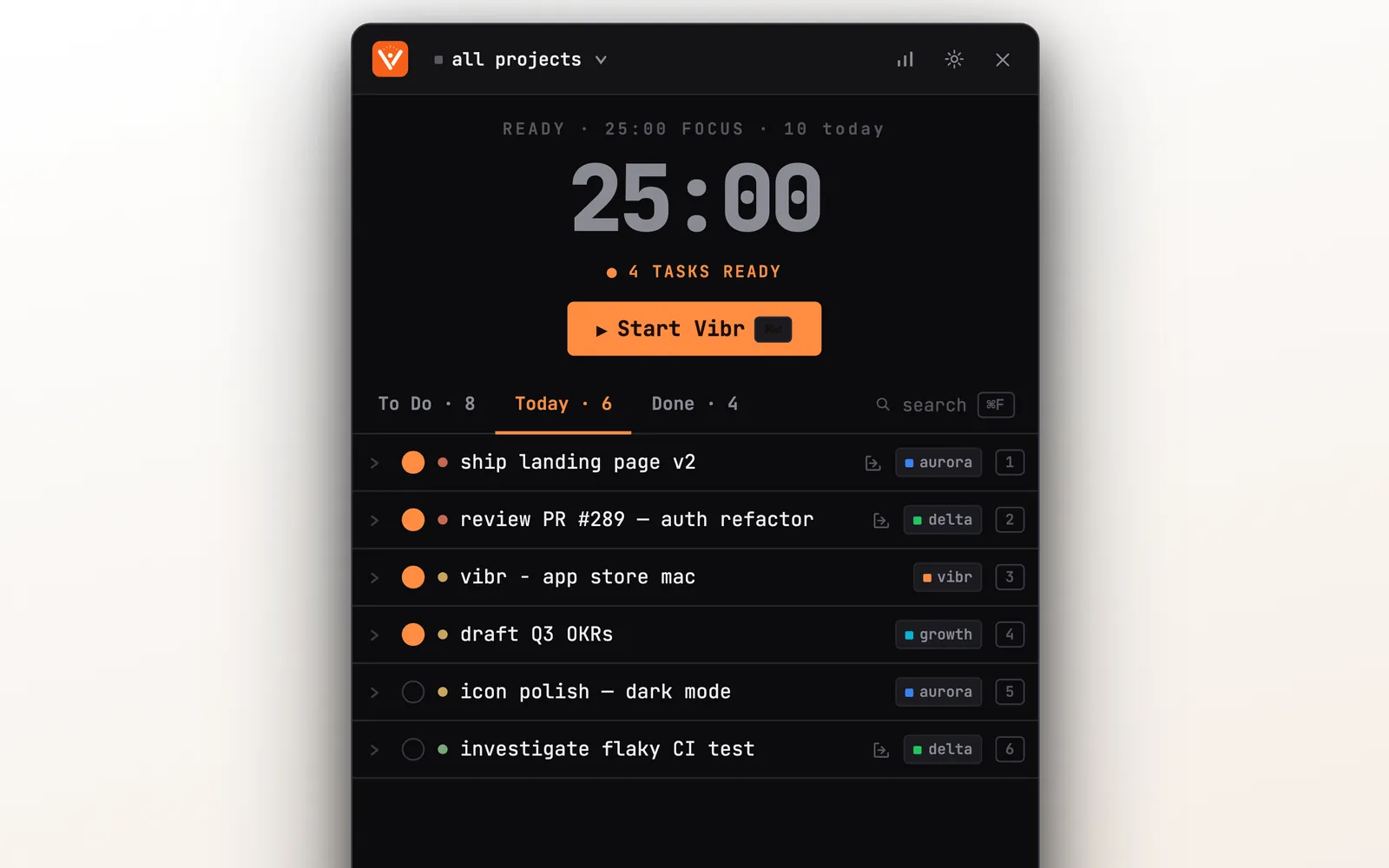
Each task carries a project tag, the filled circles are the tasks picked for this session, and the button starts the countdown. When the session ends, whatever is left goes back to your list.
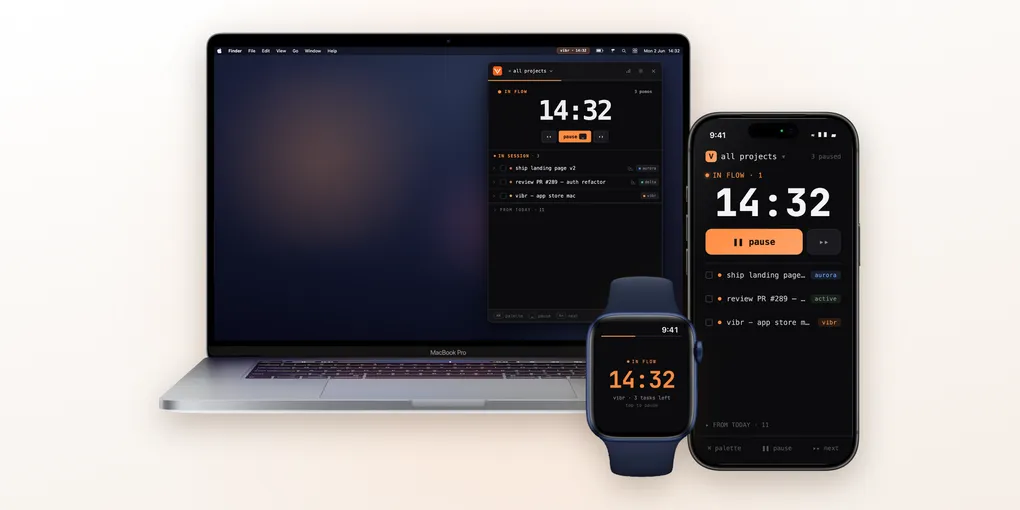
Vibr runs in the Mac menu bar, on iPhone and on Apple Watch, synced over iCloud. Below we go through it feature by feature.
Table of Contents
- Why Vibr Is Different
- Menu Bar Timer (Mac)
- Live Activity & Dynamic Island (iPhone)
- Apple Watch Companion
- Task Management & Subtasks
- Keyboard Shortcuts
- MCP Server: Let Your AI Assistant Run Vibr
- End of Day Report & Breaks
- iCloud Sync & Universal Purchase
- Apple Ecosystem Score
- Pricing
- Alternatives
- Verdict
Menu Bar Timer (Mac)
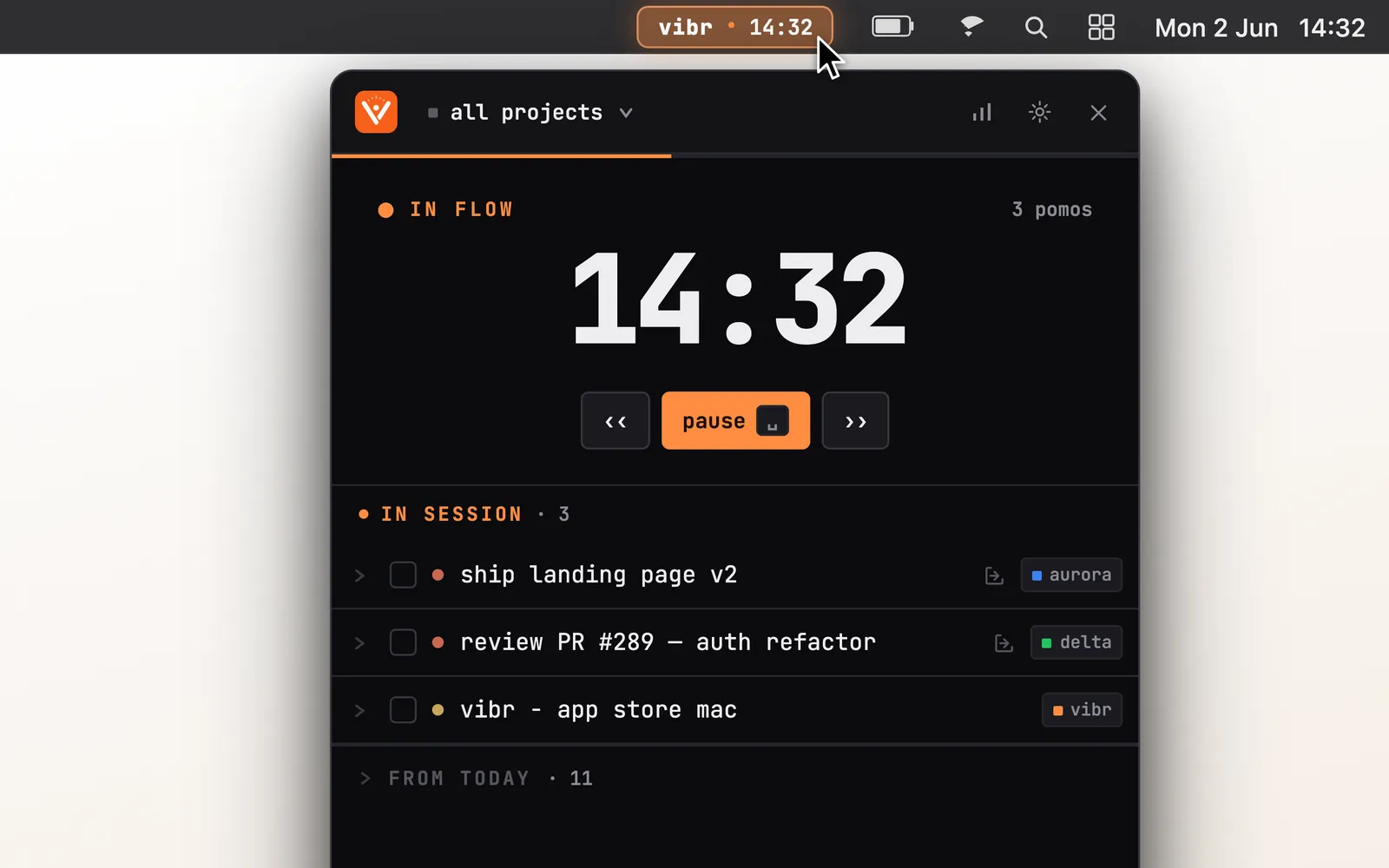
Most Pomodoro apps open a full window. Vibr stays in the menu bar, showing a countdown that ticks even when the panel is closed. Click it and the panel drops down with the running timer and the tasks you picked for the session.
What stands out:
- Project tags on every task — perfect for switching between client work, side projects, and daily ops
- Terminal-inspired dark UI with JetBrains Mono font. Clean, distraction-free
- No Dock icon — it’s a true menu bar app, not a window pretending to be one
- Idle reminder nudges you if you forget to start the next session
- Customizable durations from 5 to 90 minutes of focus, 1 to 30 minutes of break, and a long break every few pomodoros
It is a native SwiftUI app, around 4 MB on disk according to the developer.
Live Activity & Dynamic Island (iPhone)
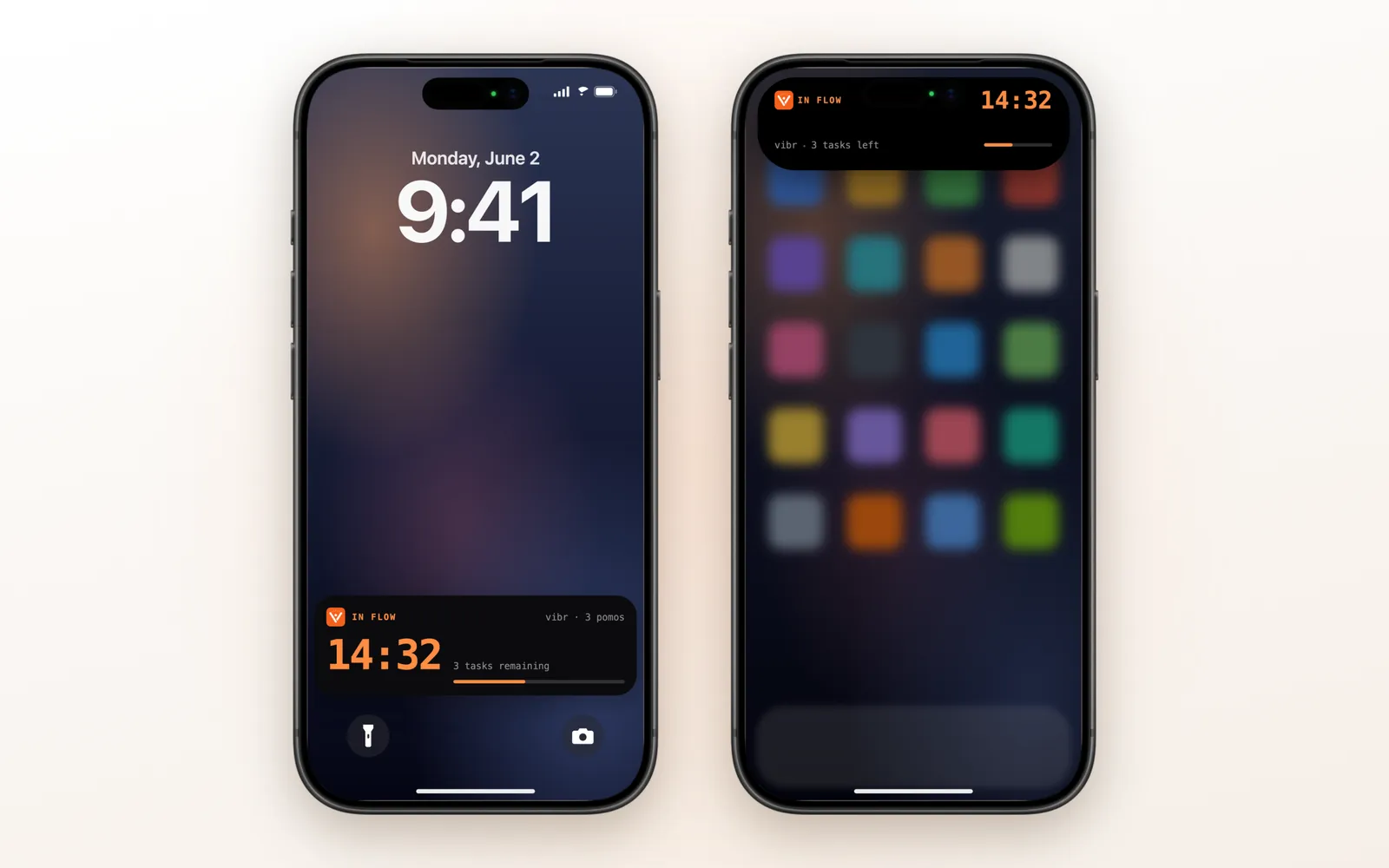
On iPhone, the focus session shows up as a Live Activity on the lock screen: the countdown, the project, how many pomodoros you have done, how many tasks are left in the session, and a progress bar.
If your iPhone has a Dynamic Island (iPhone 14 Pro and later), the timer appears there too:
- Compact view: the Vibr icon on one side and the countdown on the other
- Expanded view: the session state, the countdown, the project, tasks left, and the progress bar
- Minimal view: just the countdown, when another app is also using the island
This means you never need to open the app to check how much focus time is left. Glance at the lock screen or the Dynamic Island and keep going.
Apple Watch Companion
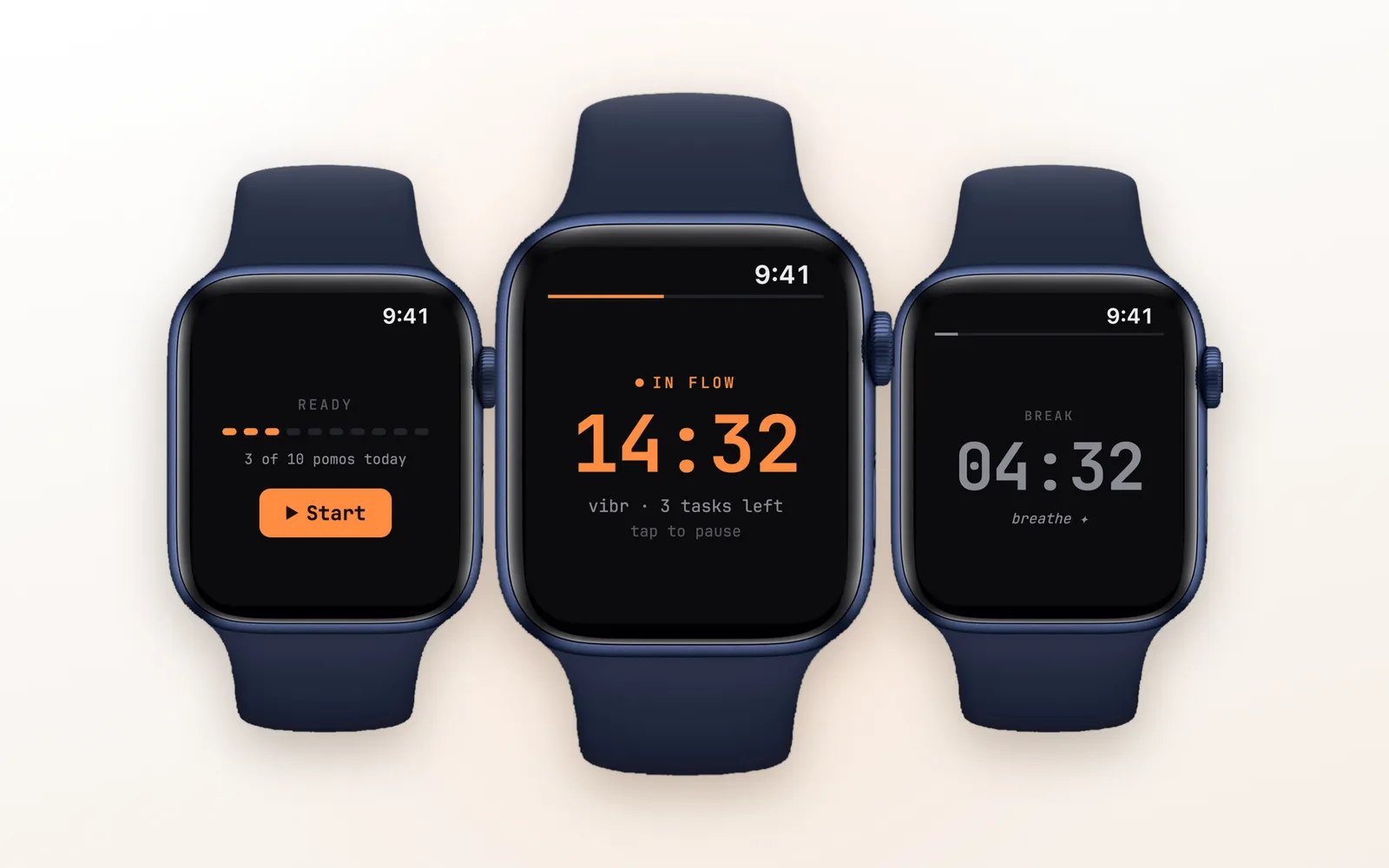
Vibr includes an Apple Watch app with three screens:
- Ready: your pomodoros for the day and a Start button
- Focus: the countdown, the project, and how many tasks are left. Tap the screen to pause or resume
- Break: the break countdown and a reminder to breathe
The Watch stays in sync with your iPhone, so a session started on one shows up on the other. It is part of Vibr Pro: you subscribe on iPhone or Mac and the Watch unlocks with it.
It’s a small feature, but checking your timer without reaching for your phone keeps you in the zone.
Task Management & Subtasks
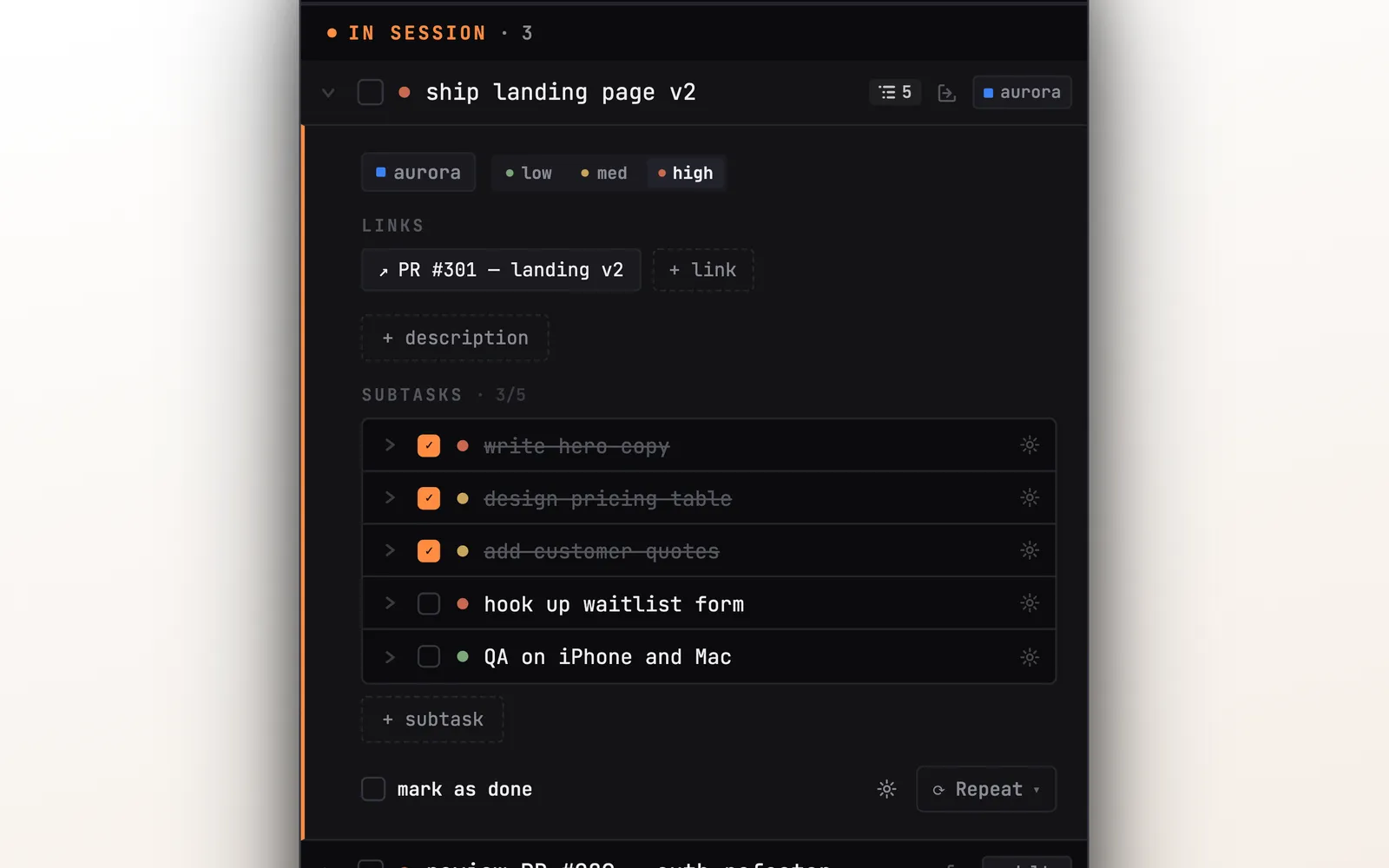
Vibr is not a full task manager like Things or Todoist. It’s intentionally simple: three lists (Today, To Do, Done), each task tagged with a project.
But each task can hold a lot more than a title:
- Subtasks — break any task into steps with a checkbox list. On Mac, paste a bulleted list and it creates one subtask per line instantly
- Rich descriptions — bold, italic, links, and lists inside any task. You can even paste screenshots on Mac and resize them in the description
- Detachable windows — pop any task into its own resizable window. Useful for keeping a reference visible while you work
- Repeat tasks — mark a task as repeating and it auto-creates a new copy when you complete it
- Quick links — paste a GitHub PR or Figma URL, click to open
On Mac, the task row shows how many subtasks it has, and the counter turns green when all of them are done.
Keyboard Shortcuts
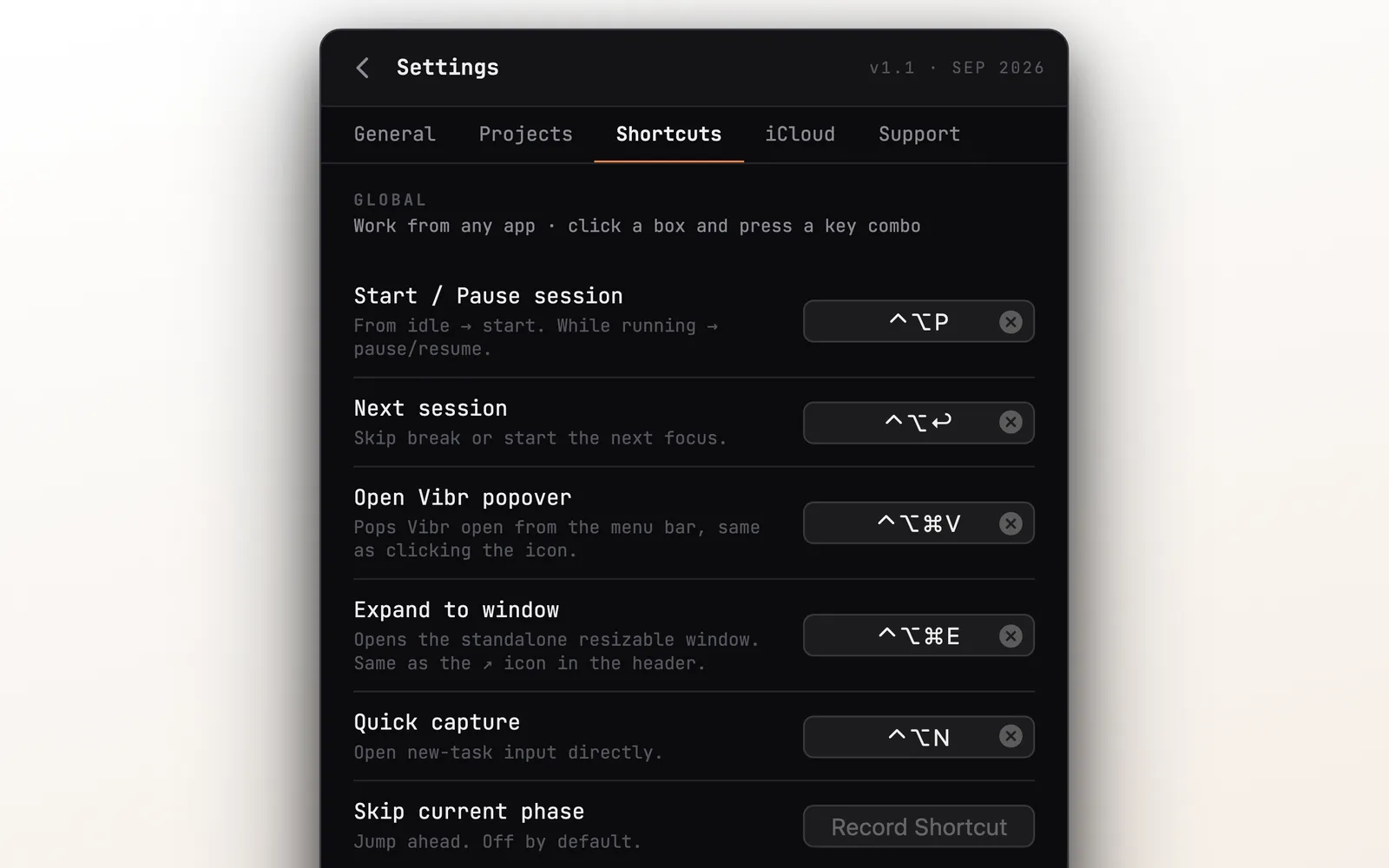
The main actions have global shortcuts, which work from any app, even when Vibr is closed:
| Shortcut | Action |
|---|---|
| ⌃⌥P | Start, pause or resume the session |
| ⌃⌥↩ | Next session (skip the break or start the next focus) |
| ⌃⌥⌘V | Open the Vibr panel from the menu bar |
| ⌃⌥⌘E | Expand Vibr into a resizable window |
| ⌃⌥N | Quick capture a new task |
Inside the Vibr window, ⌘D marks the first session task as done, ⌘, opens settings, and esc collapses or cancels.
The global shortcuts can be changed in Settings. If you live in the terminal or the editor, you can run a whole session without touching the mouse.
MCP Server: Let Your AI Assistant Run Vibr
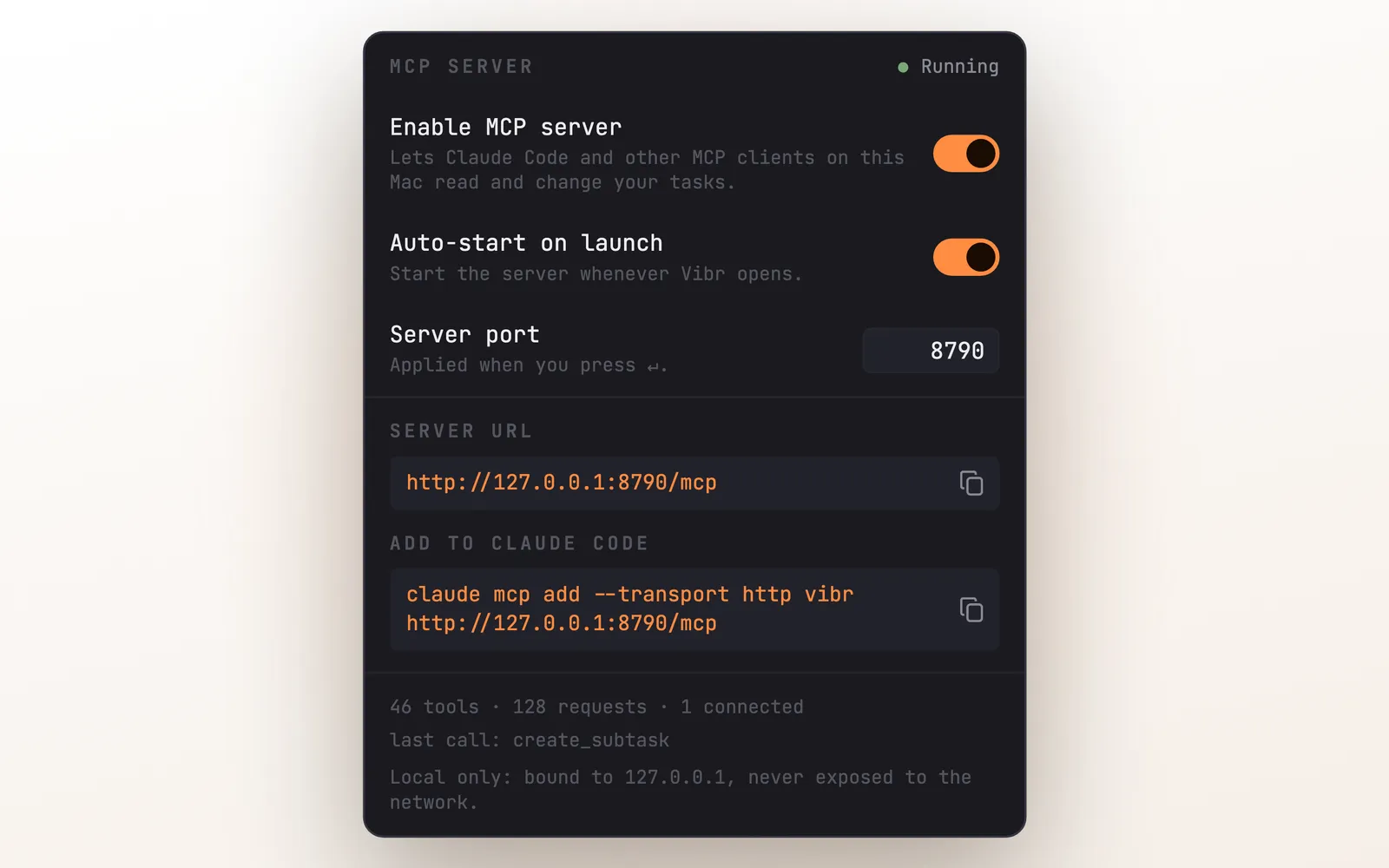
This is the feature that makes the “built for vibe coding” claim real. The Mac app has a built-in MCP server. MCP (Model Context Protocol) is the standard that lets AI assistants such as Claude Code use other apps as tools. Turn it on from the server icon in the panel header, copy the one-line command it gives you, and your assistant can operate Vibr for you.
It is not a read-only view. The server exposes more than 40 tools that cover practically everything you can do in the app:
- Tasks: list, search, create, edit, complete, move between To Do, Today and Done, delete, and undo a delete
- Subtasks and links: add subtasks to a task, attach a pull request or document link
- Projects: create, rename, recolor and delete
- The timer: start a focus session with chosen tasks, pause, resume, reset, end the session, add or remove tasks mid-session
- Stats: today’s pomodoros and focused minutes, time per project, the log of past sessions
- Settings and sync: change durations and preferences, and force an iCloud sync
In practice, you stay in the terminal and say what you want: “create a task for this bug with these five steps as subtasks and start a focus session on it”. The agent that is writing your code can also keep your task list honest, marking steps as done while it works.
The server only listens on your own Mac (127.0.0.1) and is never exposed to the network. It is a Mac feature: the iPhone and Watch apps receive the changes through iCloud sync.
End of Day Report & Breaks
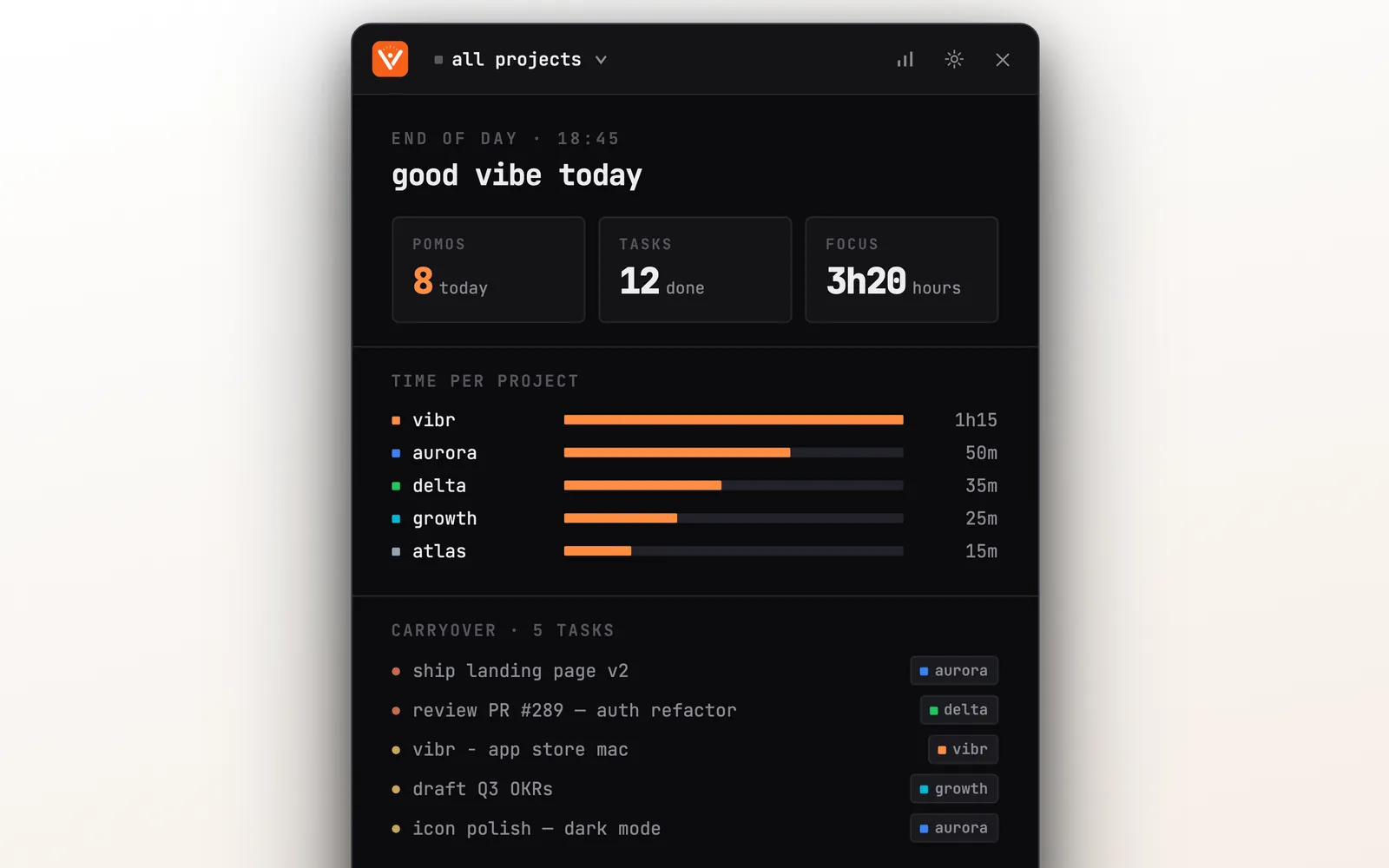
When the day ends, Vibr shows a short report: pomodoros completed, tasks done, hours of focus, and a bar for the time spent on each project. Unfinished tasks are listed as carryover for tomorrow.
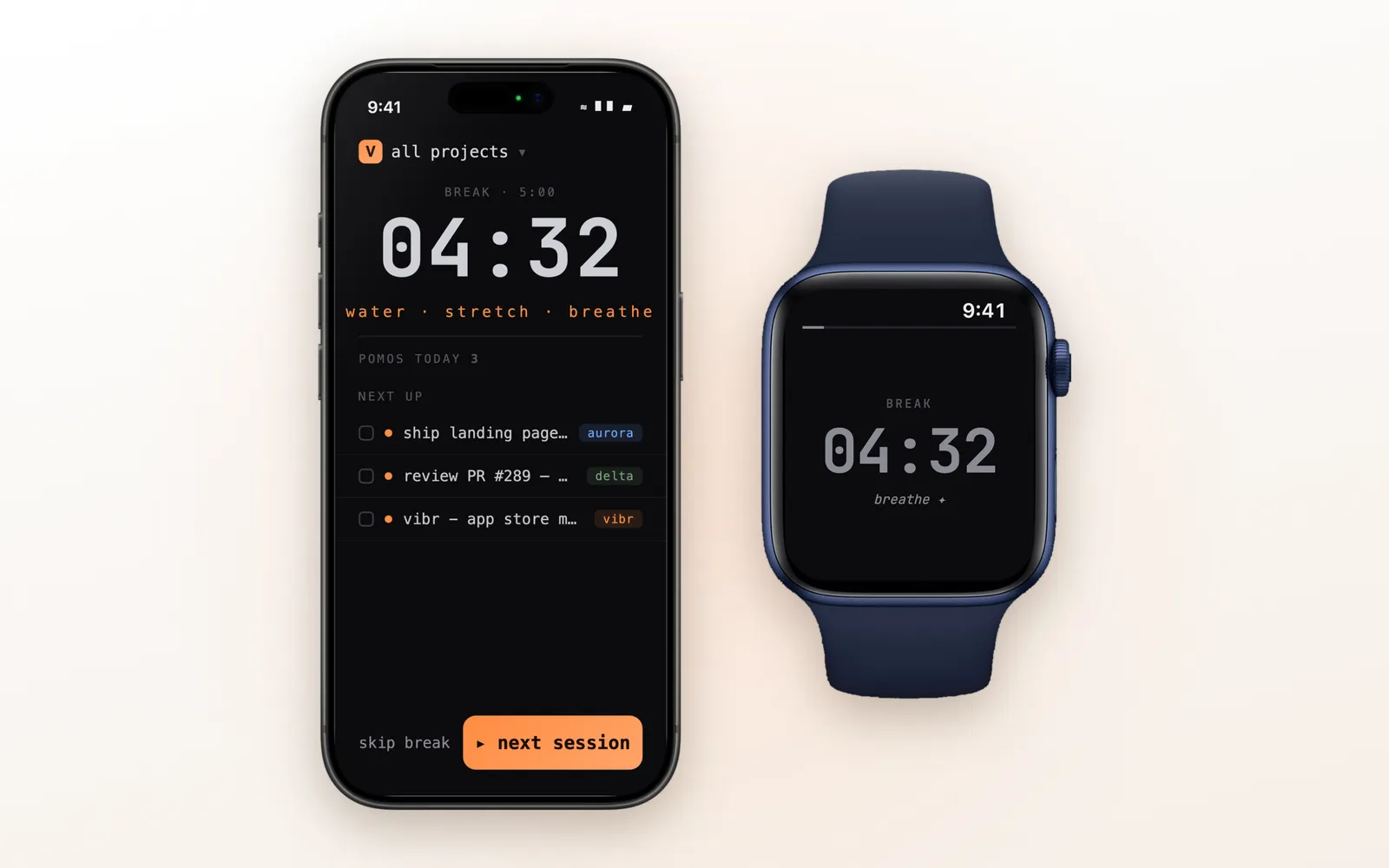
Breaks get their own screen on every device, with a countdown and a short reminder to drink water, stretch, and breathe. On iPhone you can skip the break or jump straight into the next session.
iCloud Sync & Universal Purchase
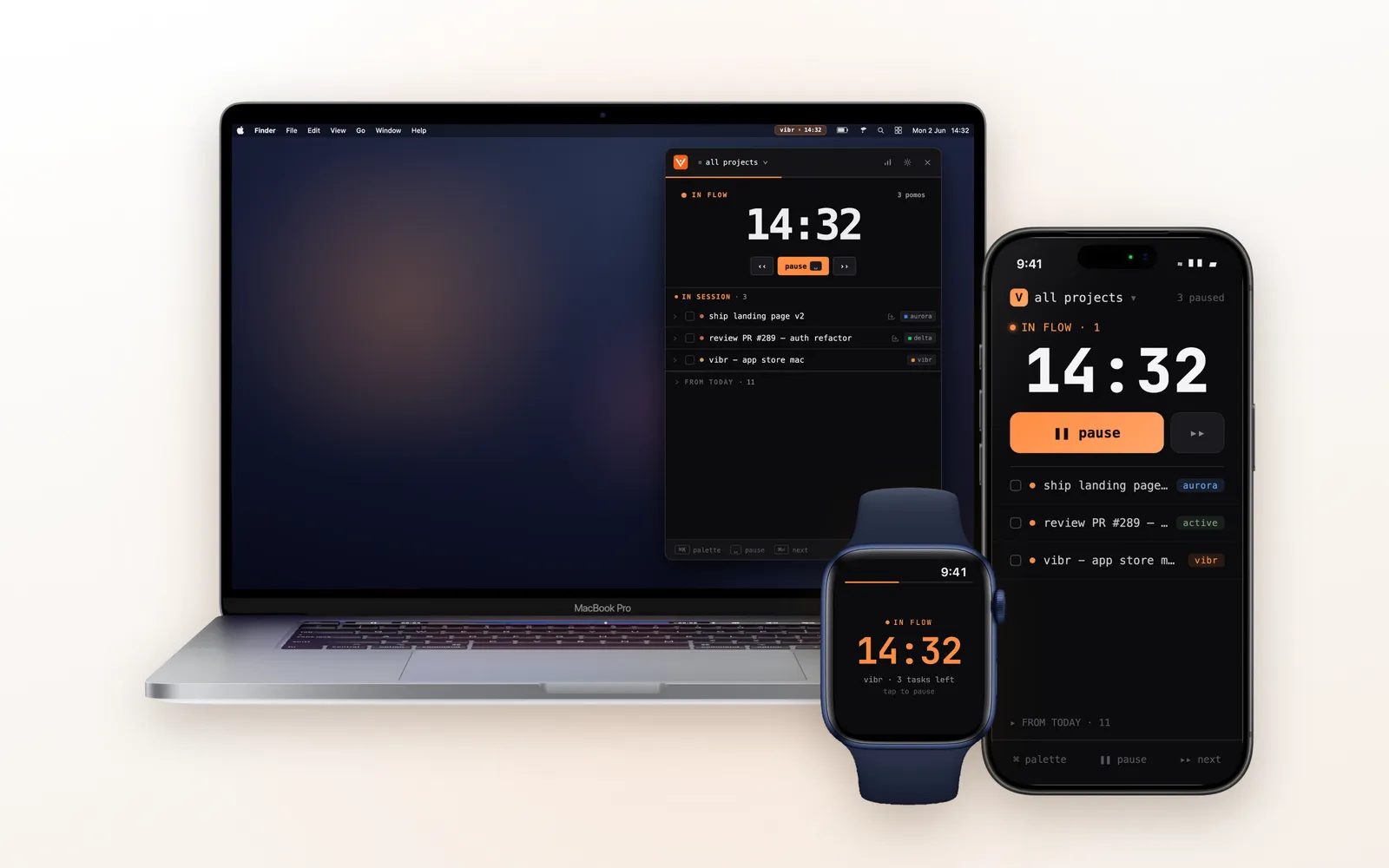
Vibr uses iCloud (via CloudKit) to sync tasks, projects, and settings across all your Apple devices. There’s no account to create, no password to remember. It uses your Apple ID.
Universal Purchase means one subscription works on Mac, iPhone, and Apple Watch. Buy on your iPhone, use it everywhere.
Privacy-wise, Vibr stores nothing on third-party servers. No analytics SDK tracking your individual behavior. Your data stays in iCloud, encrypted and private.
Apple Ecosystem Score
How well does Vibr use Apple-specific features?
| Feature | Available | Notes |
|---|---|---|
| iPhone | ✅ | Full app with Live Activity |
| iPad | ✅ | Runs the iPhone app; iPad layout coming in the next version |
| Mac (native SwiftUI) | ✅ | Menu bar app, not Electron |
| Apple Watch | ✅ | Ready, focus and break screens |
| Live Activity | ✅ | Lock screen + Dynamic Island |
| Home Screen widgets | ❌ | Not yet |
| iCloud Sync | ✅ | CloudKit, no third-party server |
| Universal Purchase | ✅ | One sub for all platforms |
| Keyboard Shortcuts | ✅ | Global, customizable |
| Siri / Shortcuts | ❌ | Not yet |
Score: 8/10. Vibr covers the parts of the Apple ecosystem that matter most for a timer: the menu bar, the lock screen, the Dynamic Island and the wrist. The gaps are Home Screen widgets and Siri for starting a session by voice.
Pricing
Vibr requires a subscription after a 7-day free trial.
| Plan | Price |
|---|---|
| Weekly | $2.99/week |
| Monthly | $9.99/month |
| Quarterly | $19.99 / 3 months |
| Annual | $49.99/year |
The annual plan works out to ~$4.17/month, which is competitive with other Pomodoro apps. The 7-day trial lets you test all features including Apple Watch and Live Activity.
Alternatives
If Vibr isn’t your style, here are other Pomodoro apps worth trying:
| App | Price | Best For |
|---|---|---|
| Forest | Free download, in-app purchases | Gamified focus with tree planting |
| Be Focused | Free download, in-app purchases | Simple Pomodoro timer |
| Focus Keeper | Free download, in-app purchases | Minimal timer with stats |
| Session | Free download, in-app purchases | Pomodoro with session analytics |
| Flow | Free download, in-app purchases | Clean design, Mac menu bar |
Forest is great for students who want gamification. Be Focused and Focus Keeper are simple, no-frills timers. Session adds music integration. Flow is the closest competitor for the menu bar experience, but lacks subtasks and Apple Watch.
What sets Vibr apart: picking tasks from several projects for one session, subtasks with paste-a-list, and deep Apple ecosystem integration (Live Activity + Dynamic Island + Watch + iCloud sync + Universal Purchase).
Verdict
4.9 / 5 ⭐
Vibr nails the core Pomodoro experience for people who work across multiple projects on Apple devices. The menu bar timer on Mac is lightweight, fast, and keyboard-driven. Live Activity and Dynamic Island make the iPhone experience effortless.
The main downside is the subscription model — $9.99/month feels steep for a timer, though the annual plan at $49.99 ($4.17/month) is more reasonable. We’d love to see a one-time purchase option.
Recommended for: vibe coders, developers, designers, and indie hackers who switch between projects and want a Pomodoro timer that works across Mac, iPhone, and Apple Watch without creating an account or leaving the Apple ecosystem.
