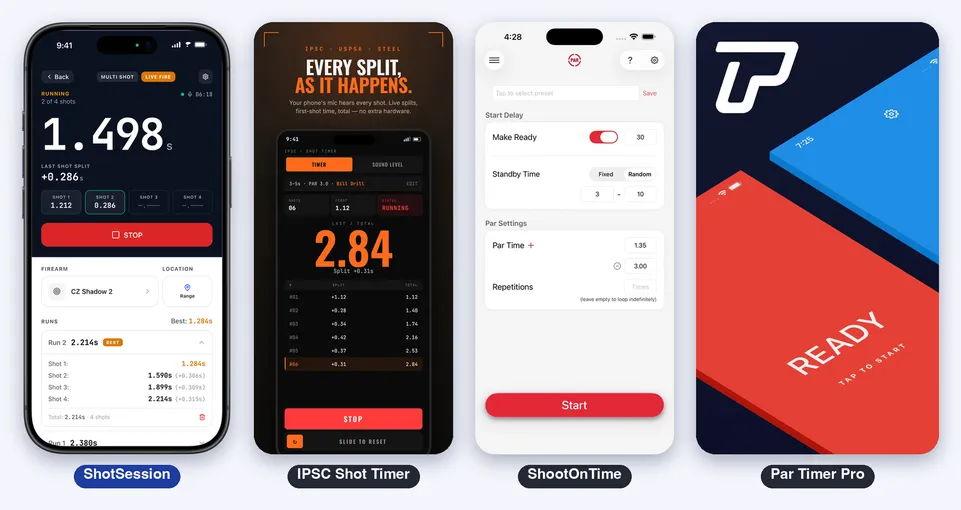
ShotSession vs IPSC Shot Timer vs ShootOnTime vs Par Timer Pro: Which Shot Timer App Is Best on iPhone?
A shot timer does one job: a beep starts the clock and the device writes down the moment of every shot. On the iPhone, dozens of apps do it, and they are not the same product. Some listen to the shots with the microphone. Others only count the par time and trust you to shoot on the beep.
This comparison puts ShotSession next to ShootOnTime: Par Timer, IPSC Shot Timer and Par Timer Pro: Firearm Trainer. They are the apps that rank at the top of the US App Store for “shot timer”, “shooting timer”, “par timer”, “ipsc timer” and “idpa timer”, according to the Astro keyword tool.
It is about the iPhone only. The competitor facts come from their official App Store listings and screenshots. We did not install or test them, so anything the listing does not say is marked “Not listed”.
Prices and limits change. Check the store before deciding.
Table of Contents
- Four Ideas of a Shot Timer
- Side by Side
- How the App Hears the Shots
- Par Time, Delay and Drills
- History, Sessions and Charts
- Apple Watch
- Privacy and Accounts
- Pricing
- Known Limits
- Which One to Choose
- Verdict
- Sources
Four Ideas of a Shot Timer
ShootOnTime is the par timer. Its listing says it is entirely free and simple, for dry fire at home or at the range, and states that it does not detect the sound of firearms. You set the delay and the par time, and it counts.
Par Timer Pro is the par timer with drills. Same idea, aimed at CCW holders, IDPA and USPSA shooters, with drills for those disciplines. It also says it does not capture the sound of gunfire.
IPSC Shot Timer is the timer with the match tools. Microphone shot detection, split times, a par buzzer with random delay, and, in its screenshots, video review, IPSC scoring and a library of ten classic drills.
ShotSession is the timer with a training log. It hears the shots too, but its center is what comes after: sessions with the firearm, the range and target photos, charts that show if you are getting faster, and cards to share.
Side by Side
| ShotSession | IPSC Shot Timer | ShootOnTime | Par Timer Pro | |
|---|---|---|---|---|
| Store version (Oct 20, 2026) | 2.03 | 1.12.0 | 1.3.8 | 26.9.0 |
| Minimum iOS | 15.1 | 15.0 | 17.0 | 15.0 |
| App size | 73.0 MB | 26.3 MB | 9.7 MB | 76.5 MB |
| Devices on the listing | iPhone, Mac, Vision, Apple Watch | iPhone, iPad, Mac, Vision, Apple Watch | iPhone, Vision | iPhone, Vision |
| Hears the shots (microphone) | Yes, live fire and dry fire | Yes | No, par time only | No, par time only |
| Par time | Yes, 1 to 30 s | Yes | Yes | Yes |
| Random start delay | Yes, 2 to 10 s by default, adjustable | Yes, configurable | Yes, fixed or random standby | Not listed |
| Drills | First shot, multi shot, par time | 10 built-in presets (Bill Drill, El Presidente, Dot Torture and more) | Saved presets | Drills for USPSA, IDPA and other disciplines |
| IPSC scoring and video review | No | Yes, in the screenshots | No | Not listed |
| Session log (firearm, range, target photos) | Yes | Not listed | Not listed | Not listed |
| Charts and trends | Yes, 30 days to all time | Trends by drill, in the screenshots | Not listed | Not listed |
| Share cards | Yes | Not listed | Not listed | Not listed |
| Apple Watch | Yes (remote) | Yes (remote) | Not listed | Not listed |
| Account | Optional | None required | None | Not listed |
| Price | Free download, Pro subscription to train | Free, no purchases listed | Free, no purchases listed | Free download, subscriptions |
| Rating on the US store | 3.0 (2 ratings) | 5.0 (8) | 4.94 (1,183) | 4.54 (376) |
How the App Hears the Shots
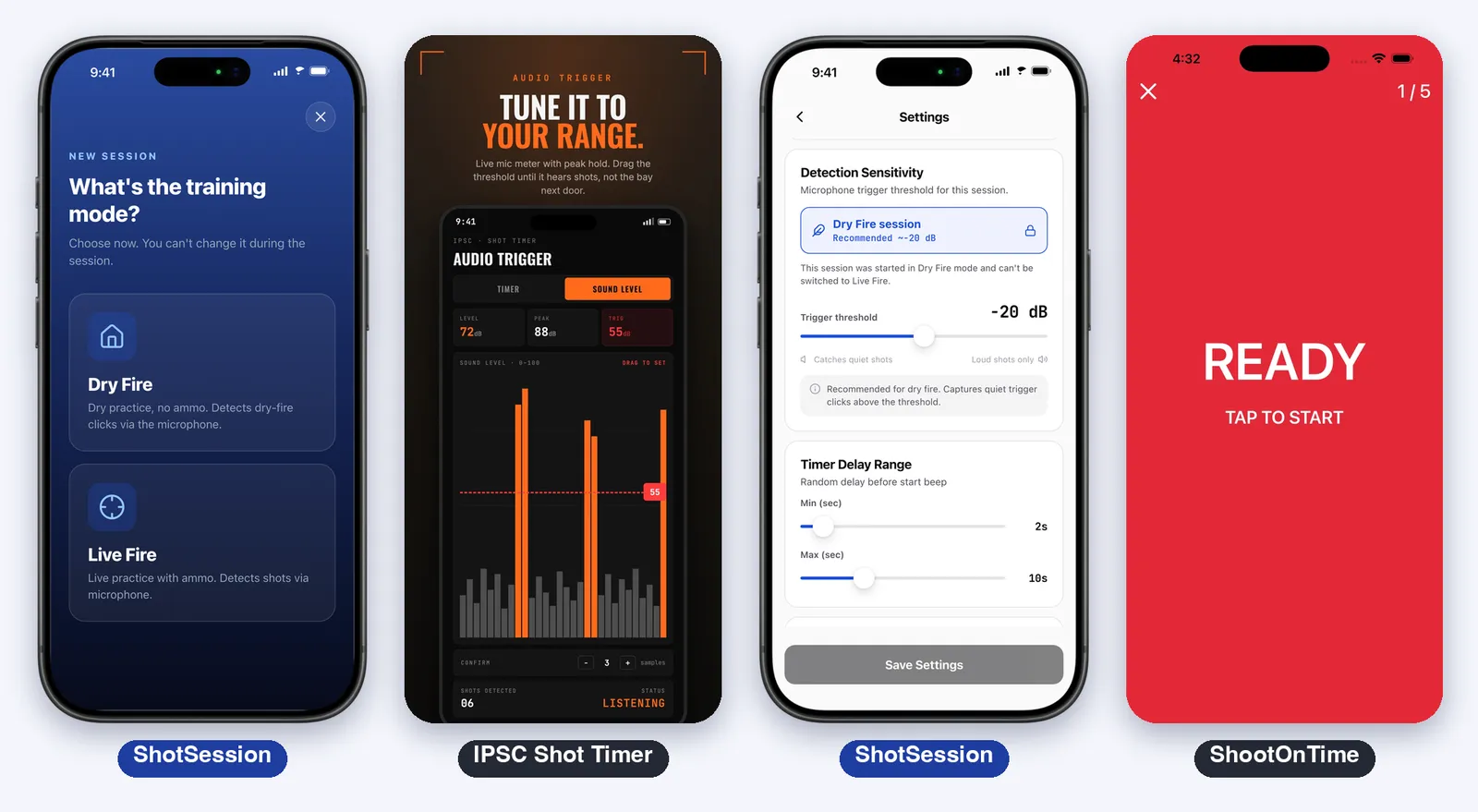
This is the first dividing line. ShootOnTime and Par Timer Pro both say in their descriptions that they do not register the sound of shots: they run the beep and the par time, and what you do in between is not measured.
IPSC Shot Timer and ShotSession listen through the microphone and stamp every shot. In IPSC Shot Timer the screenshots show an audio trigger with a live level meter and a threshold you drag. In ShotSession every session starts with one choice, Dry Fire or Live Fire, and that choice changes how the app listens: live fire counts only very loud sounds (around -10 dB), dry fire listens for the click of the trigger (from about -20 dB), and the threshold can be moved between -40 and 0 dB.
Neither is a certified match timer. The reading comes from the phone’s microphone, so it is a training tool.
Par Time, Delay and Drills
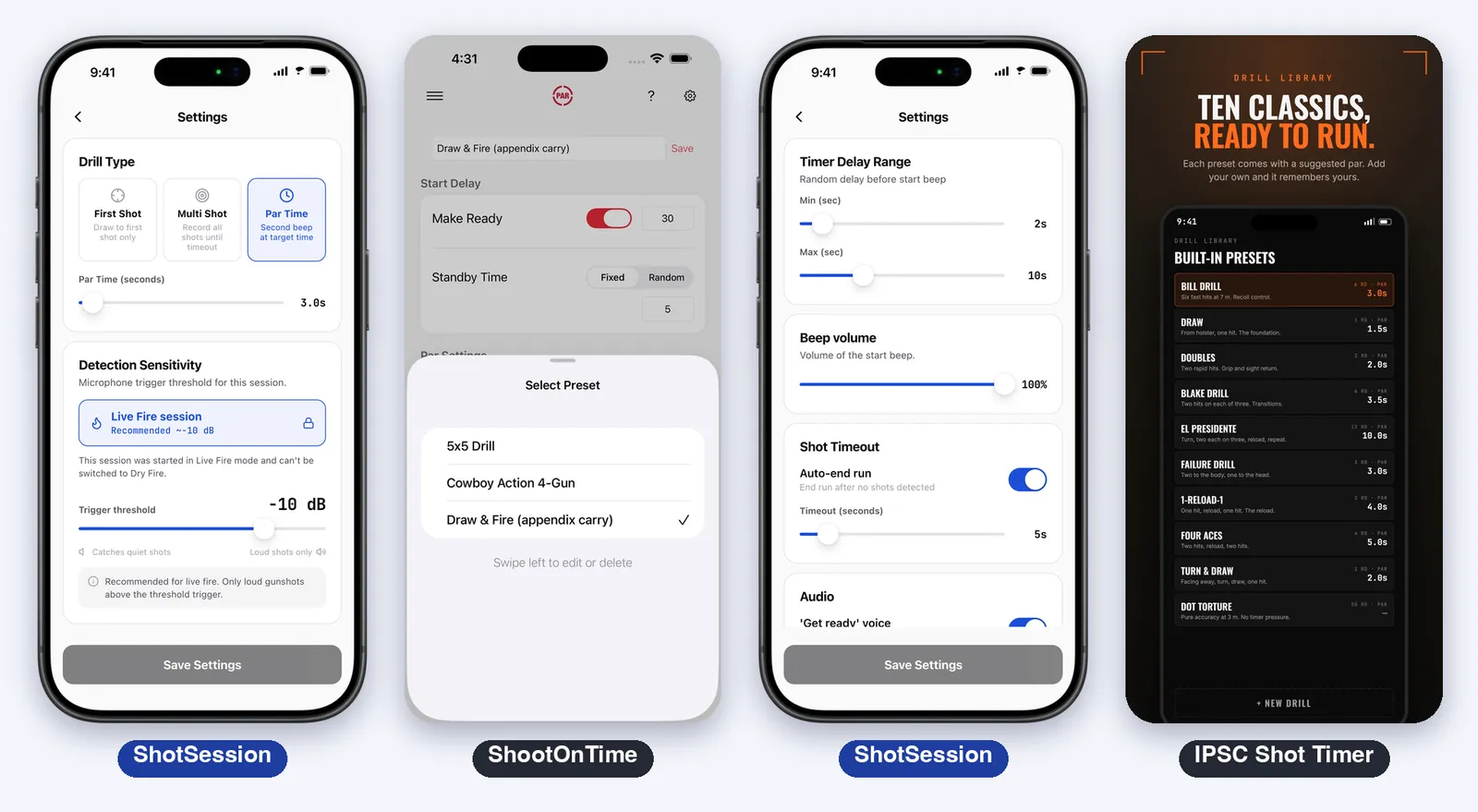
All four do par time. The difference is what surrounds it.
ShootOnTime has the cleanest screens: a start delay with Make Ready, a fixed or random standby, the par time with repetitions, saved presets such as 5x5 Drill or Draw & Fire, and full-screen colors that change from READY to STAND BY to the time.
IPSC Shot Timer ships a drill library with ten presets in the screenshots (Bill Drill, Draw, Doubles, Blake Drill, El Presidente, Failure Drill, 1-Reload-1, Four Aces, Turn & Draw and Dot Torture), each with a suggested par time.
ShotSession has three drill types: First Shot (the draw drill), Multi Shot (every shot until you stop) and Par Time (a second beep at a time from 1 to 30 seconds). The start works like a match: a voice says “get ready” and the beep comes after a random delay, 2 to 10 seconds by default. It also has beep volume, an auto-end timeout and an echo filter, so an echo indoors is not counted as a second shot.
Par Timer Pro lists drills for USPSA, IDPA and other disciplines in its release notes. The listing does not detail them.
History, Sessions and Charts
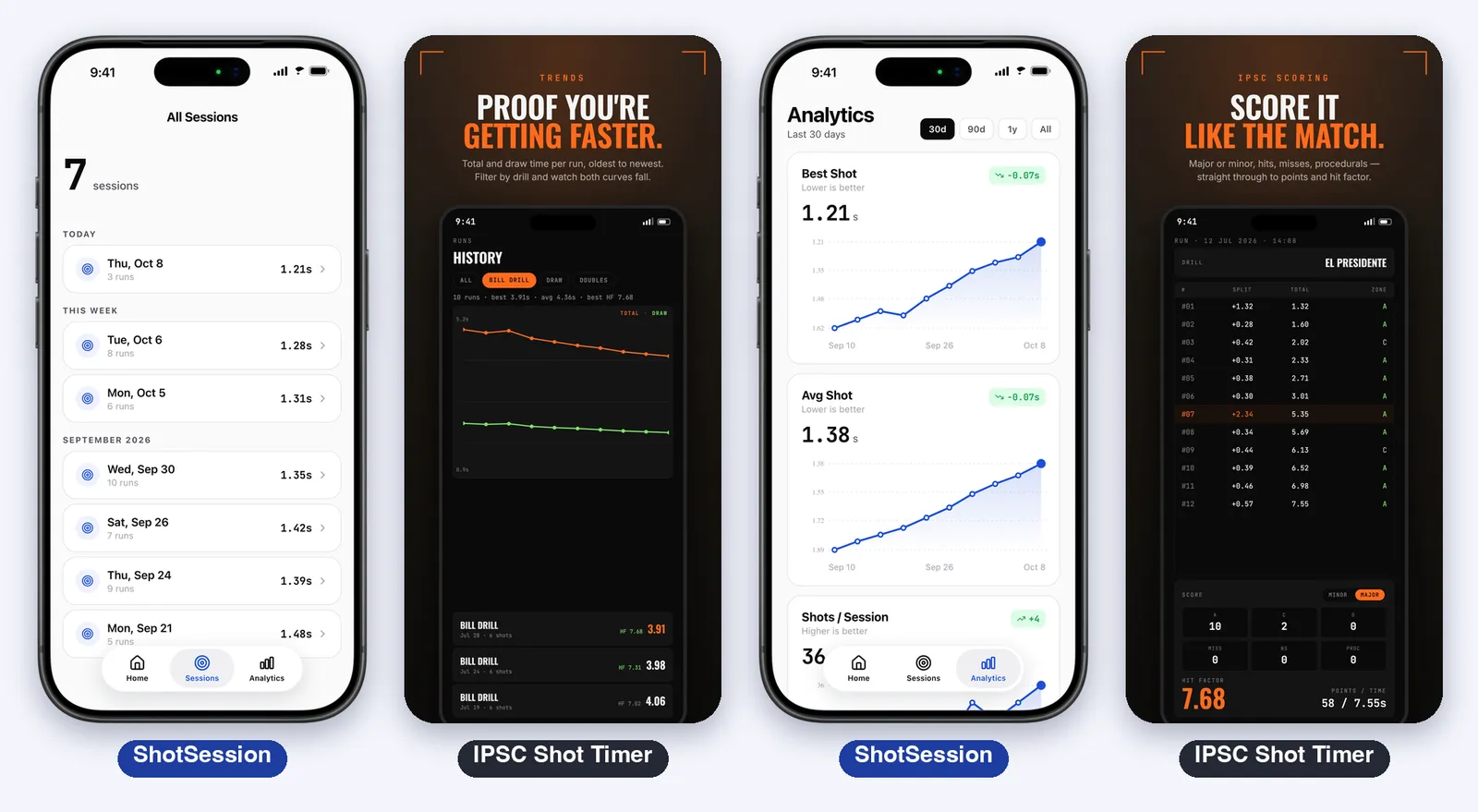
A timer shows the last string and forgets it. Whether your draw is faster than last month is a question most shooters answer from memory.
ShotSession is built around the answer. Each run goes into a session, where you can set the firearm, the range (indoor, outdoor or home) and up to five photos of the target. The Analytics tab draws one chart per metric, with one point per session: best first shot, average first shot, shots per session and a split distribution. You choose the period, from 30 days to everything. When a session ends, three summary cards can be shared as an image.
IPSC Shot Timer shows a history by drill with trend lines in its screenshots, and match scoring with hits, major or minor, points and hit factor. The listing does not mention firearms, ranges or photos.
ShootOnTime and Par Timer Pro do not list a history or charts.
Apple Watch
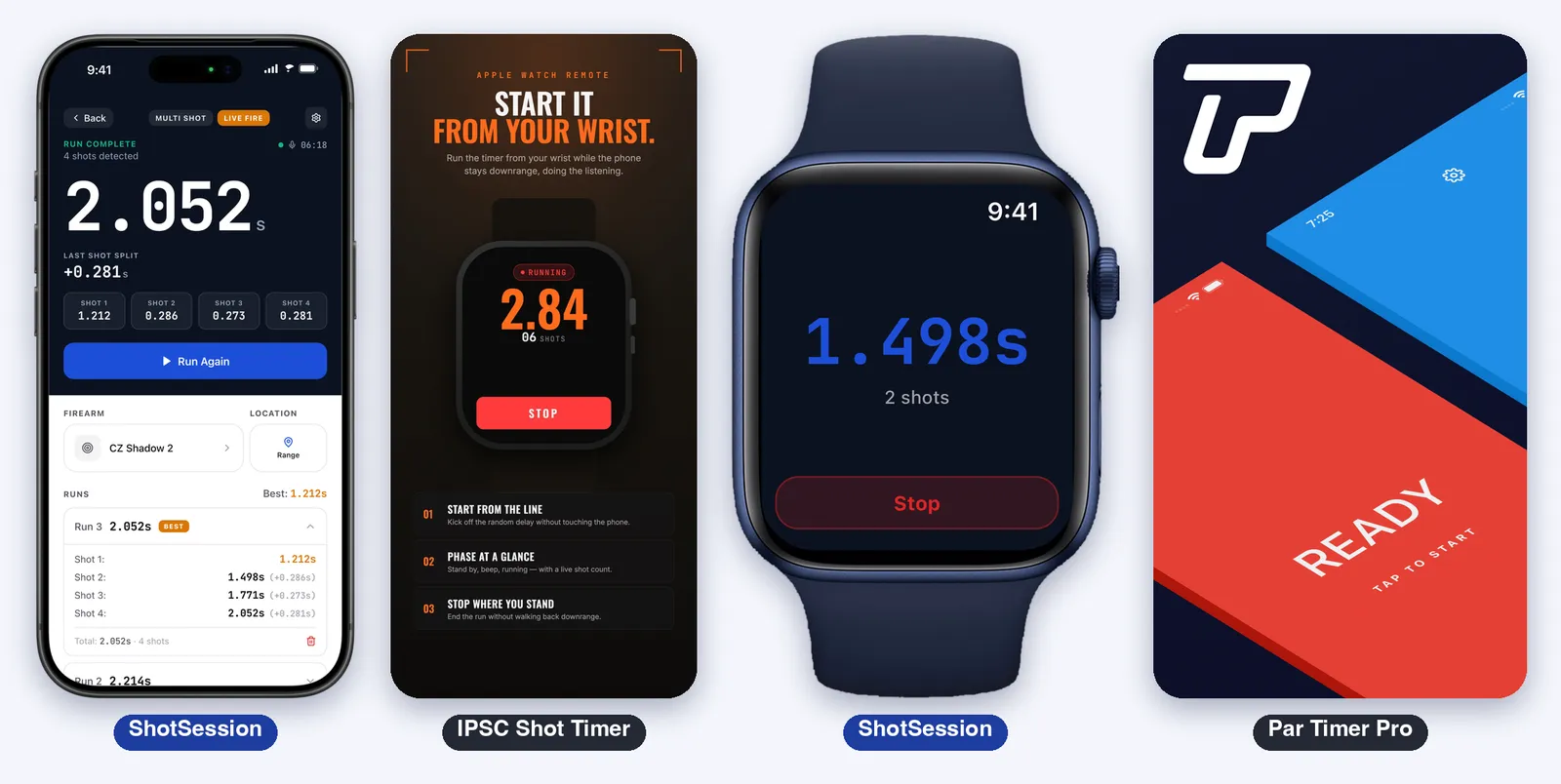
With the phone on a table or a tripod, the Watch becomes the remote.
ShotSession shows the drill and the mode on the wrist, with a Start Run button, a tap at the beep and at each shot the iPhone hears, and the time and the best of the session at the end. The iPhone does the listening, so it needs to stay nearby. The Watch app is part of the subscription.
IPSC Shot Timer lists watchOS 9 and shows an Apple Watch remote in its screenshots: you start the timer from the wrist and it keeps listening on the phone.
ShootOnTime and Par Timer Pro do not list an Apple Watch app.
Privacy and Accounts
- IPSC Shot Timer: “no ads, no tracking, no account required”. The microphone audio is processed in real time on the device, and the store label says Data Not Collected
- ShootOnTime: says it does not collect or store the data you enter, and the label says Data Not Collected
- Par Timer Pro: the label lists identifiers used to track you across other companies’ apps, and identifiers, usage data and diagnostics not linked to you
- ShotSession: works offline first and saves sessions on the iPhone, and creating an account is optional, with Apple, Google or an email code, to back up your history. Its label lists purchase history and identifiers used to track you, and email, photos and other content linked to you
If you want an app that collects nothing, the two free timers are the cleanest on the label. The history in ShotSession comes with an account, a subscription and the data that go with them.
Pricing
| Free | Paid | |
|---|---|---|
| ShotSession | Download, the example sessions and charts | Shot Session Pro to start a training session: from $5.99 a week, $19.99 every three months or $39.99 a year on the store’s list. The listing text still says the app is free to use |
| IPSC Shot Timer | Everything on the listing, no purchases listed | None listed |
| ShootOnTime | Everything, “entirely free” | None listed |
| Par Timer Pro | Download | Subscriptions: All Access and weekly, monthly and yearly options, from $0.99 to $49.99 on the list. The page does not map each price to a plan |
Prices vary by region, and every app shows yours before you subscribe.
Known Limits
- ShotSession: it is paid to train, and the listing is in English. It has no Live Activity and no Home Screen widget. It is new: 2 ratings on the store. The store version is 2.03, and the app keeps changing
- IPSC Shot Timer: 8 ratings on the store, so little history. Its listing does not mention a log with firearms, ranges and photos
- ShootOnTime: no shot detection, no history. It does what it says, par time
- Par Timer Pro: no shot detection, subscriptions, and the listing says little about what each plan unlocks
Which One to Choose
- You only need a beep and a par time: ShootOnTime
- You want the timer to hear the shots and pay nothing: IPSC Shot Timer
- You shoot IPSC or USPSA and want scoring, video review and classic drills: IPSC Shot Timer
- You want to know in a chart if your draw is faster than last month, with the firearm, the range and the target photo of each session: ShotSession
- You want a card of the session to share: ShotSession
- You want a drill list for CCW, IDPA and USPSA with par time only: Par Timer Pro
- You want to start the run from your wrist: ShotSession or IPSC Shot Timer
Verdict
Most complete timer: IPSC Shot Timer. Shot detection, split times, drill library, scoring, video review, Apple Watch remote, and free with no ads. If complete means the longest list on the timer itself, it is this one.
Simplest par timer: ShootOnTime. Free, clean and with the best rating of the group. It does not hear shots, and says so.
Best for keeping a history: ShotSession. It hears the shots, and what it adds is what comes after the run: sessions with firearm, range and target photos, charts by session and share cards. The price of that is clear: it is a subscription, and it is the newest of the four.
4.4 / 5 ⭐ for ShotSession.

Sources
Consulted on October 20, 2026.
- App Store listings: ShootOnTime: Par Timer, IPSC Shot Timer, Par Timer Pro: Firearm Trainer and ShotSession, with the Apple lookup API for versions, sizes, languages and ratings
- Ranking: keyword rankings on the US App Store from the Astro tool (shot timer, shooting timer, par timer, ipsc timer, idpa timer, dry fire and pistol timer), October 20, 2026
The ShootOnTime, IPSC Shot Timer and Par Timer Pro images are screenshots from their official App Store listings, used here to illustrate the analysis. The ShotSession images show the app with sample data.