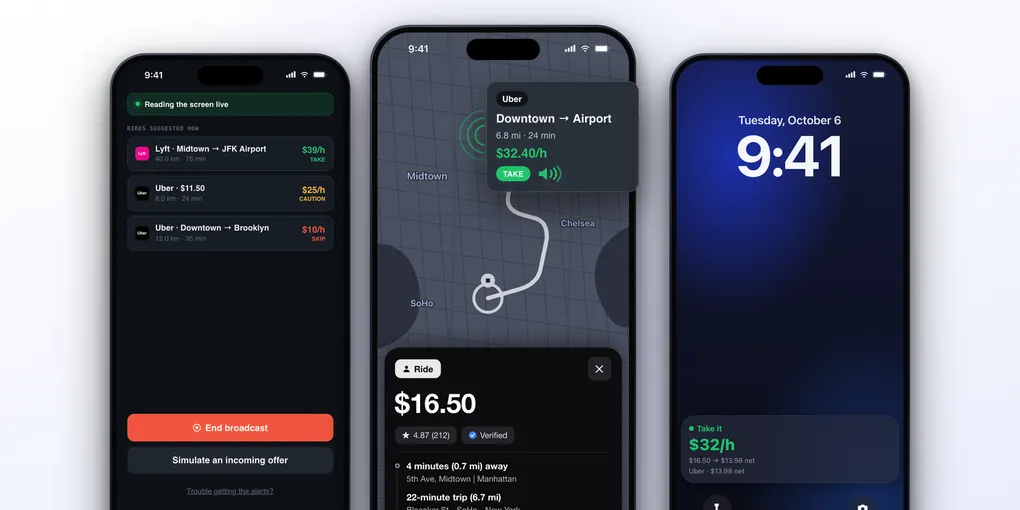
ProfitDriver vs Mystro vs Corridex vs GigU: Which Rideshare Driver App Is the Most Complete on iPhone?
For years, the tools that help rideshare drivers pick better rides lived on Android. Android lets one app read and tap inside another, and iOS does not. An iPhone driver had the offer card, about ten seconds, and mental math.
That has changed.
There are now four serious options on the App Store, and they do not work the same way. ProfitDriver, Mystro, Corridex and GigU all promise to help you earn more per hour, but each one takes a different route to get there, with different trade-offs.
This comparison is about the iPhone only. We used the apps, tested every feature and did a full review.
Table of Contents
- Two Different Ideas
- Side by Side
- How Each One Works on iPhone
- Which Apps They Cover
- How the Answer Reaches You
- The Math Behind the Answer
- Filters, Limits and Profiles
- History and Records
- The Apple Ecosystem
- Privacy and Account Risk
- Pricing
- Known Limits
- Which One to Choose
- So Which One Is the Most Complete?
Two Different Ideas
The four apps split into two groups.
Mystro automates. You link your driver accounts inside Mystro and it acts for you: it goes online and offline on each service, accepts the offers that pass your filters, declines the others, and takes the other apps offline while you are on a trip.
ProfitDriver, Corridex and GigU advise. They read the offer that appears on your screen, do the math, and tell you if it is worth it. They never accept or decline anything. The decision stays with you.
That difference matters more than any feature list, because it defines what you hand over to the app. Keep it in mind while reading the rest.
Side by Side
| ProfitDriver | Mystro | Corridex | GigU | |
|---|---|---|---|---|
| What it does | Verdict on each offer | Accepts, declines and switches apps for you | Alert on each offer | Green, yellow or red on each offer |
| How it works on iPhone | Reads your screen during a screen broadcast | Links your driver accounts and acts on them | Reads your screen during a screen broadcast | Reads your screen during a screen broadcast |
| Accepts rides for you | No | Yes | No | No |
| Verdict levels | Take, caution, skip | Accept filters and reject filters | Good, average, bad | Good, average, bad |
| Ride apps | Uber, 99, Lyft, Bolt, inDrive | Uber, Lyft, DiDi | Uber, 99, Lyft, Bolt, DiDi, Empower | Uber, Lyft, Empower in the US store. 99, inDrive in the Brazil setup |
| Delivery apps | Uber Eats and iFood, with Add another app | Uber Eats, DoorDash | iFood, 99 Food, Uber Eats, DoorDash, Keeta | Uber Eats, DoorDash, GrubHub, iFood, 99 Food, Keeta |
| Add another app (custom) | Yes | Not listed | Not listed | Not listed |
| Spoken verdict | Yes, you choose the phrase | Voice alert | Alert sound | Yes, you choose which verdicts are read aloud |
| CarPlay | Yes | Not listed | Not listed | Not listed |
| Dynamic Island and live activity | Yes | Not listed | Not listed | Not listed |
| Your real cost in the math | Fuel, wear, fixed costs | Not listed | Cost calculator | Net profit with your monthly costs |
| Profiles (airport, night) | No | Saved filter sets per service | Yes | No |
| History | Earnings and expenses | Every offer, with the reason it was accepted or rejected | Every offer, with CSV export | Every offer, with a screenshot of the card |
| Account | No | Your driver accounts, linked | No | Phone number |
| iOS | 17 or later | 15.5 or later | 17 or later | 17 or later |
| iPad | Runs the iPhone app | Runs the iPhone app | Yes | Listed, still being improved |
| Free to try | Setup and simulation free | Subscription required to go online | Free trial | Free during the launch promotion |
How Each One Works on iPhone
ProfitDriver, Corridex and GigU use the same iOS mechanism. You start a screen broadcast, switch to your driver app, and the app reads the offer card when it shows up. In all three, the reading happens on the phone.
While it runs, iOS shows its screen recording indicator.
The setup is similar too, and worth knowing before you start.
GigU, for example, walks you through these steps:
- Sign in with your phone number and pick your gig apps
- Allow trip offer notifications, and Screen Sharing notifications in iOS Settings
- Allow it during Focus mode
- Start the broadcast named “GigU Cherry Picker”
Corridex asks for the same notification permissions and a Focus exception. ProfitDriver has a troubleshooting screen for the same points.
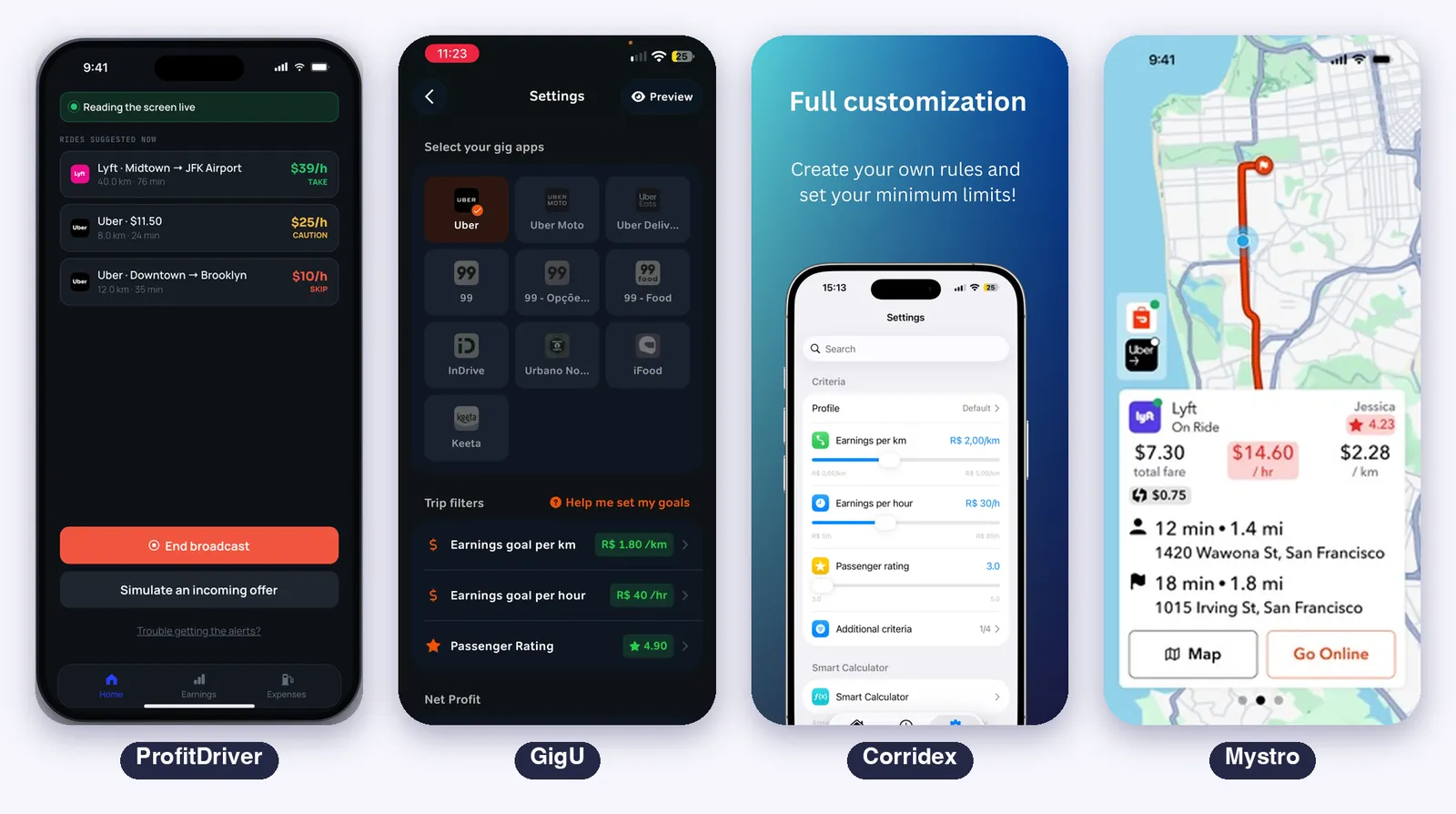
Mystro works differently. According to its own setup guide, you link your Lyft and Uber accounts inside Mystro, which receives a token from each service and uses it to see, accept and decline offers.
Your login goes straight to the gig app and the token stays only on your phone. You go online and offline through Mystro, with a big GO button, and when an offer passes your filters a countdown starts and the ride is accepted on its own.
In practice: with the three readers you keep using your driver app as always, with an advisor on top. With Mystro, Mystro becomes the place where you work.
Which Apps They Cover
Corridex has the longest list. Its listing names Uber, Lyft, 99, Bolt, DiDi and Empower for rides, and Uber Eats, DoorDash, iFood, 99 Food and Keeta for deliveries.
GigU is a Brazilian app that arrived on iPhone in late September 2026. The US listing names Uber, Uber Eats, Lyft, DoorDash and GrubHub, and its 1.0.2 update added Empower.
The Brazil listing and the setup screens we recorded show 99, 99 Food, inDrive, iFood and Keeta as well.
Mystro’s listing names Uber, Lyft, Uber Eats, DoorDash and DiDi, with a note that the information available depends on the app and the city.
ProfitDriver reads Uber, 99, Lyft, Bolt and inDrive. For Uber Eats, iFood or any other app, use Add another app: you send 2 to 5 screenshots of the offer screen, check what it understood, and it starts reading that layout. The others do not list this.
If you deliver food, this section decides it: Corridex, GigU, Mystro or ProfitDriver.
How the Answer Reaches You
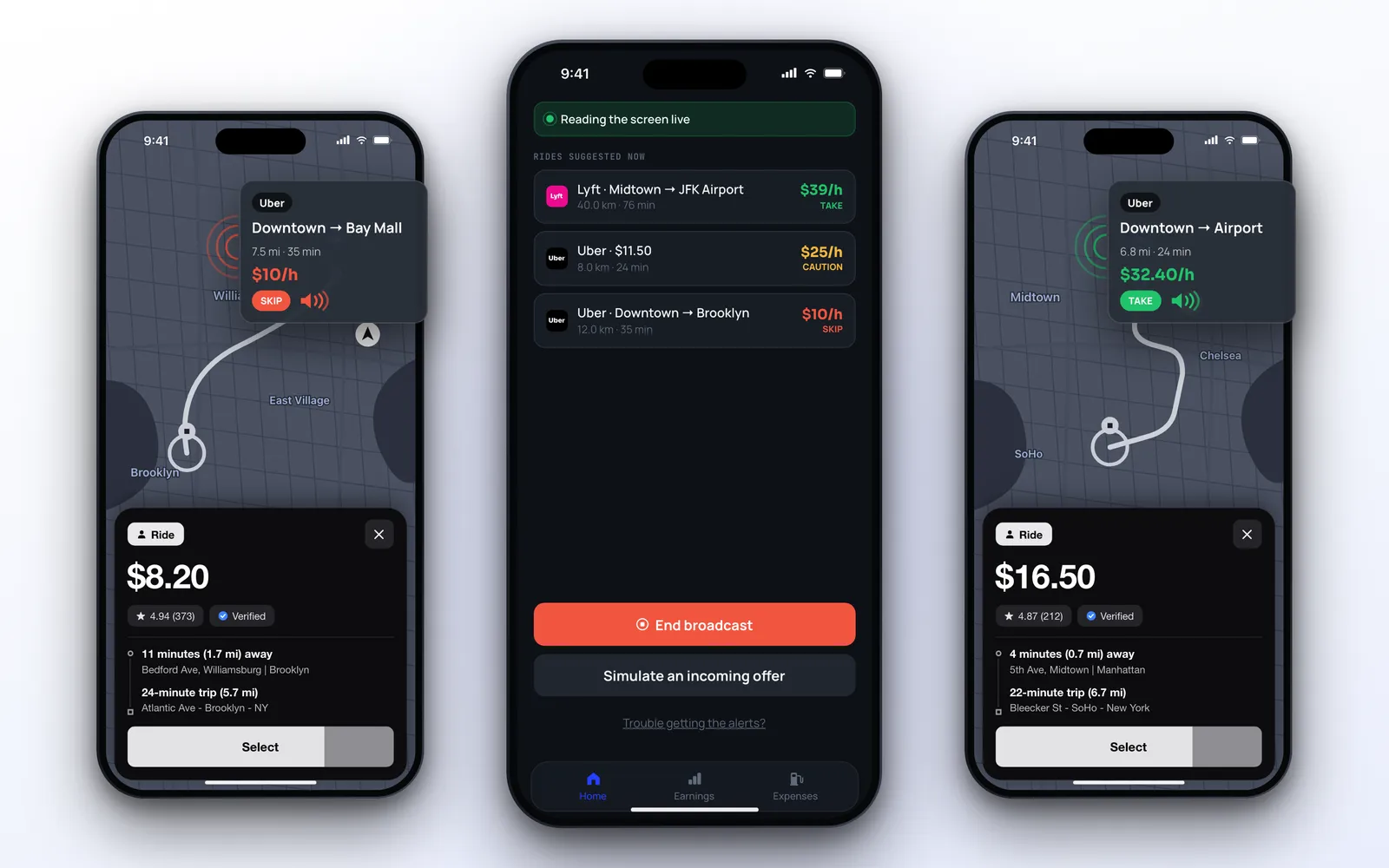
A driver cannot look at the phone for long, so how the answer arrives matters as much as the answer.
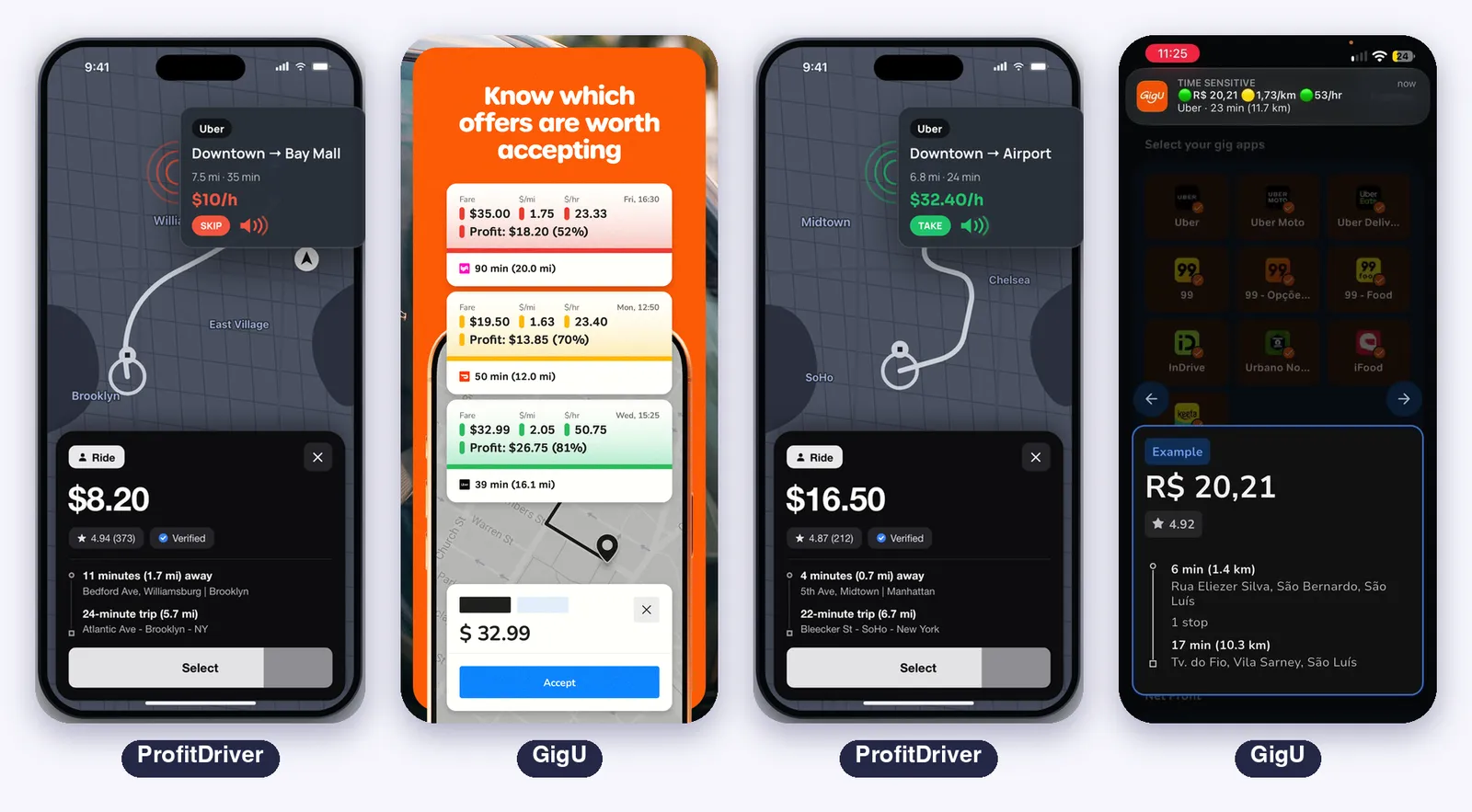
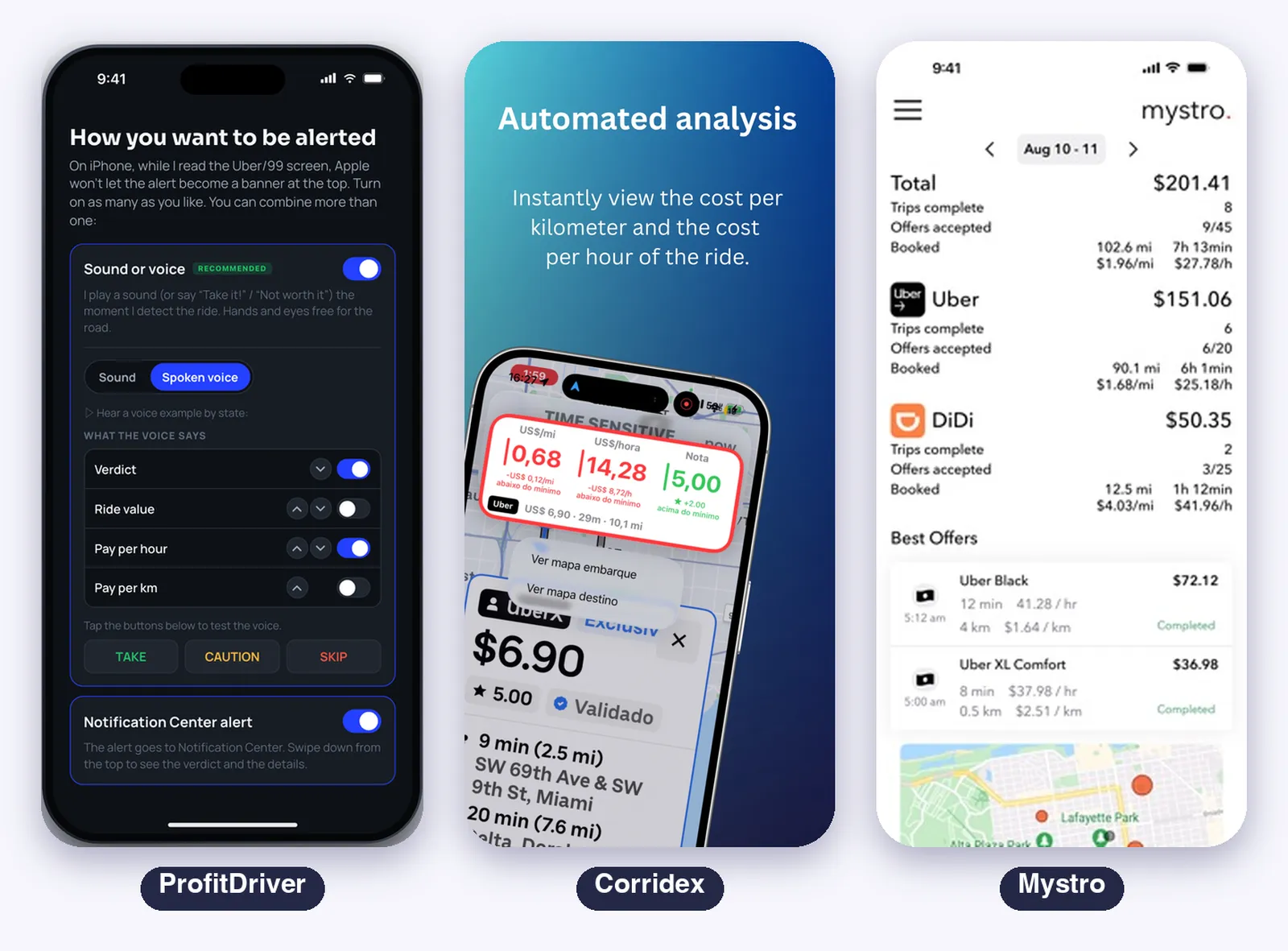
ProfitDriver gives a three level verdict (take, caution, skip) and delivers it in five ways. You can use more than one at the same time:
- Spoken voice (recommended): it says the verdict out loud, with the phrase you configure: the verdict, the fare, the pay per hour, the pay per km, in the order you want
- Live activity (recommended): the verdict at the top of the screen, and on CarPlay it is the main one
- Notification: the notification over the ride app
- Dynamic Island: the verdict in the island, at the top of the screen
- CarPlay: the color and the pay per hour on the car’s screen
To use the recommended ones, turn on the notification setting on your iPhone: Settings → Notifications → Screen Sharing → Allow Notifications.
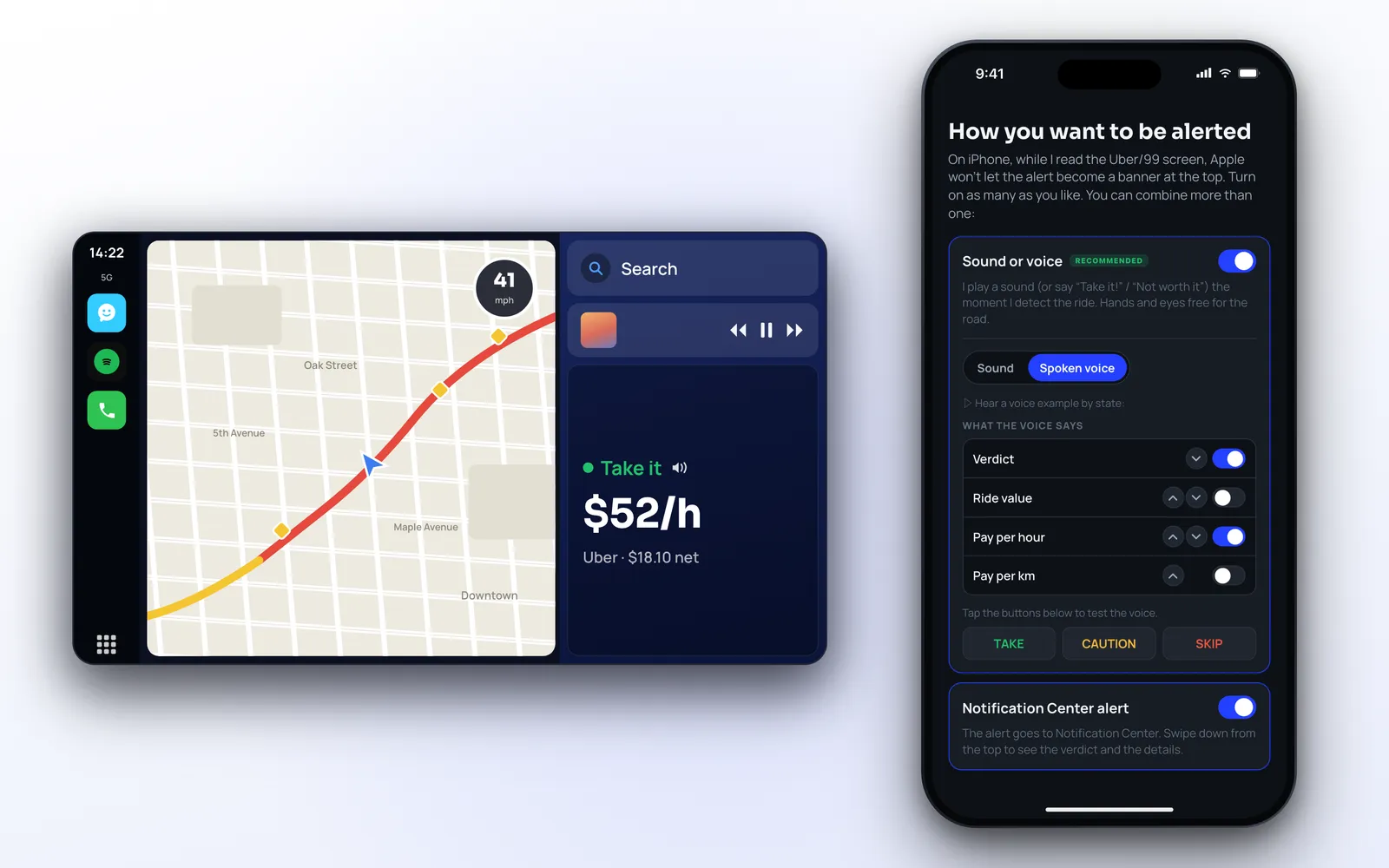
GigU sends a time sensitive notification with the fare and two colored dots, one for the pay per km and one for the pay per hour, and you swipe it down to open a card with the pickup and destination.
It has spoken trip details: you choose whether it reads aloud the good offers, the average ones, the bad ones, or any mix, and set the speed. The pickup and destination open in Google Maps.
Corridex delivers a notification and an alert sound that plays even with the phone on silent. The notification starts compact, and you swipe down to expand it, because iOS does not let an app force it open.
Mystro shows the offer on its own screen with the countdown, and its manual mentions a voice alert when an offer arrives and when a ride is accepted.
None of the other three lists CarPlay, the Dynamic Island or a live activity.
The Math Behind the Answer
All four compare the offer against limits you set. The difference is what goes into the number.
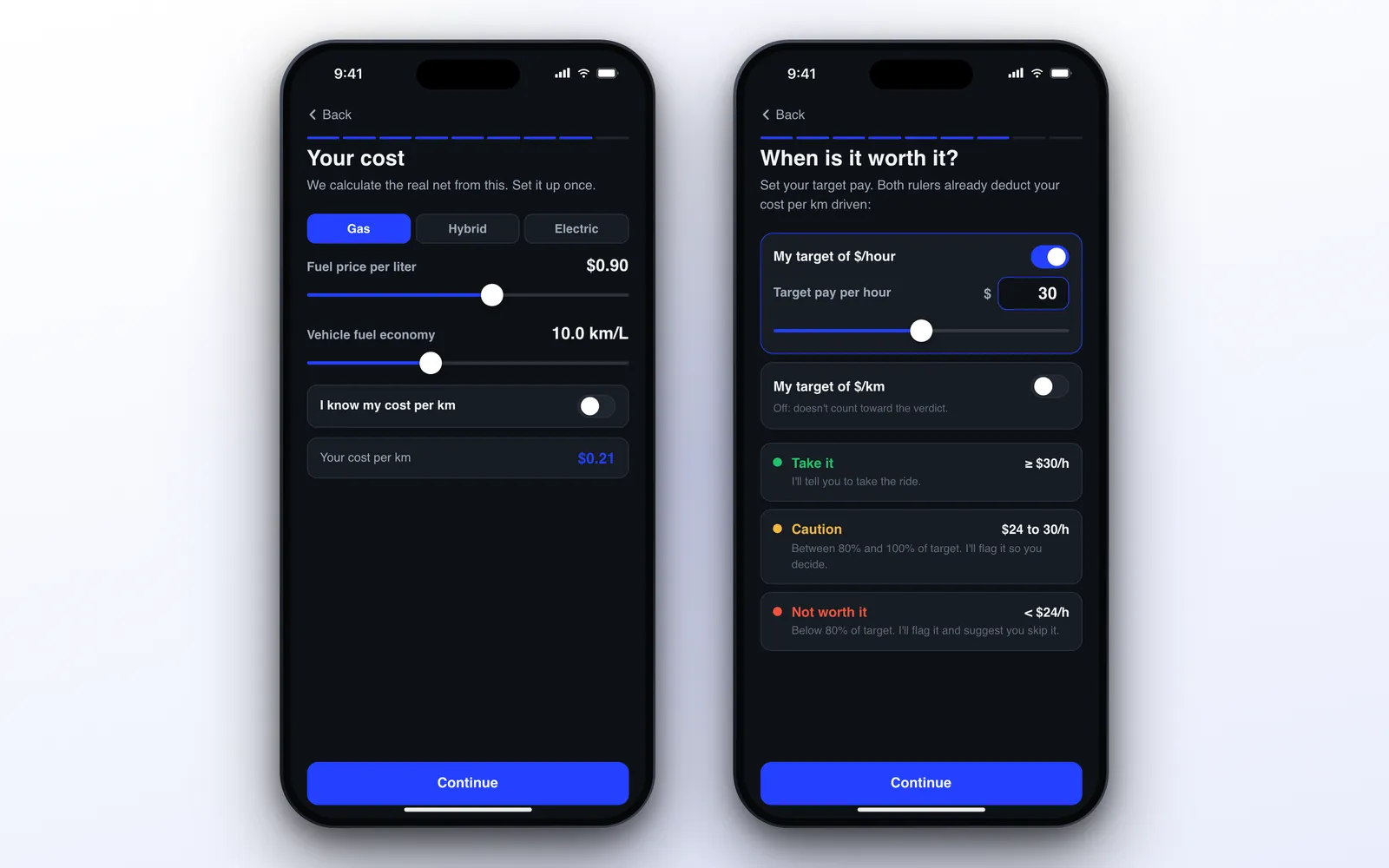
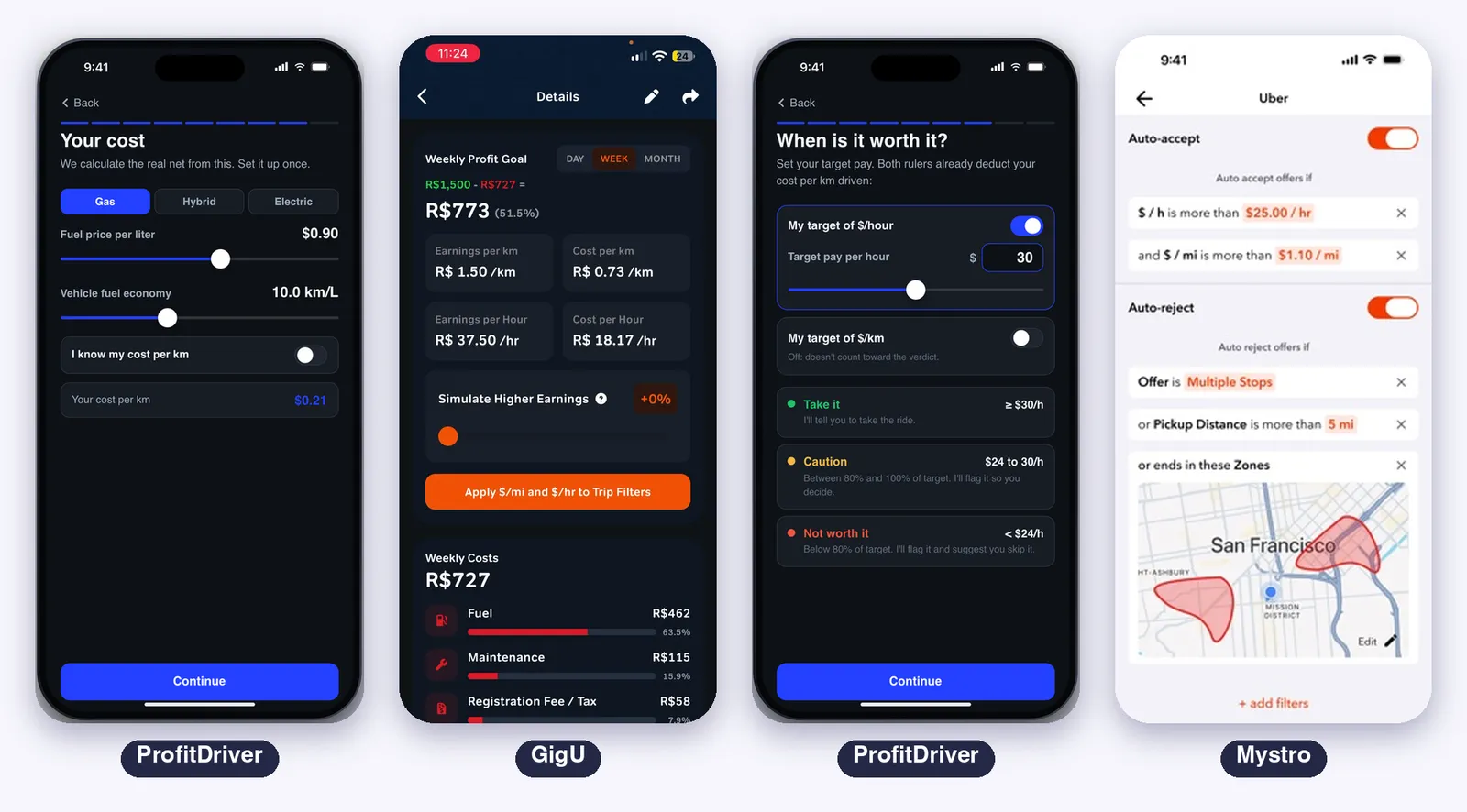
ProfitDriver works with profit, not revenue. You enter your vehicle type, fuel price and consumption, and optionally your fixed monthly costs. Every verdict already subtracts that cost, and the target you set is what you want to keep per hour.
There is also a passenger rating filter that can lower a verdict.
GigU is the closest to it.
Its wizard asks about your vehicle, your weekly goal, the days, hours and distance you drive, fuel and consumption, and monthly costs for insurance, maintenance and registration.
A Details screen then shows your profit goal for the day, week or month, your earnings and cost per km and per hour, and a slider to simulate higher earnings and apply the result to your filters. The offer card shows the profit and the margin in percent.
A Details screen then shows your profit goal for the day, week or month, your earnings and cost per km and per hour, and a slider to simulate higher earnings and apply the result to your filters.
The offer card shows the profit and the margin in percent.
Corridex calculates pay per km and per hour and has a cost calculator that turns your fuel and expenses into a minimum rate, including financed or rented cars and electric or CNG vehicles.
Mystro uses filters to decide what to accept and what to decline, by service: total pay, pay per hour, pay per mile, trip time, passenger rating and zones you draw on a map. It does not ask for your costs.
Filters, Limits and Profiles
Corridex has the most limits. Besides the minimum per km or mile and per hour, it offers minimum offer value, passenger rating, multiple stops, and distance or time for the pickup, the trip or the whole ride.
Profiles let you keep one set of limits for the airport, another for nights and another for deliveries, and switch in one tap.
Mystro keeps filters per service, with saved sets such as “Weekend Nights”. To auto-accept, the offer must match all the accept filters. To auto-reject, matching any one reject filter is enough.
One limitation it documents: the distance filter uses the straight line between start and end, which is shorter than the real route.
GigU has goals per km or mile and per hour, plus a minimum passenger rating, and you choose which metrics appear on the card and in which order. It shows a preview of the card while you change the settings.
ProfitDriver has a target per hour, an optional target per km or mile, a rule to require both or either one, and the passenger rating filter. It has one set of targets, with no profiles.
History and Records
Corridex keeps a history of every offer it read, with totals, averages, a picture of the offer card, and export to CSV. According to its latest release notes, the history is kept for 30 days.
GigU saves every offer with the fare, time, addresses and classification, filtered by date and by app, and can keep an automatic screenshot of each analyzed offer, deleted after 30 days.
Mystro lists every offer, including the ones it ignored or rejected, with the earnings total, a breakdown by service, mileage, and the reason each offer was accepted or rejected.
ProfitDriver has an Earnings tab and an Expenses tab, where fuel fill-ups also refine your real consumption. It does not export to CSV.
For drivers who want to analyze their own data in a spreadsheet, Corridex is the one.
The Apple Ecosystem
| ProfitDriver | Mystro | Corridex | GigU | |
|---|---|---|---|---|
| iPhone | Yes | Yes | Yes | Yes |
| iPad | Runs the iPhone app | Runs the iPhone app | Yes | Listed, still being improved |
| Apple Watch | No | Not listed | Not listed | Not listed |
| CarPlay | Verdict screen | Not listed | Not listed | Not listed |
| Dynamic Island and live activity | Yes, iOS 18 | Not listed | Not listed | Not listed |
| Home Screen widgets | No | Not listed | Not listed | Not listed |
| Languages in the store | See the store | 11 | 6 | 4 (English, French, Portuguese, Spanish) |
- Only ProfitDriver has CarPlay and the Dynamic Island with a live activity
- ProfitDriver uses the iPhone as a whole while you drive: on-device reading, voice, CarPlay and lock screen
- None of the four has an Apple Watch app or widgets today
Privacy and Account Risk
This is the part most comparisons skip.
Corridex states that everything runs on the device, that nothing is sent to any server, and that no account is needed. Its App Store privacy label says no data is collected.
ProfitDriver also reads on the device and needs no account. It does send the result of each reading (the app name, the fare and the calculated value) to a server, because that is how the Dynamic Island is updated while you are in the driver app.
Screen images are not uploaded.
GigU asks you to sign in with your phone number and collects contact data, usage data and, with your permission, photos. The company says it never asks for your driver app password and does not connect to your driver account.
Mystro needs your driver accounts linked, and a login by phone number for the subscription. Its guide says your login goes straight to the gig app and that the token is stored only on your phone.
Still, it is the only one of the four that acts inside your accounts.
About the rules of the ride apps: none of these four is made or endorsed by Uber, Lyft or the others.
Mystro’s manual says that by using it you agree to comply with the services’ policies, and Corridex’s latest update added a warning about Uber’s screen capture terms before monitoring starts.
Automating acceptance is a bigger step than reading your own screen, but in both cases it is worth reading the terms of the apps you drive for.
One more practical point from Mystro’s manual: offers you decline or let expire through it count against your acceptance rate, the same as in the driver apps.
Pricing
All four are free to download. Prices vary by country, and each app shows yours before you subscribe.
| ProfitDriver | Mystro | Corridex | GigU | |
|---|---|---|---|---|
| Free part | Targets, cost, expenses and simulation | Settings only. Going online needs the subscription | 7 day free trial | Everything, during the launch promotion |
| Paid part | Reading offers live (weekly, monthly, quarterly and annual plans) | Everything, one subscription per device | Automatic monitoring | A subscription called GigU Turbo after the promotion |
| Store prices | Shown in the app | $18.99 a month, $139.99 a year | $5.99 a month, $14.99 a quarter, $39.99 a year | $9.99 a month, $25.99 a quarter, $71.99 a year |
| Trial | Some plans | Through a code | Yes | The promotion |
Known Limits
- ProfitDriver: needs a subscription to read offers live, the live activity needs iOS 18, and there is no Apple Watch app
- Mystro: the most expensive of the four, with the subscription per device and linking drops reported by users in some updates
- Corridex: monitoring stops with the screen locked, Apple Music pauses while the screen is shared, and DoorDash offers have no hourly rate
- GigU: it is on version 1.0 on iPhone, with the iPad experience still being improved and notifications that need a Focus exception
Which One to Choose
- You want the app to accept for you and you run Uber and Lyft together: Mystro
- You deliver food or work in many apps: ProfitDriver, because you can add Uber Eats, iFood or any other layout with Add another app
- You want to tune many limits and keep profiles: Corridex
- You want a clear answer in the car by voice, on CarPlay or on the Dynamic Island, with your real cost inside: ProfitDriver
- You want a similar idea for free while the launch promotion lasts, with a net profit wizard: GigU
- You want to export your offers to a spreadsheet: Corridex
- You drive in a market or with an app none of the others list: ProfitDriver, because you can add it with Add another app
So Which One Is the Most Complete?
It depends on what “complete” means for the way you work.
Most automation: Mystro. It is the only one that accepts and declines for you and juggles several apps at once. If you run Uber and Lyft together in the United States and want hands off the phone, nothing else here does that.
The price is handing it your accounts and working from inside it.
Widest coverage and most limits: Corridex. More ride apps, delivery apps, profiles, offer history with export, and the strictest privacy statement of the four.
For delivery drivers and for people who like to tune many limits, it is the most complete.
Newest and cheapest right now: GigU. The idea is close to ProfitDriver, with a net profit wizard and a green, yellow and red answer, and it is free during the launch promotion. It is a 1.0 on iPhone, so expect it to change.
Most complete on the Apple side: ProfitDriver. It is the one that uses the iPhone as a whole: spoken verdict, CarPlay, Dynamic Island and lock screen.
It is also the one that puts your real cost at the center of the answer, so the number you hear is profit, and the only one that lets you add another app yourself.
For a rideshare driver who wants a clear answer without looking at the phone, it is our pick.
In short: Mystro drives the apps for you, Corridex gives you the most data, GigU gives you the easiest start for free, and ProfitDriver gives you the clearest answer in the car.
