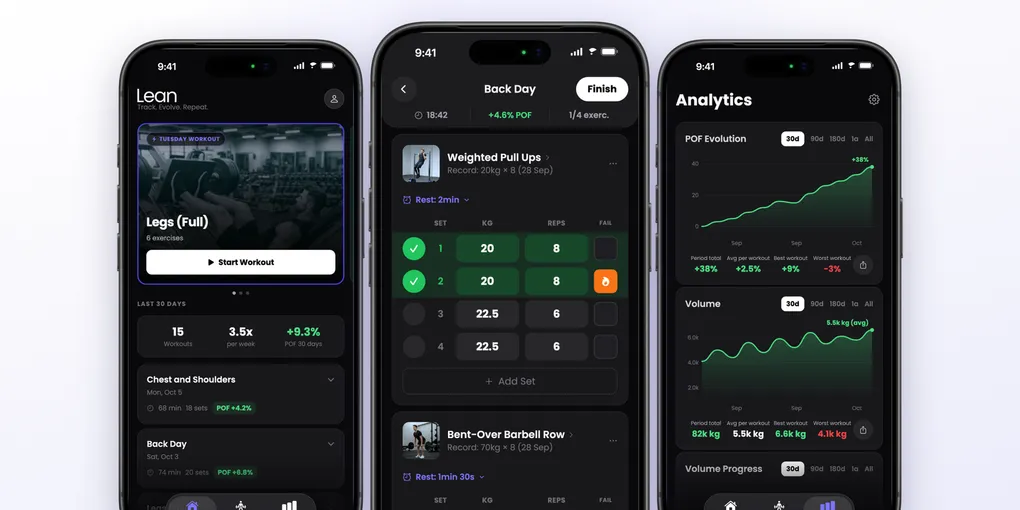
Lean Review: The Gym Workout Tracker That Scores Your Progress on iPhone
Most people who train with weights hit the same wall. They show up, they work hard, and months later they are lifting about the same as before. The problem is rarely effort. It is that nobody is keeping score.
Muscle and strength come from progressive overload: doing a little more than last time, with more weight, more reps, or a harder set. That only works if you know what “last time” was. A notes app or memory does not cut it, because the question you need answered in the gym is simple and immediate: did I beat my previous session or not?
Why Lean Is Different
Most workout trackers are logbooks. They store what you did and leave the judging to you. Lean turns the log into a score. Every workout gets a POF, short for Progressive Overload Factor: a percentage that says how much you progressed compared with the last time you did the same exercises.
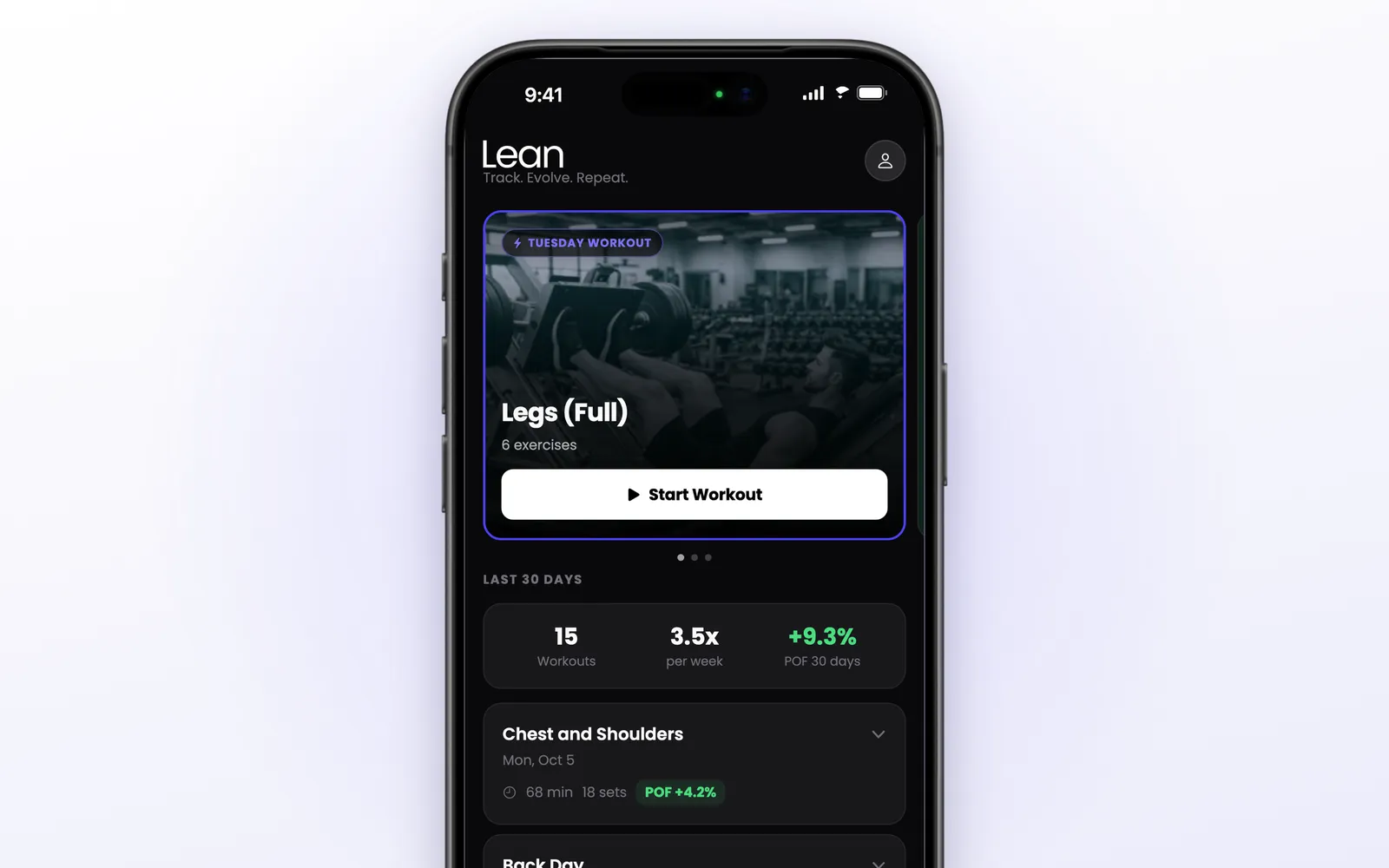
The Home screen shows your next workout, your last 30 days (workouts, how many times per week, and the POF for the period), and each recent workout with its own POF tag: green when you progressed, red when you went backwards.
The score weighs three things, and the app explains them on a screen called “What is POF?”:
- Weight has the highest impact
- Reps have a moderate impact
- Going to failure adds a 10% bonus to that set
Each set gets a score, the sets of an exercise are added up, and the total is compared with the last time you did that exercise. The workout’s POF is the average progress across its exercises. If you would rather follow total volume, you can pick that as your main indicator instead.
Table of Contents
- Why Lean Is Different
- Logging a Workout
- Lean Trainer: A Plan Built From Your Answers
- Ready-Made Routines and Import
- Analytics
- Live Activity & Dynamic Island
- Apple Watch
- Challenges With Friends
- Offline, Sync and Apple Health
- Apple Ecosystem Score
- Pricing
- Alternatives
- Verdict
Logging a Workout
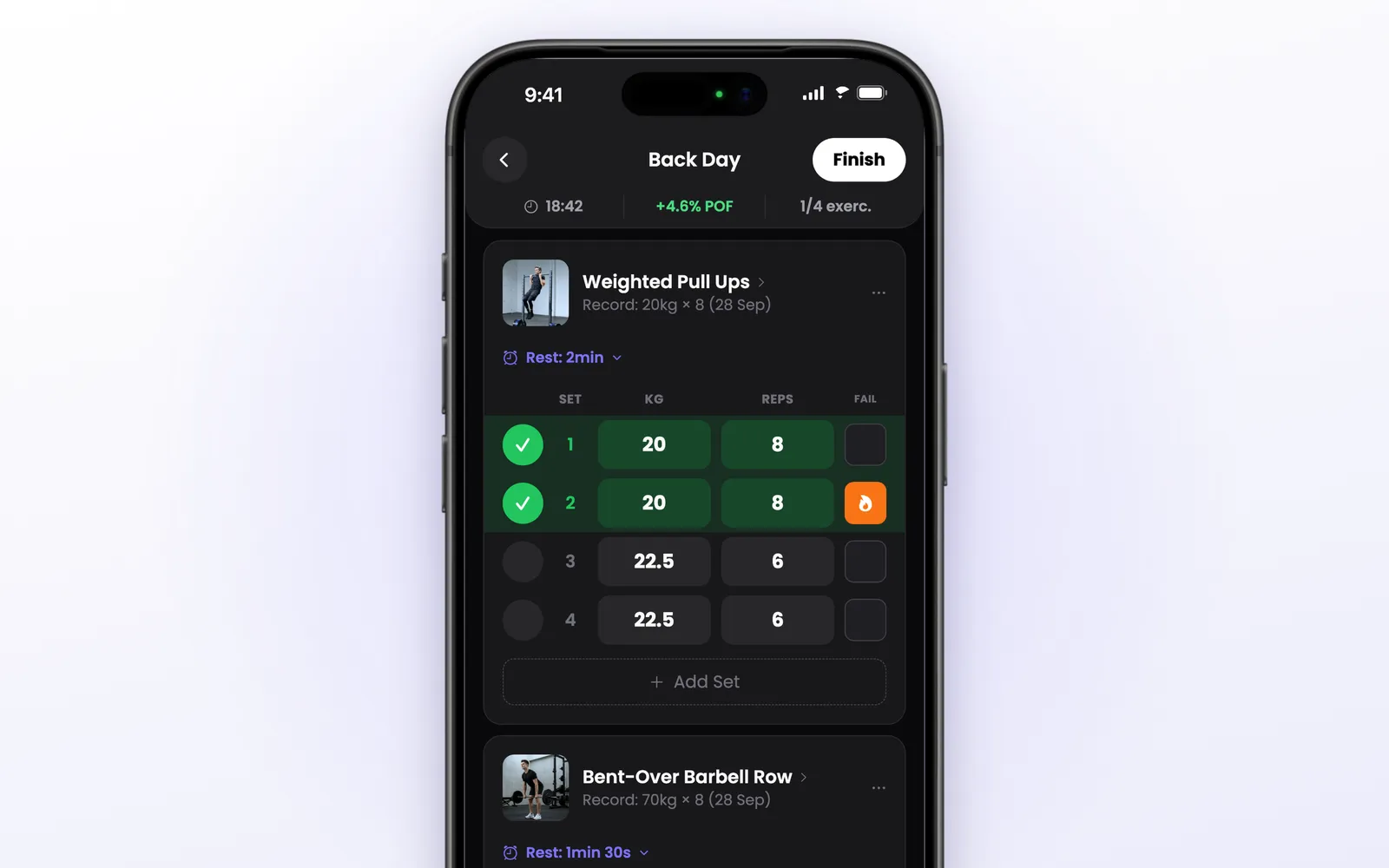
The workout screen is built to be used between sets, with one hand:
- Sets come pre-filled with the weight and reps from the last time you did that exercise, so most of the time you just tap the check
- Your record for the exercise sits under its name, so you know what to beat
- The FAIL column marks a set taken to failure, which counts in the POF
- The rest timer starts when you complete a set. The bar at the bottom has -15, +15 and Skip, and each exercise remembers its own rest time
- The header shows the elapsed time, the live POF of the workout, and how many exercises are done
Each exercise has a photo, and tapping its name opens a detail page with muscles worked, instructions, your progression chart and, for many exercises, a YouTube demonstration. The catalog has more than 880 exercises, and you can create your own.
When you finish, Lean builds a share card with the workout summary, in light, dark or transparent background. If you changed the exercises along the way, it asks whether to update the routine.
Lean Trainer: A Plan Built From Your Answers
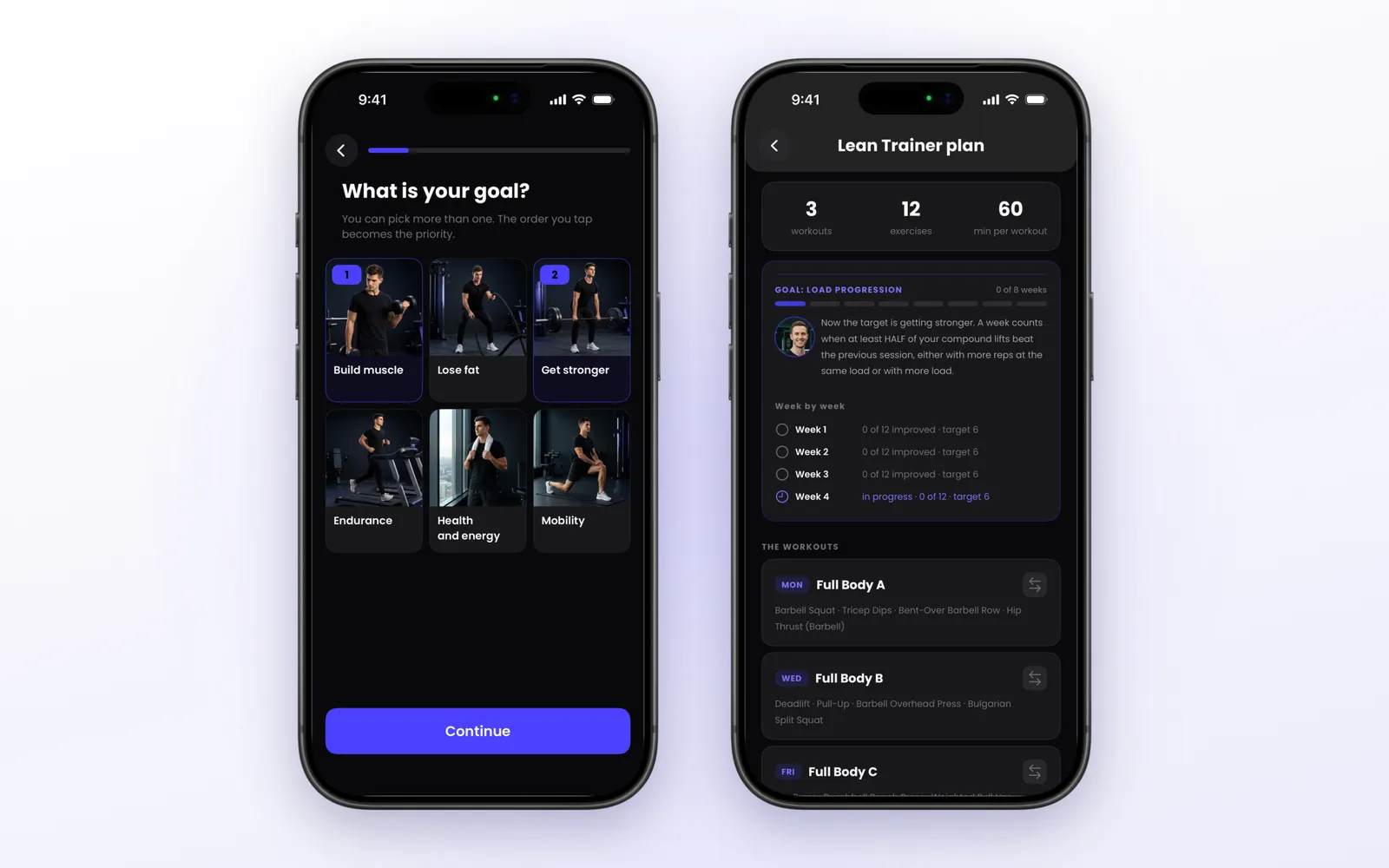
If you do not have a routine, Lean Trainer builds one. It asks about your goal (you can pick more than one, and the order you tap becomes the priority), your training history, where you train and what equipment you have, which days, how long per session, rest time, sports you play, any limitation, and muscle groups you want to emphasize.
From that it builds your week: full body, upper/lower or push/pull/legs, depending on how many days you train. You can swap any exercise before saving.
The plan comes with a goal, in two phases:
- Consistency: four weeks in a row hitting your training days. A missed week resets the count
- Load progression: eight weeks. A week counts when at least half of your compound lifts beat the previous session, with more reps at the same load or with more load
When the load phase is complete, the app reviews the cycle (what progressed, what stalled) and proposes the next plan.
Ready-Made Routines and Import
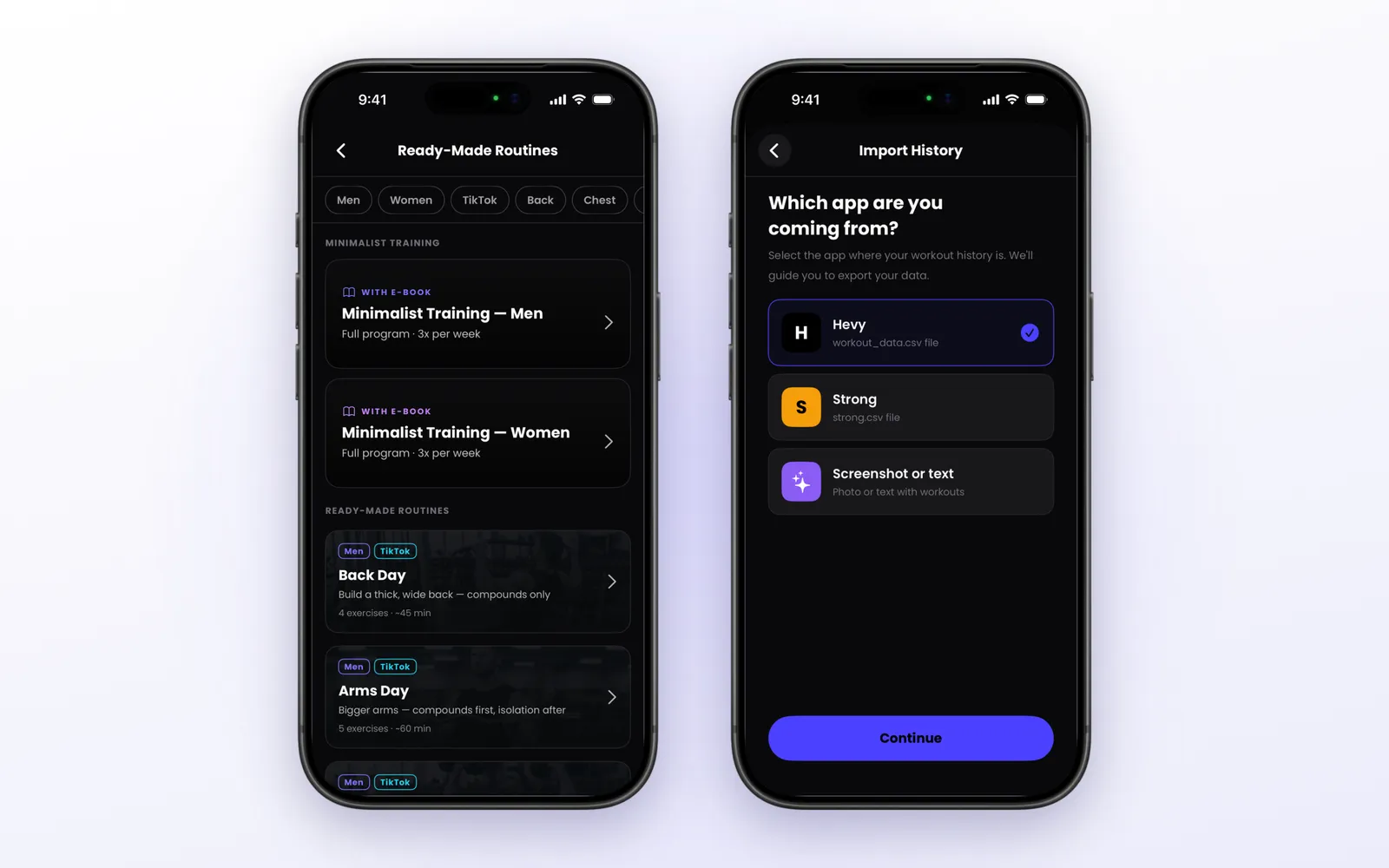
There are three other ways to get started:
- Ready-made routines: 16 routines, with filters for men, women and muscle group, each added with one tap. There is also a Minimalist Training program, three sessions per week, that comes with an e-book
- Build your own: name, days of the week, exercises and target sets
- Import your history: from Hevy or Strong with their CSV export, or from a screenshot or pasted text, which the app reads and turns into workouts
Importing matters for a tracker built on comparisons. With your history in place, the POF and the records work from day one instead of starting from zero.
Analytics
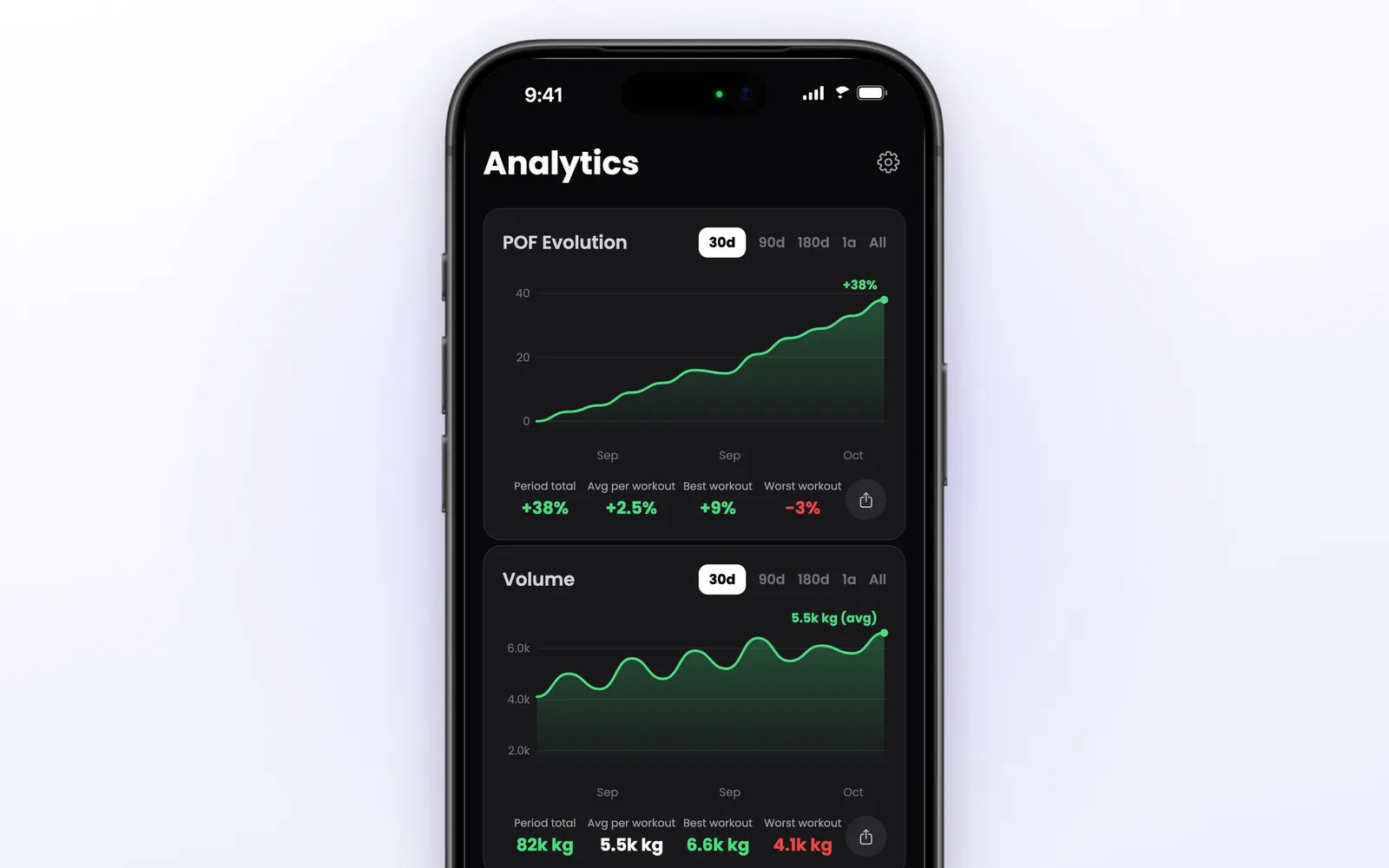
The Analytics tab has four charts:
- POF Evolution: your progress score over time
- Volume: weight times reps per session
- Volume Progress: how volume changed versus the previous session
- Frequency: a calendar and a year heatmap of the days you trained
Each chart has its own period (30 days, 90 days, 180 days, one year, or all) and a share button. In the settings you choose which charts appear and which indicator is your main one, the one shown on Home and during the workout.
Body measurements live in the profile: weight, body fat, waist, chest, arm and others, each with a chart and an optional goal.
Live Activity & Dynamic Island
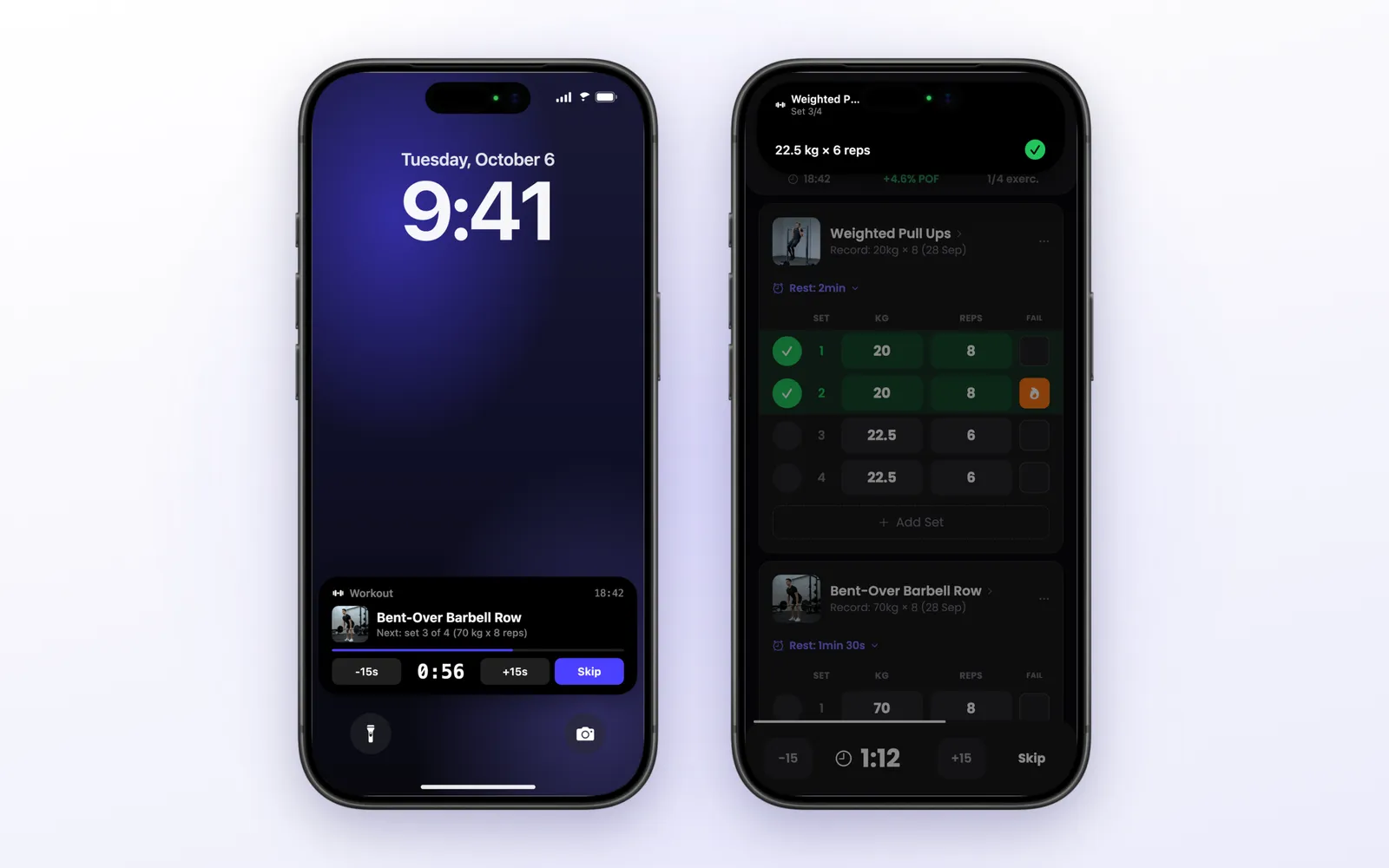
This is where Lean feels most at home on iPhone. During a workout, the lock screen shows a Live Activity with the exercise, the next set, and the rest countdown. The buttons work without unlocking the phone: -15s, +15s and Skip during rest, and a check to complete the set when it is time to lift.
On iPhones with a Dynamic Island, the same information follows you into other apps: the exercise name and the timer in the compact view, and the set with the complete button when you expand it.
In practice, you can run most of a workout with the phone locked on the bench.
Apple Watch
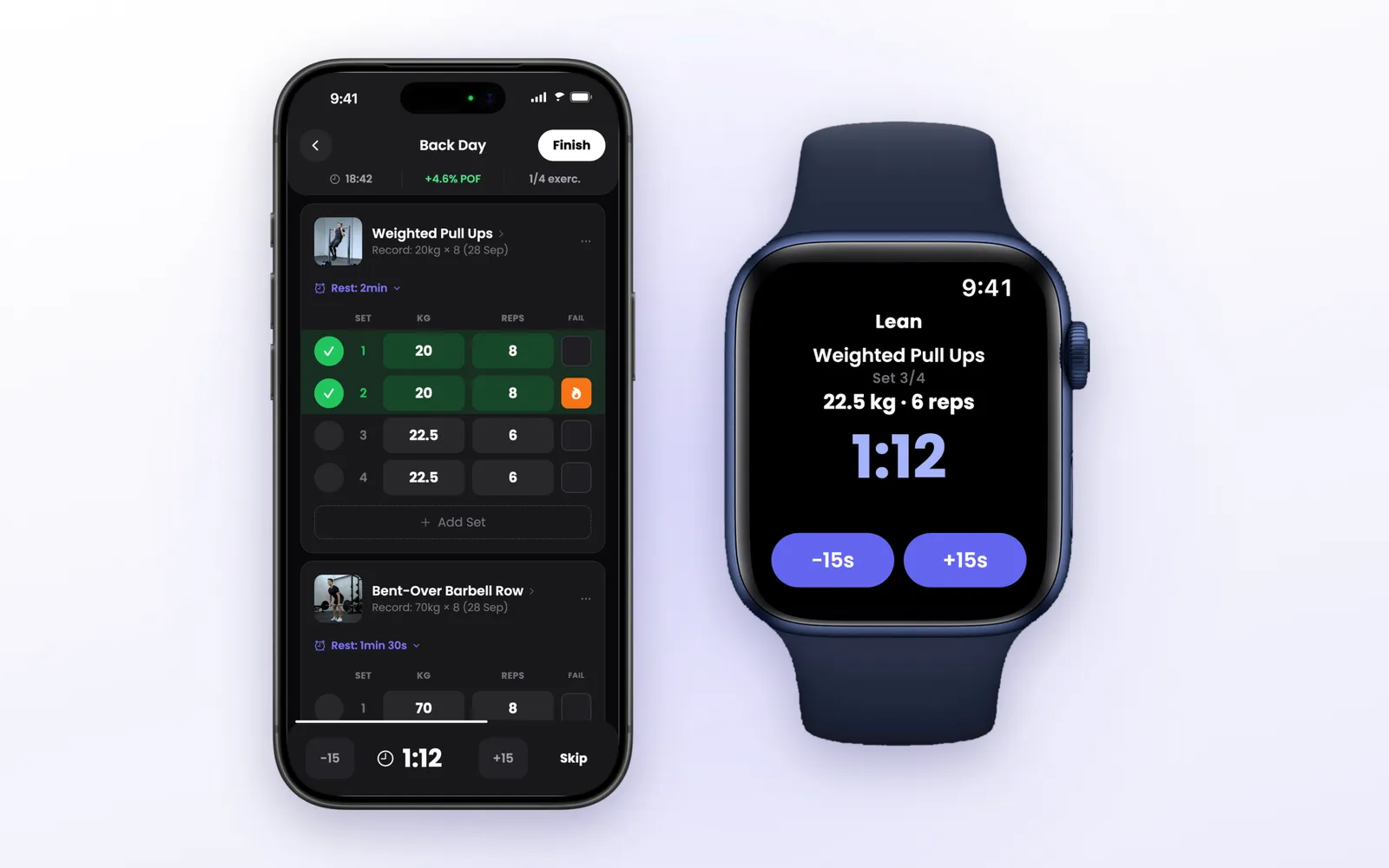
Lean has an Apple Watch app that works as a companion to the iPhone. When a workout is running, the Watch shows the current exercise, the set, the weight and reps, and a large rest countdown with -15s and +15s buttons. When the rest ends, it taps your wrist.
One thing to know: the Watch does not log sets. You complete them on the iPhone or from the Live Activity, and the Watch follows along. It is a rest timer on your wrist, and a good one, but not a standalone tracker.
Challenges With Friends
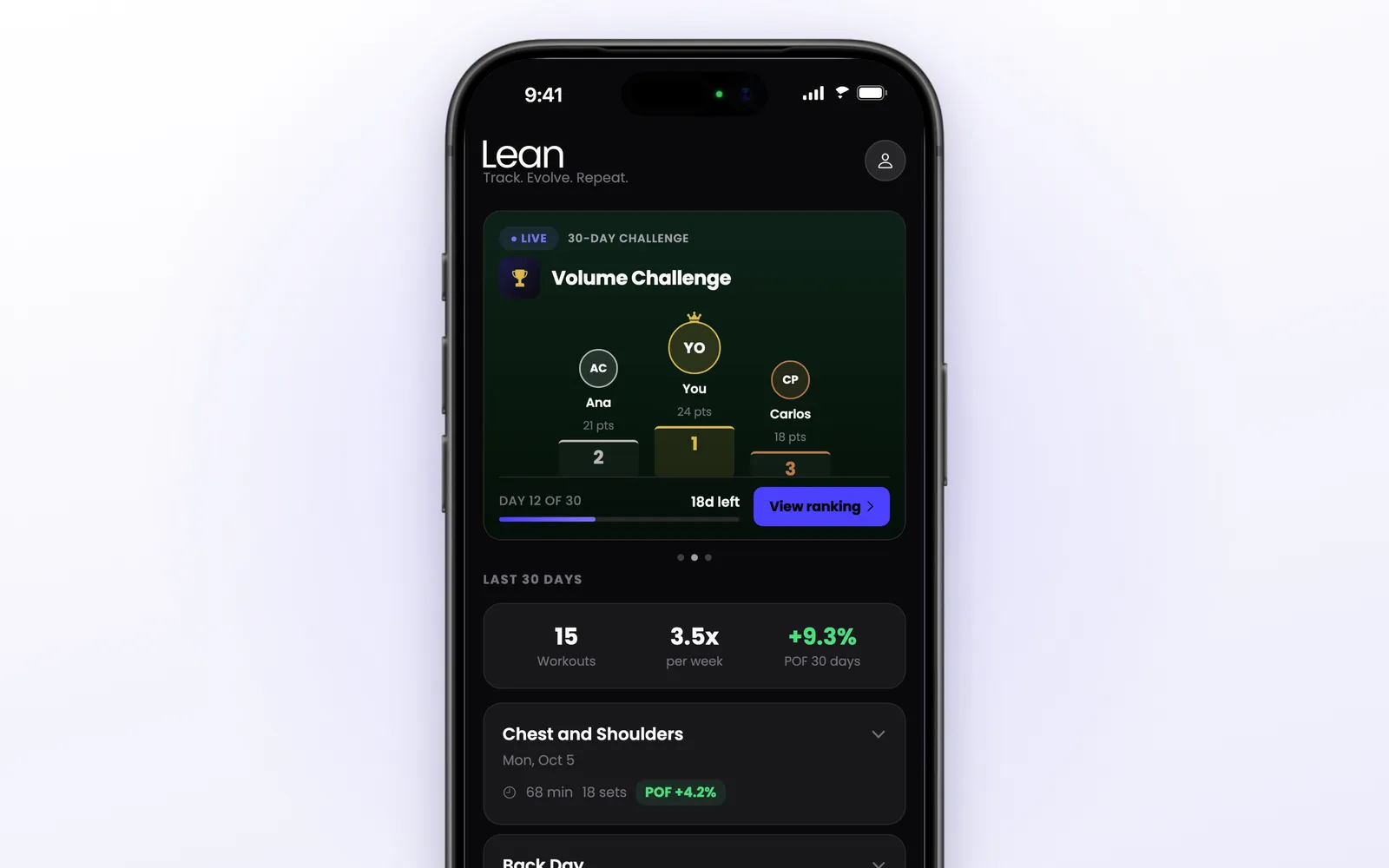
You can create a challenge, choose how it is scored, and invite friends with a link:
- Workouts: most workouts in the period
- POF: most progression per workout
- Volume Progress: biggest improvement in volume
- Total Volume: most weight lifted
Challenges run for 7, 15, 30 or 90 days and can be private or public. There are fairness rules you can switch on, such as counting at most one workout per day and only workouts of 30 minutes or more. The challenge shows a podium, the full ranking and a feed of everyone’s workouts.
Scoring by POF is the interesting one: a beginner who improves a lot can beat someone much stronger who is standing still.
Offline, Sync and Apple Health
Lean saves everything on the phone first and syncs when there is a connection. You can run and finish a workout, edit routines and log measurements with no signal, which matters in a basement gym. The first launch, challenges and the photo import need internet.
You can start without creating an account. Signing in with Apple, Google or email keeps your history in the cloud.
With Apple Health turned on, each finished workout is saved as strength training with estimated calories, so it counts toward your Fitness rings. Lean writes to Health but does not read from it.
Apple Ecosystem Score
| Feature | Available | Notes |
|---|---|---|
| iPhone | ✅ | Built in SwiftUI, iOS 17 or later |
| iPad | ✅ | Runs the iPhone app |
| Mac | ❌ | There is a web version |
| Apple Watch | ✅ | Companion rest timer |
| Live Activity & Dynamic Island | ✅ | With working buttons on the lock screen |
| Home Screen widgets | ❌ | Not yet |
| Apple Health | ✅ | Saves workouts and calories |
| Sign in with Apple | ✅ | Also Google and email |
| Siri / Shortcuts | ❌ | Not in the current version |
Score: 6/9. Lean is strongest exactly where it is used: on the iPhone lock screen and on the wrist during a workout. The gaps are Home Screen widgets and Siri.
Pricing
Lean is free to download. You can look around, build routines and run the Lean Trainer questions, but starting a workout requires Lean Pro, a subscription. Some plans start with a 14-day free trial, and the app shows the plans and prices for your country before you subscribe.
Alternatives
| App | Price | Best For |
|---|---|---|
| Hevy | Free download, in-app purchases | Social feed and a large community |
| Strong | Free download, in-app purchases | A classic, simple gym log |
| Fitbod | Free download, in-app purchases | Workouts generated for you each day |
| JEFIT | Free download, in-app purchases | A big library of plans |
If you already use Hevy or Strong, Lean can import your history from either one, so trying it does not mean starting over.
What sets Lean apart is the score. The others tell you what you lifted. Lean tells you whether it was better than last time, and builds the plan, the charts and the challenges around that one answer.
Verdict
4.8 / 5 ⭐
Lean takes the one principle that makes training work, progressive overload, and makes it visible after every workout. Logging is fast, the rest timer is where you need it, and the Live Activity lets you run a session from the lock screen.
The downsides: you need a subscription to start workouts, the Apple Watch app does not log sets, and there is no Home Screen widget.
Recommended for: people who lift regularly and want to know, in one number, if they are actually getting stronger, and anyone coming from another tracker who wants a plan and a reason to beat the last session.
