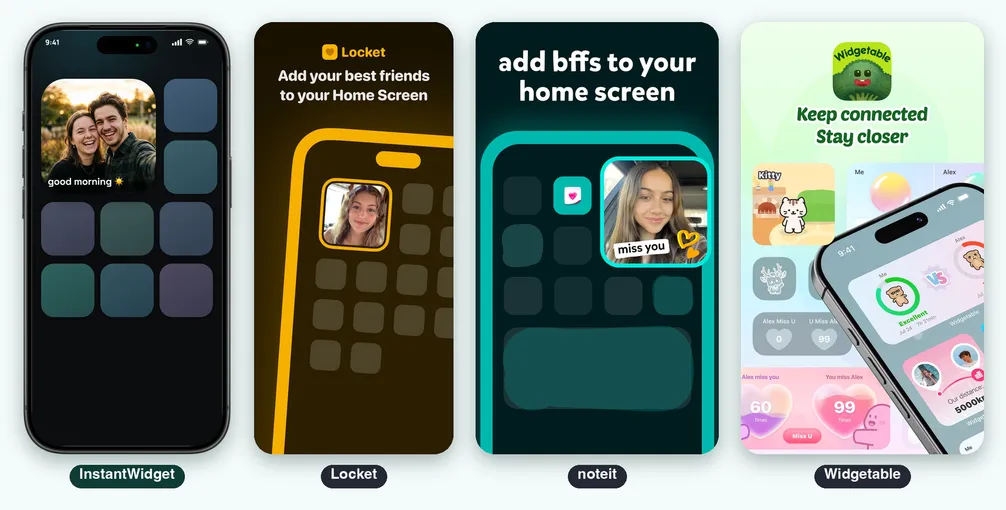
InstantWidget vs Locket vs noteit vs Widgetable: Which Photo Widget App Is Best for Couples on iPhone?
You send a photo in a chat and it scrolls away in minutes. A photo on the Home Screen is seen every time you unlock the phone. That is the idea behind photo widget apps, and on the US App Store four of them show up again and again when you search for “locket”, “widget for couples”, “bff widget” or “widgetable”.
This comparison puts InstantWidget next to Locket Widget, noteit and Widgetable, the three that rank highest in the App Store search results for those terms, according to the Astro keyword tool.
It is about the iPhone only. The competitor facts come from their official App Store listings. We did not install or test them, so anything the listing does not say is marked “Not listed”.
Prices and limits change. Check the store before deciding.
Table of Contents
- Four Ideas of a Home Screen Widget
- Side by Side
- The Widget on Your Home Screen
- Sending Something
- History, People and Reactions
- Widgetable: Pets, Mood and Distance
- Apple Watch
- Account, Ads and Privacy
- Pricing
- Known Limits
- Which One to Choose
- Verdict
- Sources
Four Ideas of a Home Screen Widget
InstantWidget is one person, one widget. You connect with your person through a private link, and whatever one of you sends becomes the widget on the other’s Home Screen. No feed, no likes, no account.
Locket is a group of best friends. The listing says live photos from your best friends, with up to 20 friends, emoji reactions, a history and a recap video.
noteit is notes between partners and friends. The listing describes a widget that shows live notes from your partner: you link with them and send a note, a picture or a drawing.
Widgetable is the widget as a game. Besides photos, it has virtual pets raised together, mood and sleep widgets, a distance widget and many themes.
Side by Side
| InstantWidget | Locket | noteit | Widgetable | |
|---|---|---|---|---|
| Store version (Oct 19, 2026) | 1.02 | 2.69.0 | 2.24.7 | 4.2.010 |
| Minimum iOS | 17 | 15 | 15 | 16 |
| App size | 15.8 MB | 145.4 MB | 95.6 MB | 569 MB |
| Languages | 9 | 8 | 14 | 15 |
| Who you send to | One person per link, more contacts allowed | Up to 20 friends | Partner or friends | Besties and couples |
| What you can send | Photo, video up to 6 s, drawing, text note | Photo from the camera, reactions | Note, picture, drawing | Snaps, emojis, doodles and texts (“Pin It!”), plus pets, mood, sleep, distance |
| Widget sizes | Small and medium | Not listed | Not listed | Not listed (lock screen widgets listed) |
| Apple Watch | Yes | Not listed | Not listed | Not listed |
| Account | None, uses iCloud | Phone number listed in the privacy label | Name, email and phone listed in the privacy label | Not listed |
| Ads | None, per the listing | Contains advertising | Contains advertising | Not listed |
| Free plan | One send per day | Free download, with Locket Gold as a paid option | Free download, with a Diamond subscription as a paid option | Free download, with Premium as a paid option |
| Rating on the US store | 5.0 (1 rating) | 4.76 (580,419) | 4.76 (99,037) | 4.92 (386,947) |
The Widget on Your Home Screen
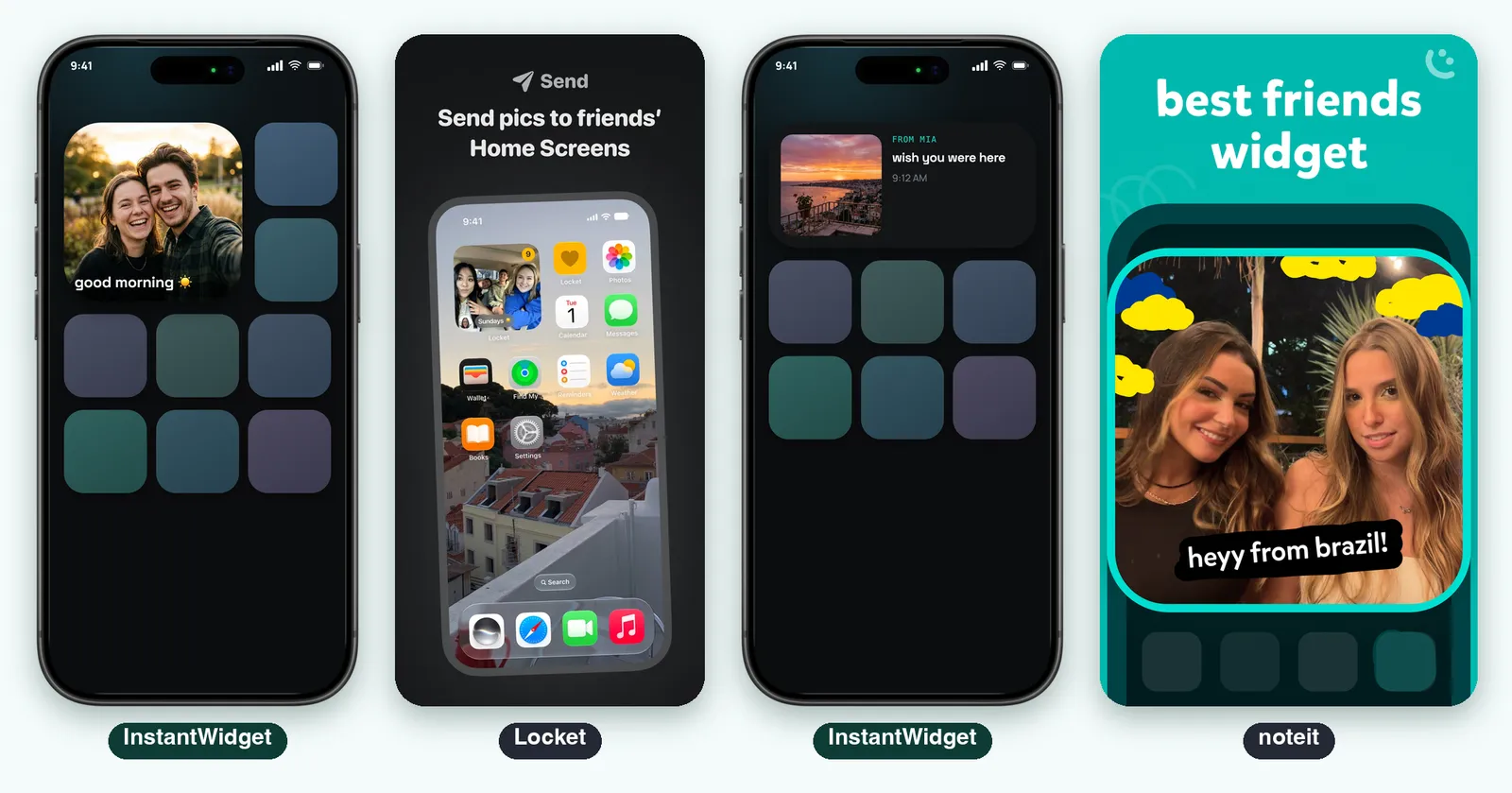
In InstantWidget the widget comes in small and medium. The small one is the latest photo with the caption over it. The medium one puts the photo on the left and, on the right, who sent it, the caption and the time. When your person sends something, the widget changes on its own and a notification arrives with their name, the caption and the photo.
Locket shows the latest photo from your friends. Its listing also describes a “Crush” or “Best Friend” widget, which shows photos only from that person. noteit shows a live note from your partner on the Home Screen, with a drawing or a picture. Neither listing says which widget sizes they offer.
Sending Something
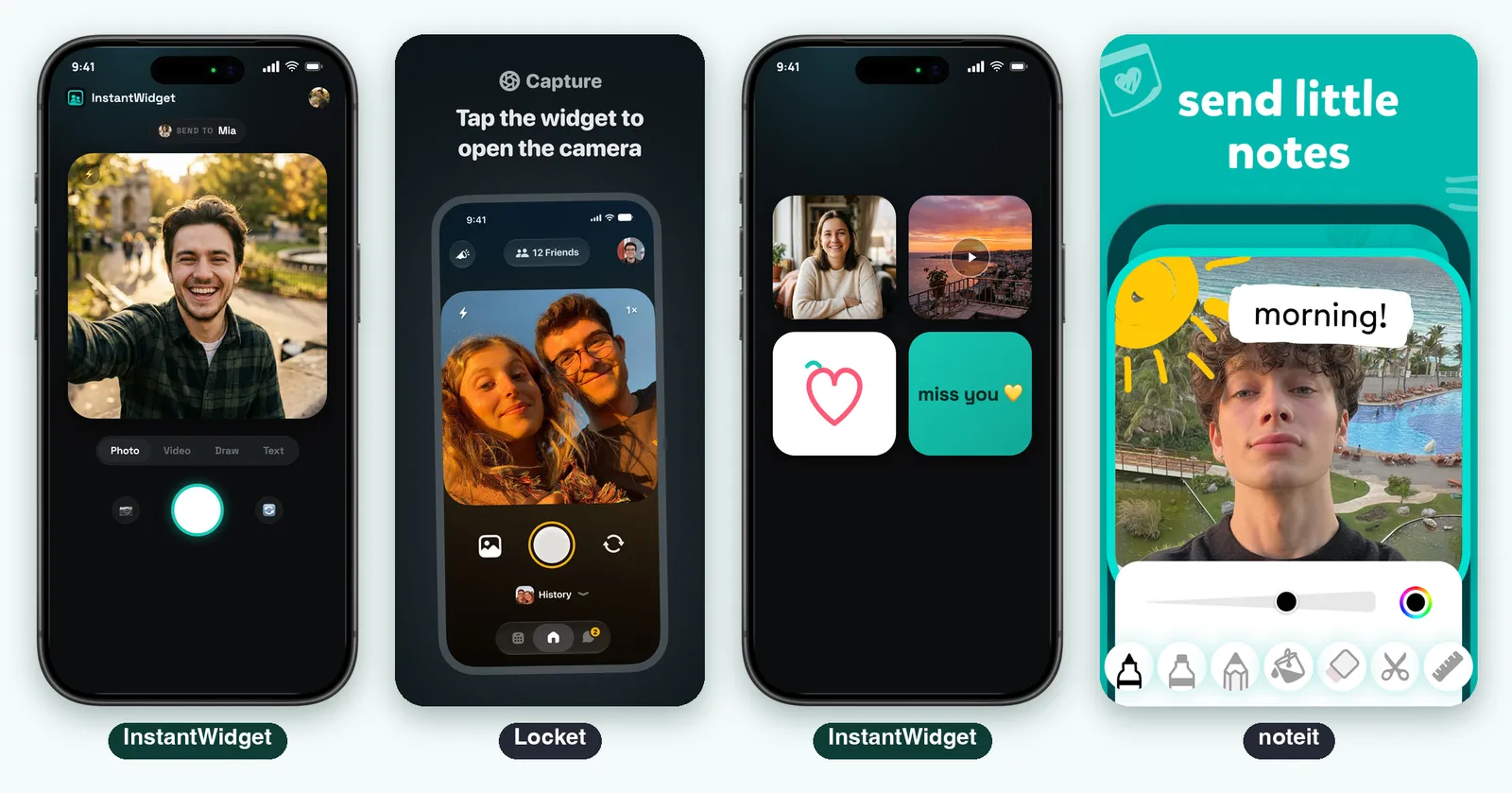
InstantWidget opens on the camera with the name of the person you are sending to. Four modes sit under the viewfinder: Photo, Video (a clip of up to six seconds), Draw and Text. You add a caption and tap Send. If the connection drops, the card stays saved and the app keeps trying.
In Locket you tap the widget, the camera opens, you take a picture and send it. Reactions are the other way to answer: the listing says your friend gets a notification and watches emojis fall on the photo.
In noteit the pitch is the drawing. Its screenshots show a pen and brush toolbar drawn over a photo, and the text on a picture.
History, People and Reactions
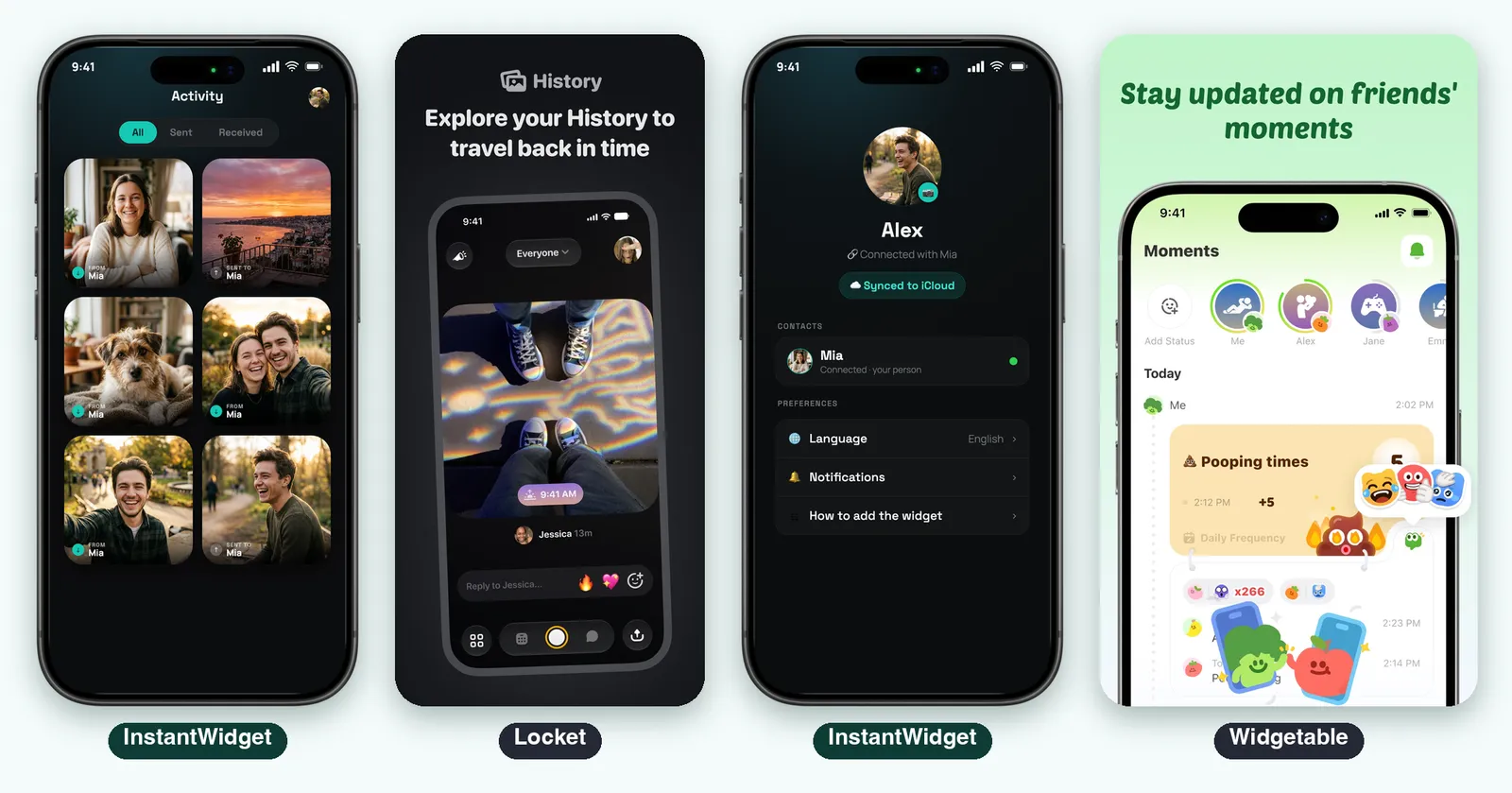
InstantWidget keeps everything you two exchange in the Activity tab, as a grid with the filters All, Sent and Received. It is a small album made only of things that were on a Home Screen. The profile shows the iCloud sync and the connected contact.
Locket builds a history of all the images sent and, according to the listing, a video recap that stitches memories together, and a recap video at the end of every month. It is built around groups: the listing caps it at 20 friends.
The trade here is simple. The bigger apps give you more people, reactions and recaps. InstantWidget gives you a quiet place for two people.
Widgetable: Pets, Mood and Distance
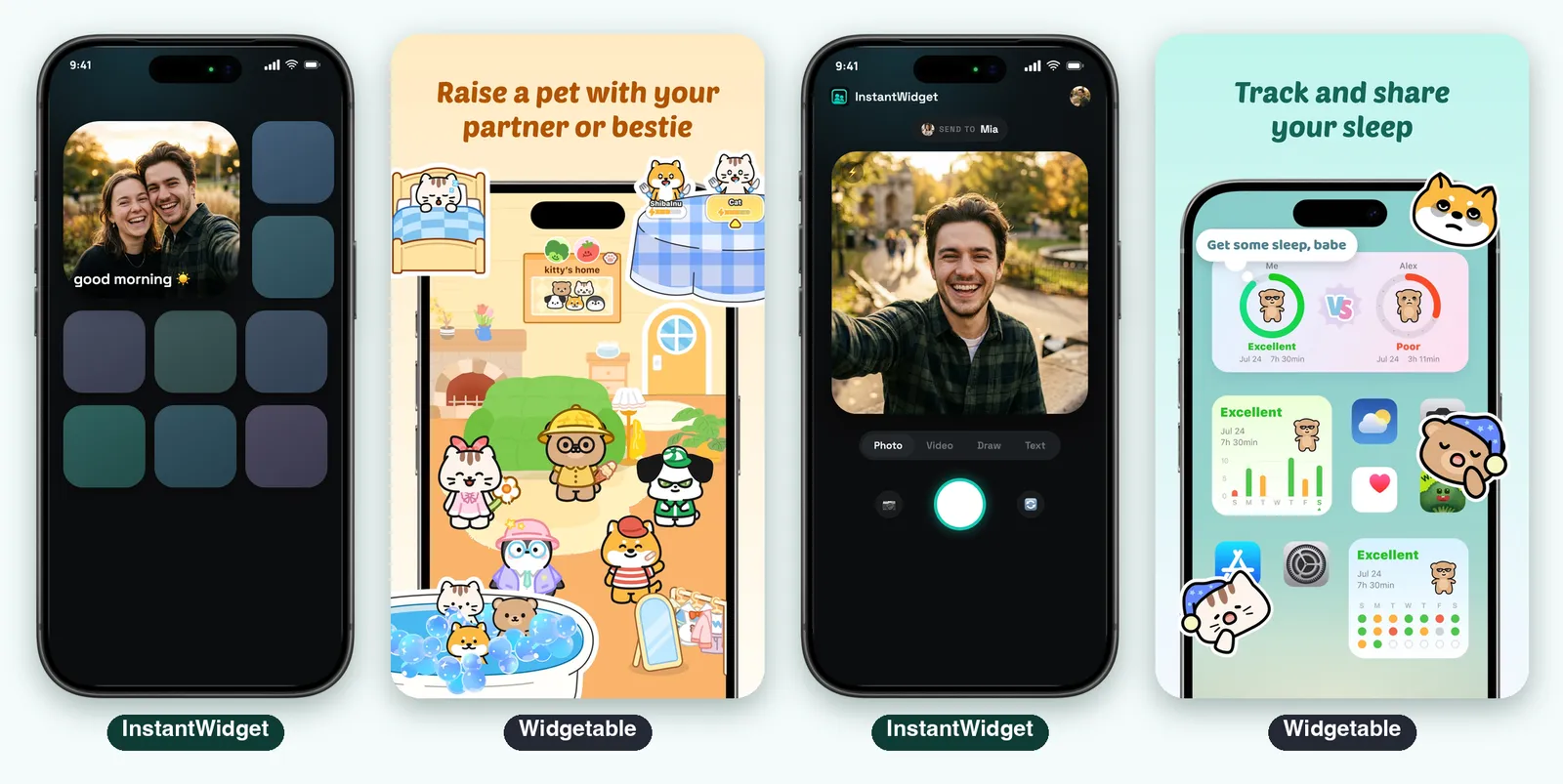
Widgetable is a different product. The listing highlights raising virtual pets together, a Sleep Widget, Mood Bubble and Mood Jar, a Distance Widget that shows the real-time distance on the lock screen, a Miss You Widget and a Plant Widget, plus wallpapers. Its privacy label lists precise and coarse location, and the listing warns the app may use your location even when it is not open.
If you want a shared game on your screens, this is the one. If you want a photo of your person, it is a lot of app: 569 MB against 15.8 MB for InstantWidget.
Apple Watch
InstantWidget has an Apple Watch app that shows the latest card your person sent, full screen, with the caption, and complications for the watch face and the Smart Stack. The Watch app is part of the paid plan.
Locket, noteit and Widgetable do not list an Apple Watch app on their US listings. noteit lists Apple Vision, which none of the others do.
Account, Ads and Privacy
InstantWidget asks for no email, phone number or password. It uses the iCloud account already on the iPhone, and each connection is a private link. The listing says “No account. No password. No ads.” The consequence: both people need an iPhone signed in to iCloud. There is no Android version.
The privacy labels of the others show what they collect and link to you:
- Locket: phone number, coarse location, device ID, usage data and purchase history, and it lists data used to track you across other companies’ apps and websites
- noteit: name, email address, phone number, user content and user ID
- Widgetable: device ID, usage data, fitness data and precise and coarse location, and it lists usage data used to track you
Locket and noteit also list “Contains Advertising” on the store.
Pricing
All four are free to download.
| Free | Paid | |
|---|---|---|
| InstantWidget | One send per day, with camera photos, drawings and text | InstantPro removes the limit and adds video, gallery uploads and the Watch app: $1.99 a week or $9.99 every three months on the store’s list, and the description text still says $9.00 |
| Locket | Free download | Locket Gold, with several prices between $1.99 and $36.00 on the list. The listing does not say which is weekly, monthly or yearly |
| noteit | Free download | Diamond Subscription from $1.99 to $7.99, plus Streak Repair packs from $2.99 to $6.99 |
| Widgetable | Free download | Premium: $19.99 a year or $4.99 a month (a $1.99 monthly tier also appears), plus diamonds, pet egg, wish jar and pet food |
Prices vary by region, and every app shows yours before you subscribe.
Known Limits
- InstantWidget: no Android, no Lock Screen widget and no large Home Screen widget. On the widget a video appears as a still frame and plays when opened in the app. It is new: one rating on the store so far
- Locket: capped at 20 friends, and it is built for groups, not for one person
- noteit: the listing says nothing about Apple Watch or about widget sizes
- Widgetable: the heaviest app (569 MB), with location always on if you allow it, and a lot of features around the photo
Which One to Choose
- You want your partner’s photo on your Home Screen and nothing else: InstantWidget
- You want a group of up to 20 best friends: Locket
- You like drawing and writing on top of a photo: noteit
- You want pets, mood, sleep and distance between you: Widgetable
- You do not want to give a phone number or an email: InstantWidget
- You want the photo on your wrist: InstantWidget
Verdict
Most features: Widgetable. Pets, mood, sleep, distance and themes. If complete means the longest list, it is Widgetable.
Best for a group of friends: Locket. Reactions, history, a recap video and the biggest number of ratings.
Best for drawing: noteit. A note or a drawing on the widget of your partner.
The simplest and most direct: InstantWidget. You connect to one person, you send a photo, a video, a drawing or a note, and it is on their Home Screen. No account, no ads, no feed. The price of that simplicity is clear: iPhone only, small and medium widgets, and a free plan of one send per day.
4.6 / 5 ⭐ for InstantWidget.

Sources
Consulted on October 19, 2026.
- App Store listings: Locket Widget, noteit - bff widget, Widgetable: Besties & Couples and InstantWidget, with the Apple lookup API for versions, sizes, languages and ratings
- Ranking: keyword rankings on the US App Store from the Astro tool (locket, widget for couples, bff widget, couple widget and widgetable), October 19, 2026
- Official sites: locket.camera, iconichearts.com/noteit and widgetable.net load only with JavaScript and add nothing beyond the listings
The Locket, noteit and Widgetable images are screenshots from their official App Store listings, used here to illustrate the analysis. The InstantWidget images show the app with sample data.